Section 3: Operation
3-32 013-100199-04
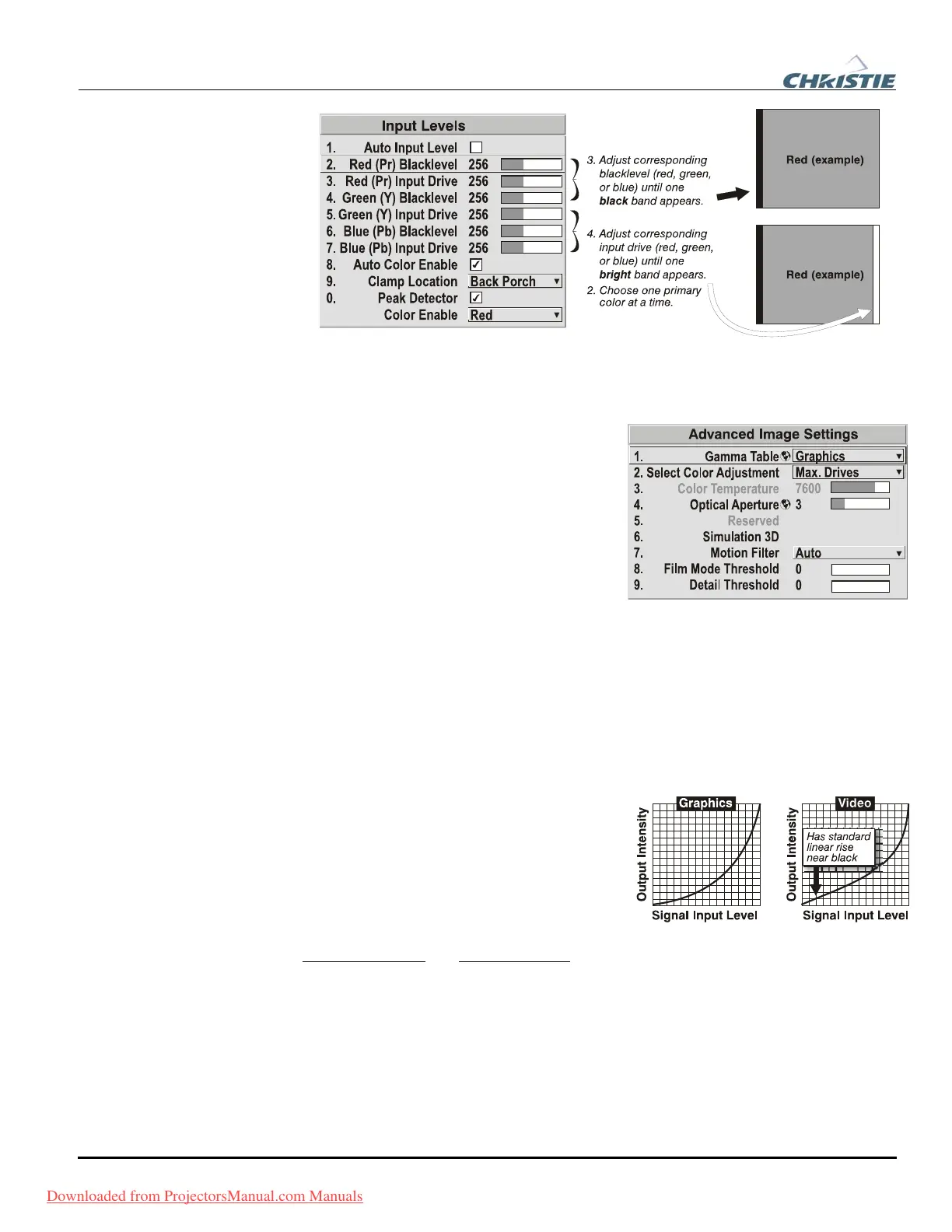
Figure 3.7. Adjusting Input Levels Using the Peak Detector
(RED EXAMPLE SHOWN)
Advanced Image Settings — SUBMENU
Use the Advanced Image Settings submenu
to make the adjustments necessary for lesser-
used but more specialized applications on
your projector.
GAMMA TABLE: This control applies a default video, graphics or simple gamma table
or “curve” to your images, controlling the intensity of midlevel colors and producing
maximum contrast, brightness and color performance. As shown at right, the graphics
curve is a simple power curve while the video curve has a linear segment near black to
compensate for increased black levels typical of video signals. A simple gamma curve
is a value of 2.2 and is correct for most signal conditions. Although the projector
automatically applies either the graphics or video curve according to what type of
incoming signal is detected, in some cases you may wish to override this default and
use graphics gamma for a video source or
video gamma for a graphics source.
Alternatively, if neither default is ideal, you
may prefer to apply the simple (non-
optimized) gamma curve or a user-defined
custom gamma curve that has been created
externally, named, and downloaded to the
projector (requires separate PC-based
Arbitrary Gamma
and KoRE Librarian software applications). If any of these special
user curves have been installed, their names will appear in the Gamma Table pull-
down list.
Keep in mind that any Gamma Table choice sets the related Gamma value (shown in
the Image Settings menu) to a 2.2 default, where it can be fine-tuned as desired.
Different values (1-3) here indicate that the original gamma table has been adjusted
with either the Gamma slide bar or direct key.
Downloaded from ProjectorsManual.com Manuals



 To Next Page