Section 3: Operation
013-100199-04 3-45.
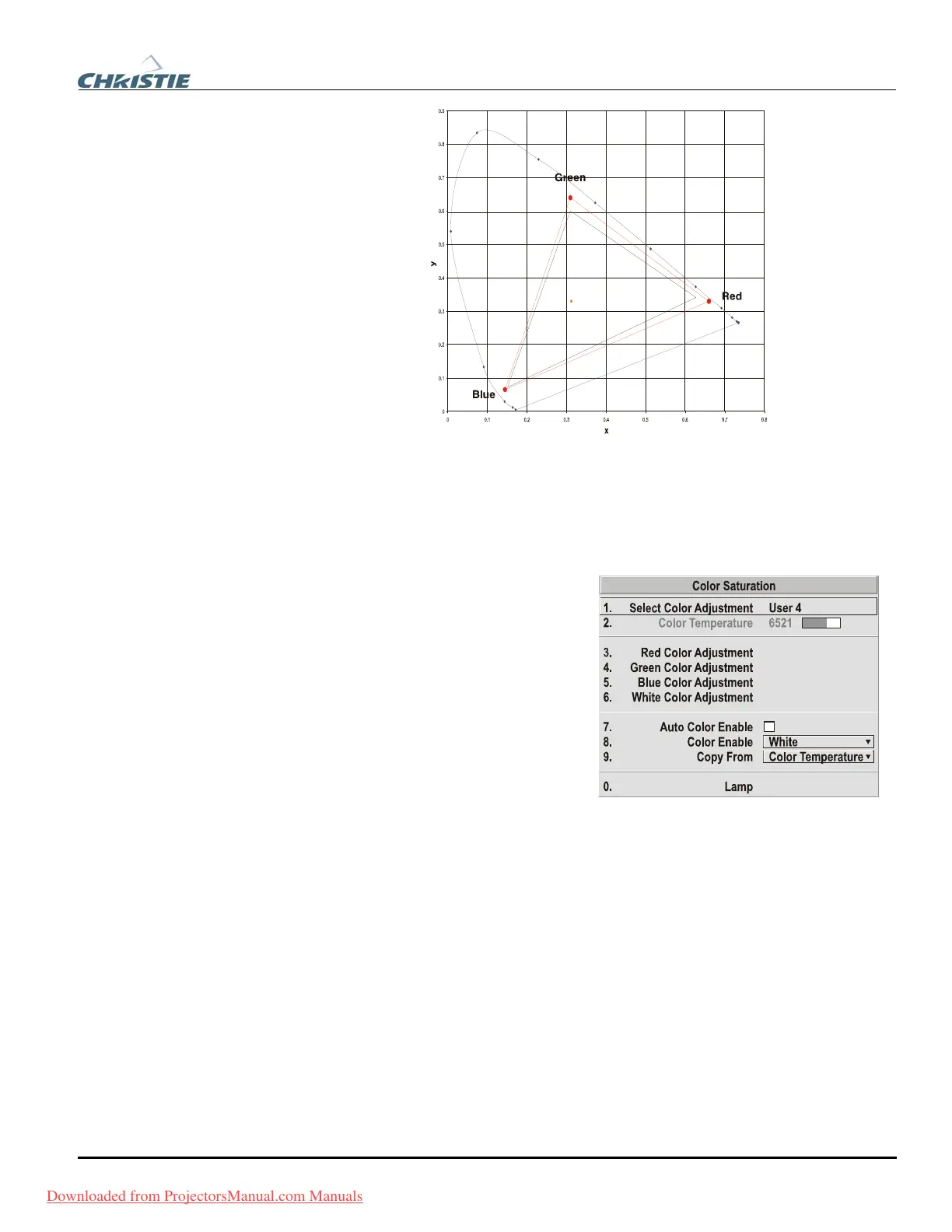
Figure 3.10. CIE 1931 Chromaticity Diagram (without Yellow Notch Filter)
NOTE: Keep new x,y coordinates within the original color gamut triangle shown
here.
PROCEDURE FOR X,Y ADJUSTMENTS: See 3.10, Using Multiple Projectors.
COLOR SATURATION: Use this submenu
if you do not have specific color
coordinates in mind and will simply
judge color performance by eye or
meter. Like the Color Adjustment by X,Y
submenu, each color control actually
defines new x/y coordinates for that
color and changes its hue—it is just a
different interface.
Adjust the hue of each primary color
(red, green, blue, and white) by using
more or less of it in relation to the other
colors.
NOTE: A Color Saturation adjustment defines the corresponding x/y coordinates
shown in the Color Adjustment by X,Y submenu. These x/y coordinates will remain
stable for this User gamut until they are changed again via either menu. Values
displayed in the Color Saturation menu, however, will likely fluctuate as you use the
projector, and will be different when you return to this menu at some point in the
future. These floating changes do not affect the x/y coordinates or gamut.
Black Level Blending
— SUBMENU
Black Level Blending is a feature that eliminates the differences between black levels
when edge blending multiple projectors. The Black Level Blending submenu provides
many controls to allow the edges of adjacent images to be smoothly overlapped
creating a “seamless” image. Edge blending smoothes white levels, and if edge
blending is not in use, Black Level Blending is disabled. Black Level Blending
provides a simple solution for uneven black levels, without the need for external
Downloaded from ProjectorsManual.com Manuals



 To Next Page