Section 3: Operation
013-100199-04 3-59.
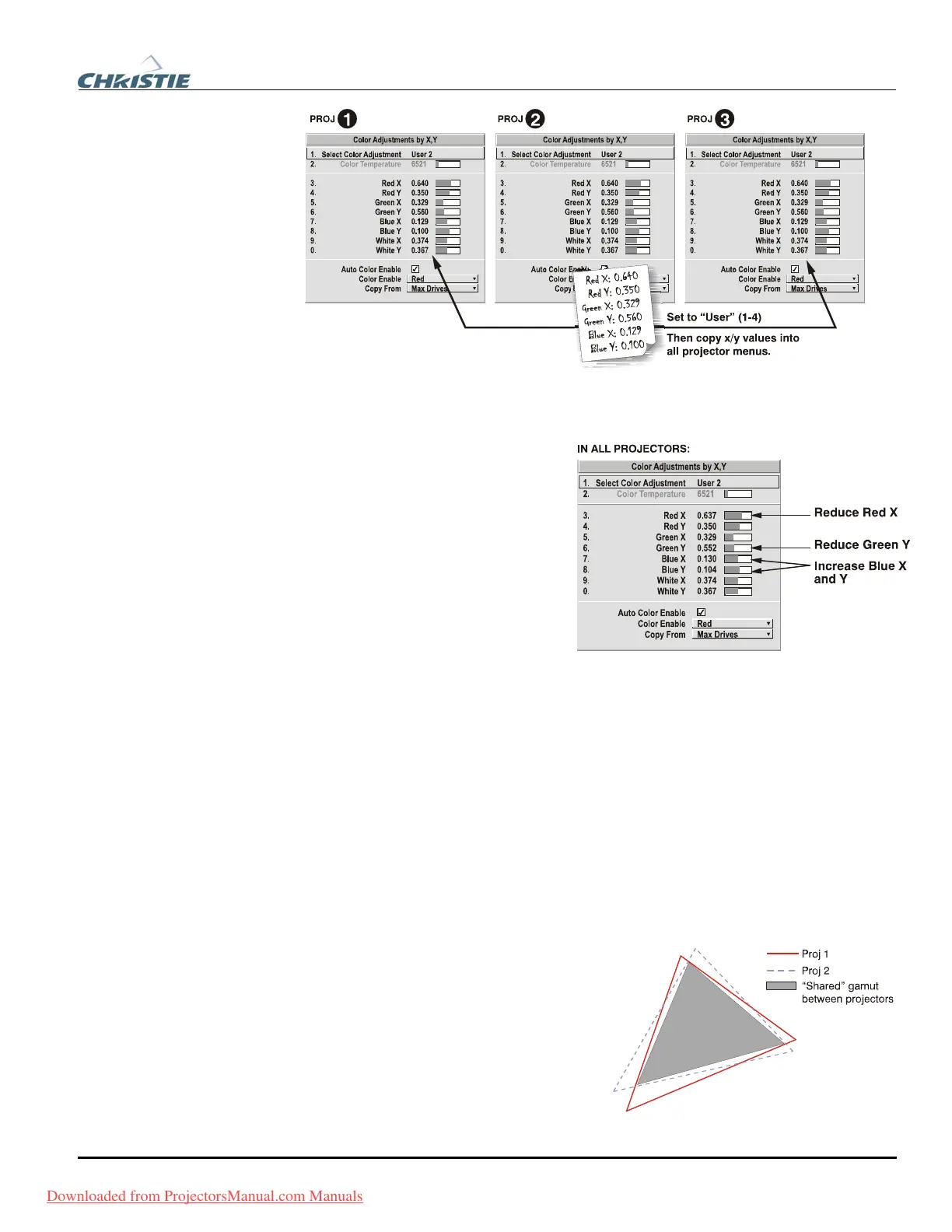
Figure 3.14. Copy X/Y Values into All Projectors
6. In each projector, judge by eye and adjust x/y coordinates slightly in the following
manner:
• To match reds, decrease “Red
X” until full field red screens
match.
• To match greens, decrease
“Green Y” until full field
green screens match.
• To match blues, increase both
“Blue X” and “Blue Y” until
full field blue screens match.
NOTE: For speed, enable the “Auto
Color Enable” checkbox. Each color coordinate you select will then automatically
trigger a full field display of the corresponding color.
Alternatively, use the Color Saturation menu for these adjustments or to fine tune.
NOTE: For speed, enable the “Auto Color Enable” checkbox. Each color coordinate
you select will then automatically trigger a full field display of the corresponding
color.
These coordinate adjustments move the three color points closer together (see below)
to establish a “shared” gamut attainable by all projectors in your group. Adjust only as
necessary to ensure that the resulting color palette is as large as possible. When done,
you may need to adjust lamp power slightly.
7. All screens should now be color-
matched. Apply this new “User”
gamut to a source at any time by
selecting it in the “Select Color
Adjustment” list accessed in the
Advanced Image Settings menu.
Downloaded from ProjectorsManual.com Manuals



 To Next Page