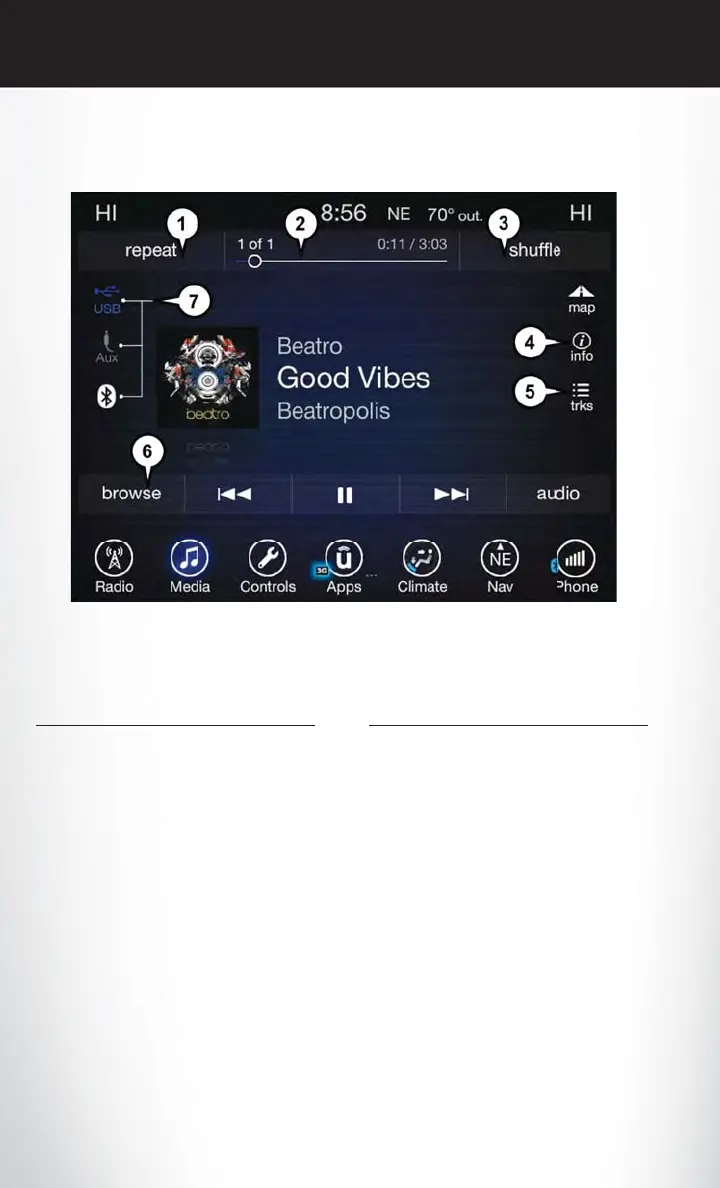
Media Controls
The controls are accessed by pressing the desired button on the touchscreen and choosing
between AUX, USB or Bluetooth.
NOTE:
Uconnect will automatically switch to the appropriate mode when something is first connected or
inserted into the system.
Navigation
• The information in the section below is only applicable if you have the 8.4 NAV system or the
Navigation has been activated on your 8.4 system.
• If you have a Uconnect 8.4 system your radio is “Navigation-Ready,” and can be equipped with
Navigation at an extra cost. Please see your dealer for details.
Press the “Nav” button on the touchscreen in the menu bar to access the Navigation system.
Media Controls
1 — Repeat Music Track
2 — Music Track And Time
3 — Shuffle Music Tracks
4 — Music Track Information
5 — Show Songs Currently In Cue To Be
Played
6 — Browse Music By
7 — Music Source
ELECTRONICS
122















 To Next Page