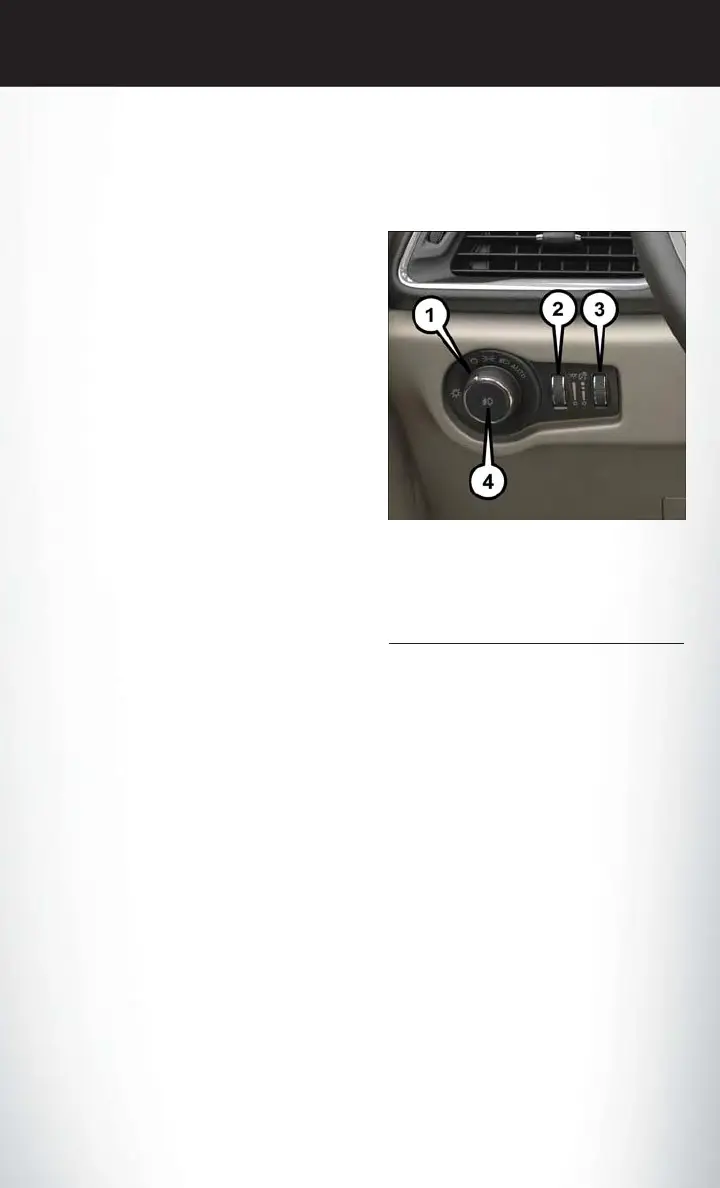
HEADLIGHT SWITCH
The headlight switch is located on the left side of the instrument panel. The switch controls the
operation of the headlights, parking lights, instrument panel lights, interior lights and the fog lights.
Rotate the headlight switch clockwise to the
second detent for parking light and instrument
panel light operation. Rotate the headlight
switch to the third detent for headlight, parking
light and instrument panel operation.
Automatic Headlights
This system automatically turns your headlights
on or off based on ambient light levels. To turn
the system on, turn the headlight switch to the
extreme clockwise position aligning the indicator
with the AUTO on the headlight switch. When
the system is on, the Headlight Time Delay fea-
ture is also on. This means your headlights will
stay on for up to 90 seconds after you turn the
ignition switch OFF. To turn the Automatic Sys-
tem off, turn the headlight switch counterclock-
wise to the O (OFF) position.
NOTE:
The engine must be running before the head-
lights will come on in the Automatic mode.
Automatic High Beam — If Equipped
The Automatic High Beam system provides increased forward lighting at night by automating
high beam control through the use of a digital camera mounted on the windshield. This camera
detects vehicle specific light and automatically switches from high beams to low beams until the
approaching vehicle is out of view.
NOTE:
Broken, muddy or obstructed headlights and taillights of vehicles in the field of view will cause
headlights to remain on longer (closer to the vehicle). Also, dirt, film and other obstructions on
the windshield or camera lens will cause the system to function improperly.
Headlight Switch
1 — Rotate Headlight Switch
2 — Ambient Dimmer Control
3 — Instrument Panel Dimmer
4 — Fog Lamps Button
OPERATING YOUR VEHICLE
59















 To Next Page