Near
Changing the FCW status to the “Near” setting, allows the system to warn you of a potential
frontal collision when you are much closer.
This setting provides less reaction time than the “Far” setting, which allows for a more dynamic
driving experience.
More dynamic or aggressive drivers that want to avoid frequent warnings may prefer this setting.
NOTE:
Changing the Active Braking status to “Off” prevents the system from providing autonomous
braking, or additional brake support if the driver is not braking adequately in the event of a
potential frontal collision. Active braking can be turned “Off” in the Uconnect controls settings.
Refer to the Owner's Manual on the DVD for further details.
WARNING!
Forward Collision Warning (FCW) is not intended to avoid a collision on its own, nor can
FCW detect every type of potential collision. The driver has the responsibility to avoid a
collision by controlling the vehicle via braking and steering. Failure to follow this warning could
lead to serious injury or death.
NINE-SPEED AUTOMATIC TRANSMISSION
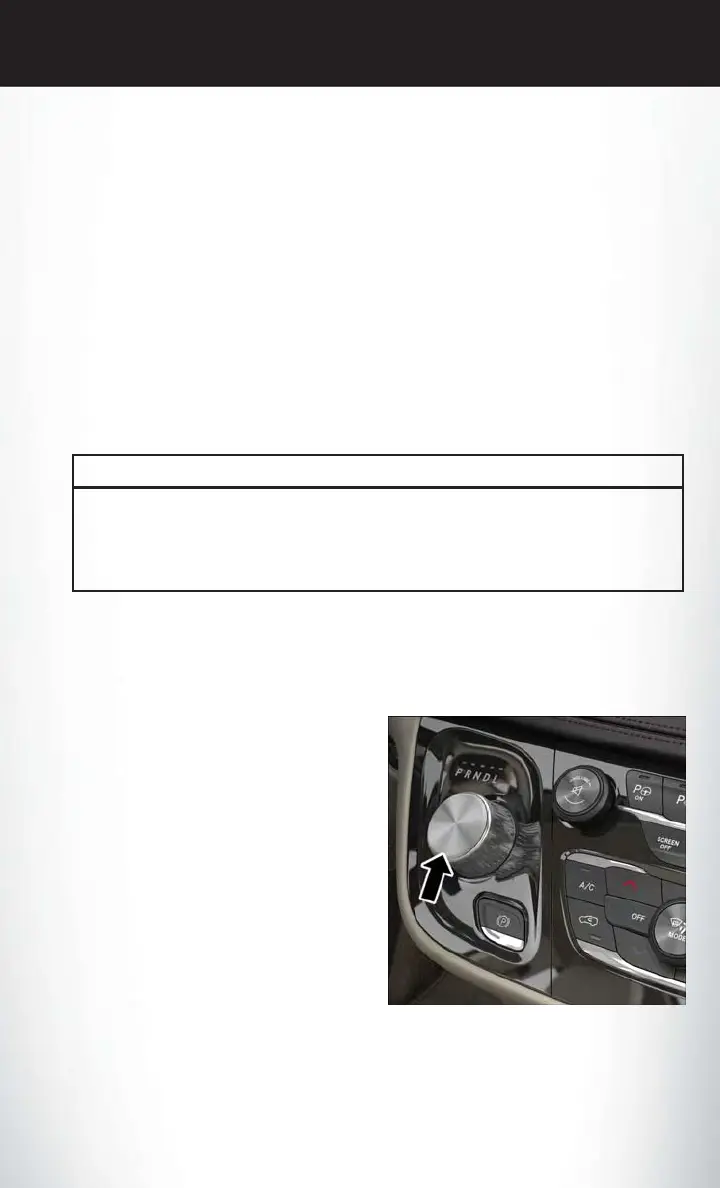
The transmission is controlled using a rotary electronic gear selector located on the center
console. The transmission gear range (PRNDL) is displayed both above the gear selector and in
the Instrument Cluster Display.
To select a gear range, simply rotate the gear
selector.
NOTE:
You must press the brake pedal to shift the
transmission out of PARK or from NEUTRAL
into DRIVE or REVERSE (when stopped or
moving at low speeds).
Push down on the gear selector and then rotate
to access the L position.
Select the DRIVE range for normal driving.
Transmission Gear Selector
OPERATING YOUR VEHICLE
71















 To Next Page