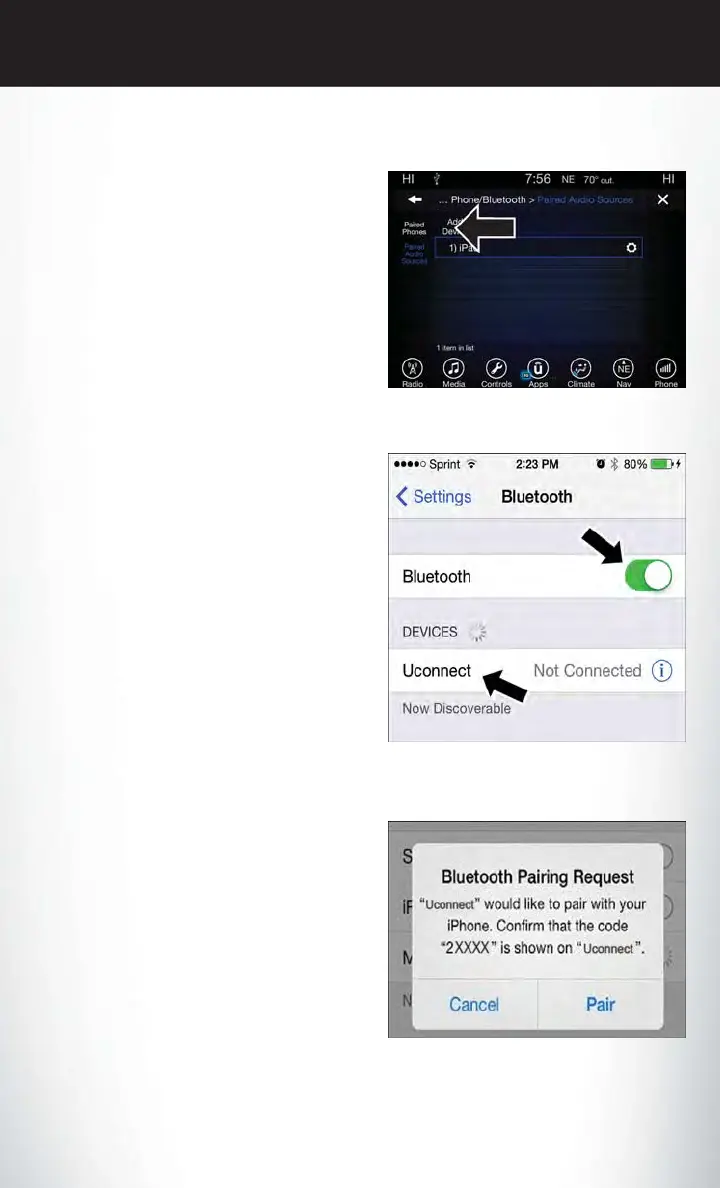
Uconnect 8.4 & 8.4 NAV:
1. Place the ignition in the ACC or ON posi-
tion.
2. Press the “Phone” button in the Menu Bar
on the touchscreen.
3. Select “Settings.”
4. Select “Paired Phones.”
5. Select “Add device.”
•
Uconnect Phone will display an “In prog-
ress” screen while the system is connecting.
Pair Your iPhone:
To search for available devices on your
Bluetooth enabled iPhone:
1. Press the Settings button.
2. Select Bluetooth.
•
Ensure the Bluetooth feature is enabled.
Once enabled, the mobile phone will be-
gin to search for Bluetooth connections.
3.
When your mobile phone finds the Uconnect
system, select “Uconnect”.
Complete The iPhone Pairing Procedure:
When prompted on the mobile phone, accept
the connection request from Uconnect Phone.
NOTE:
Some mobile phones will require you to enter
the PIN number.
Uconnect 8.4 & 8.4 NAV
Bluetooth On/Uconnect Device
Pairing Request
ELECTRONICS
141















 To Next Page