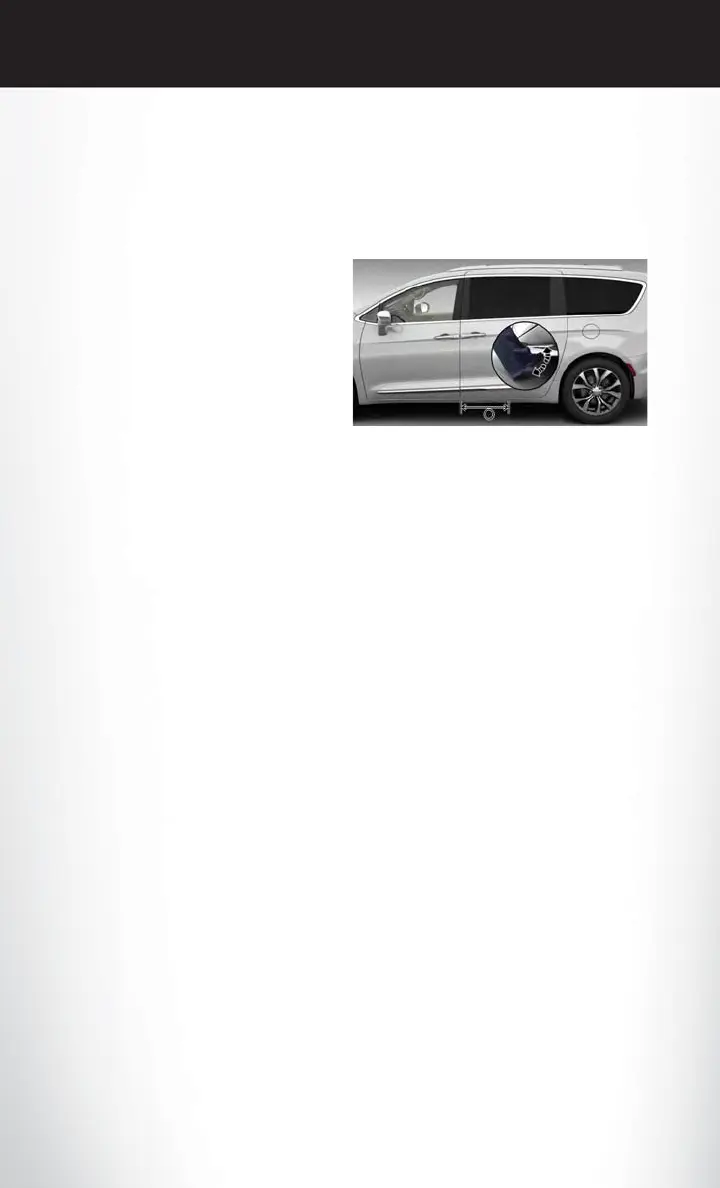
Hands-Free Sliding Doors – If Equipped
Hands-Free Feature
Make sure you have an RKE Key Fob within 3 ft (1 m) of the sliding side doors.
1. Move your foot under and away from the
center of the sliding door detection area in a
single-kick motion. Do not move your foot
sideways or the sensors may not detect the
motion.
2. The sliding side doors will power open or
close.
NOTE:
Allow the power system to open the sliding side
door(s). Manually pushing or pulling the sliding
side door may activate the system’s obstacle
detection feature and stop the power operation
or reverse its direction. Manually interfering with the sliding side door motion may also cause an
open/close failure.
NOTE:
Splashing water may cause the Hands-Free Sliding Door to open. Keep the RKE Key Fob away
from the rear bumper detection area when washing your vehicle.
Obstacle Detection
The system stops when it detects an obstacle. Two short tones sound and the system will reverse
to the open or closed position. When you remove the obstacle, you can power open or close the
sliding side door.
If the sliding side door encounters multiple obstructions within the same cycle, the system will
automatically stop. If this occurs, the sliding side door must be opened or closed manually.
The sliding side door will not power open or close if the gear selector is in gear or the vehicle
speed is above 0 MPH (km/h).
NOTE:
Entering your vehicle while the sliding side door is closing can cause your vehicle to bounce and
activate obstacle detection. To prevent this, let the sliding side door close completely before you
enter your vehicle. Before driving off, check the instrument cluster for a sliding side door or door
open message or warning indicator. Failure to do this could result in unintentionally leaving the
sliding side door open while driving.
NOTE:
Disable the Hands-Free Sliding Door feature through Uconnect during the following:
• Vehicle Servicing
• Jacking and Tire Changing
Hands-Free Sliding Doors
GETTING STARTED
20















 To Next Page