10
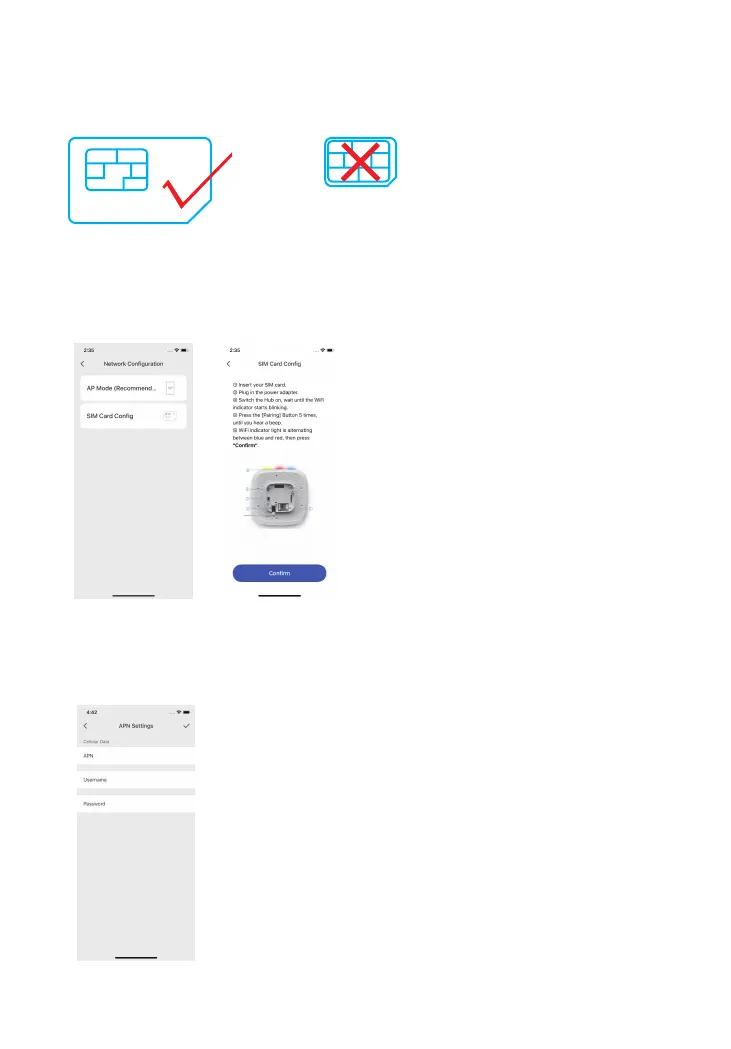
SIM Card Cong: If home Wi-Fi is not available, SIM card Cong comes in handy for
sending notications, SMS and phone calls. First prepare a regular-size 4G SIM card and
insert it into the hub’s SIM slot.
Press the conguration button for 5 times and you will hear one beep, and then connect
your mobile phone to the device’s hotspot. In your phone’s Wi-Fi list, connect to “LTE-400
Alarm” and then return to the app, wait for the connecting process to complete.
If the SIM card cong fails, you might need to ll in the APN settings of the card.
*Note: The APN setting varies from country to country. Please consult the local operator
on how to set the APN correctly.



 To Next Page