09
Step Three: Add the Smart Hub to the App
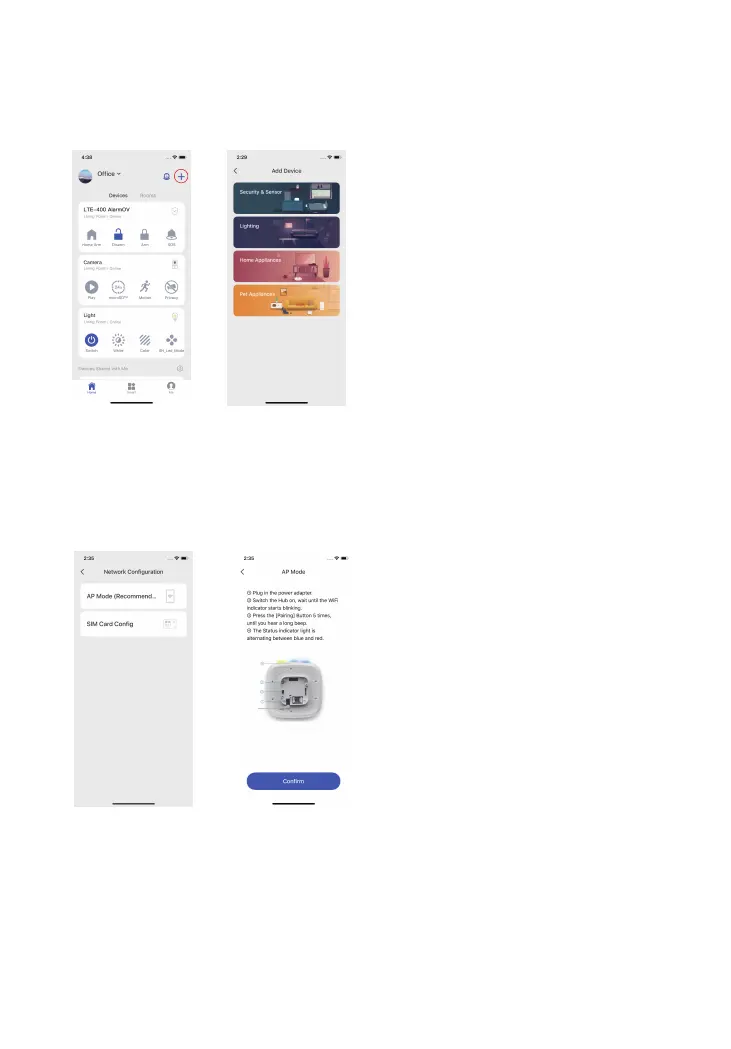
1. Press the [ + ] button on the main page. Tap on [Security & Sensor], then follow the
device set up steps to connect the hub with your home WiFi.
2. There are two ways to add the device: AP Mode and SIM Card Cong.
AP Mode: Press the conguration button for 5 times and you will hear one beep, then
enter the Wi-Fi password and tap “Conrm”. Next, connect your mobile phone to the
device’s hotspot. In your phone’s Wi-Fi list, connect to “LTE-400 Alarm” and then return
to the app, wait for the connecting process to complete.
Important: The Hub does not support 5GHz band Wi-Fi. If a dual-band (5GHz and 2.4GHz) router is
used, make sure to connect to the 2.4GHz Wi-Fi instead of the 5GHz’s. Make sure your smart phone is
connected to the local Wi-Fi network and then follow the steps in the app to connect the hub to the
router.



 To Next Page