CIARA Astro SN-6310
- 17 -
1.5.2 Solving hard drive problems
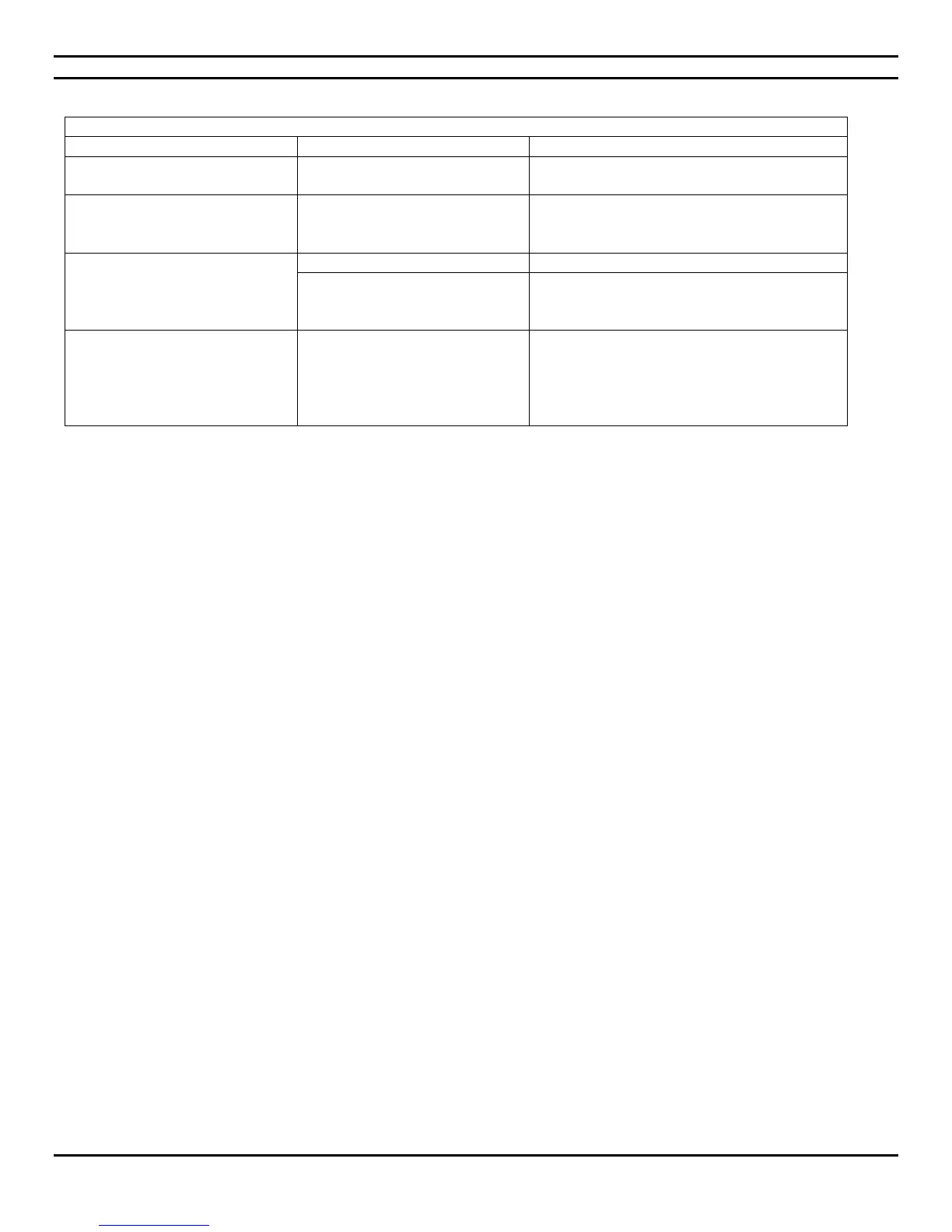
Solving hard drive problems
Hard disk has bad sectors or has
failed.
Use a utility to locate and block usage of bad
sectors. If necessary, reformat the hard disk.
Disk transaction problem.
Either the directory structure is
bad or there is a problem with a
file.
In Windows, right-click Start, click Explore, and
select a drive. Select File > Properties > Tools.
Under Error-checking, click Check Now.
System files missing or not
properly installed.
For Windows 7, the system will need to be
booted with a system DVD and the repair
option selected to try and fix problems.
Micro PC seems to be locked up.
Program in use has stopped
responding to commands.
Attempt the normal Windows “Shut Down”
procedure. If this fails, press the power button
for four or more seconds to turn off the power.
To restart the micro PC, press the power
button again.


 To Next Page