CIARA Astro SN-6310
- 27 -
1.6.3 Insertion of the processor
ATTENTION : Components such as the processor may be permanently damaged by shocks arising from static electricity. It is hence
important to wear an antistatic bracelet during the installation process.
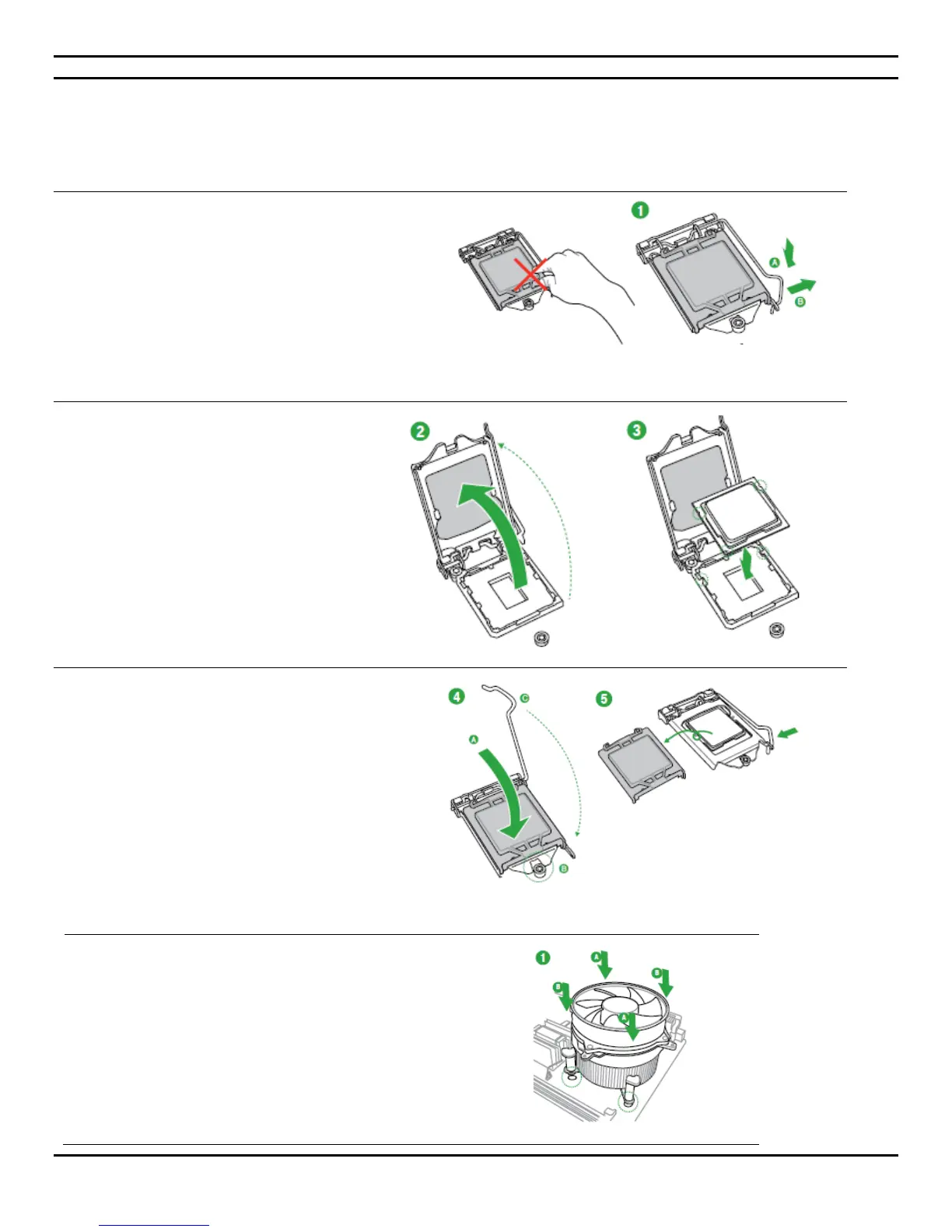
Open the socket lever by pushing
the lever down and away from the
socket, lift the load plate. Do not
touch the socket contacts.
Remove the processor from the
protective processor cover.
Hold the processor only at the edges, being
careful not to touch the bottom of the
processor.
The processor is to be placed onto the
motherboard in its designated space while
taking note of its specific processor pin
orientation.
Once correctly installed, press down on the
load plate, close and engage the socket lever.
Insert fan and heat sink module, aligning the
four pins with the holes.
Fasten the fan module by turning the four
thumbs.


 To Next Page