CIARA Astro SN-6310
- 59 -
4.16 Configuration jumper block
NOTE
Always turn off the power and unplug the power cord from the micro PC before shorting the two pins. Shorting the pins with the power
on may result in unreliable micro PC operation.
4.16.1 Setting the BIOS configuration jumper
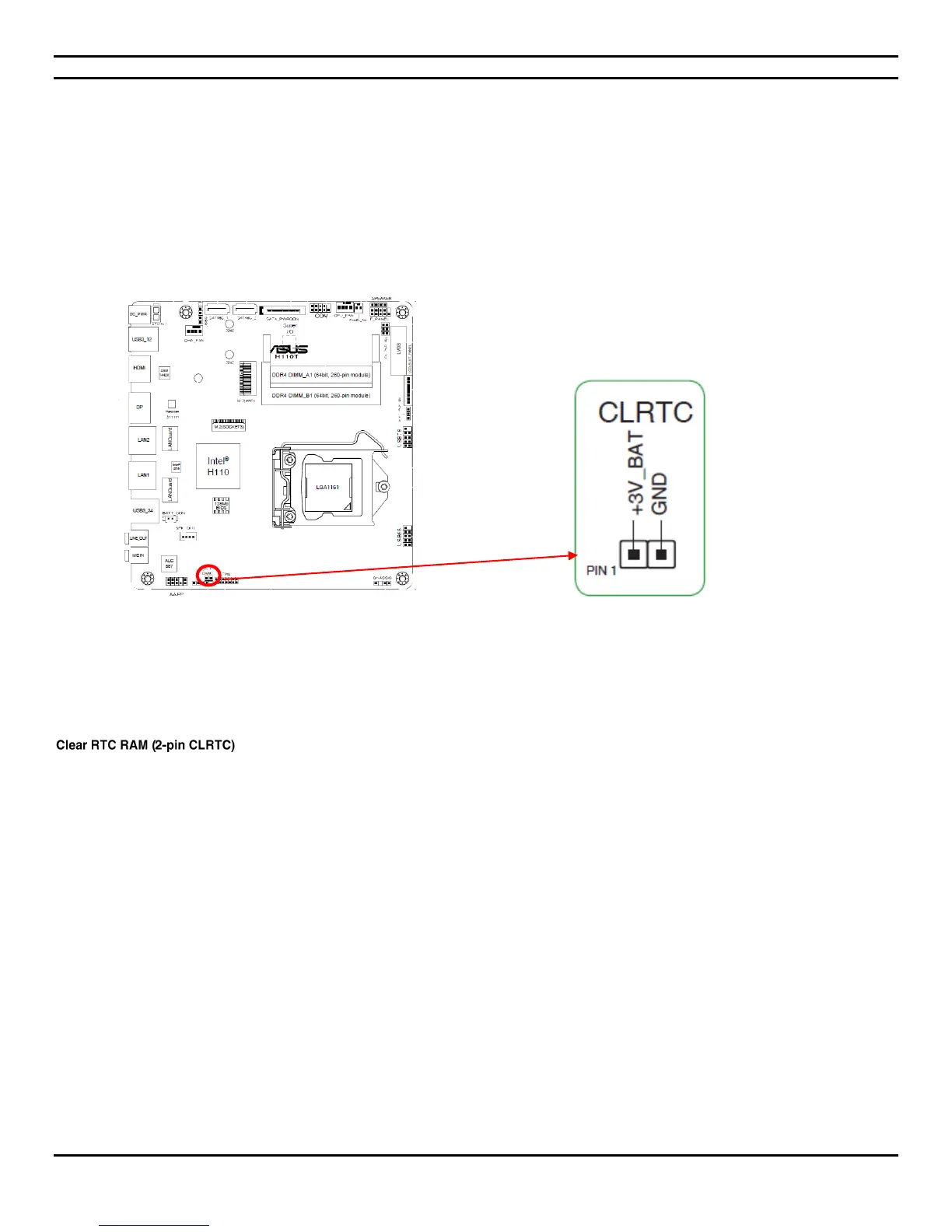
Figure shows the location of the Desktop Board’s BIOS configuration header.
Location of the BIOS Configuration Jumper Block
The two-pin BIOS header enables all board configurations to be done in the BIOS Setup program. Table below shows the jumper
settings for the BIOS Setup program modes.
4.17.2 Clearing or changing passwords
This jumper allows you to clear the Real Time Clock (RTC) RAM in CMOS. You can clear the CMOS memory of date, time, and system
setup parameters by erasing the CMOS RTC RAM data. The onboard button cell battery powers the RAM data in CMOS, which include
system setup information such as system passwords.
To erase the RTC RAM :
1. Turn OFF the micro PC and unplug the power cord.
2. Use a metal object such as a screwdriver to short the two pins.
3. Plug the power cord and turn ON the micro PC.
4. Hold down the <Del> key during the boot process and enter BIOS setup to reenter data.
Except when clearing the RTC RAM, never short the pins on CLRTC header. Shorting the pins will cause system boot failure!


 To Next Page