CIARA Astro SN-6310
- 30 -
Install a DIMM module into a memory socket on the system main board, as follows :
First, make sure the power is turned Off and the power cord is unplugged. Then remove the case cover.
Align the module so that the pin 1 marking on the module corresponds to the DIMM socket pin 1 marking. The module can only fit in
the socket in one way ; you cannot insert the DIMM incorrectly.
Slide the module into the socket at a 90-degree angle to the main board. (See figure below)
After inserting the DIMM module completely into the socket, push up on the socket latches securing the DIMM into place.
NOTE
To release the memory module, push both latches down and carefully rock the module away from the main board. You should then be
able to pull the module up and out of the socket.
ATTENTION : Components such as memory may be permanently damaged by shocks arising from static electricity. It is hence important
to wear an antistatic bracelet during the installation process.
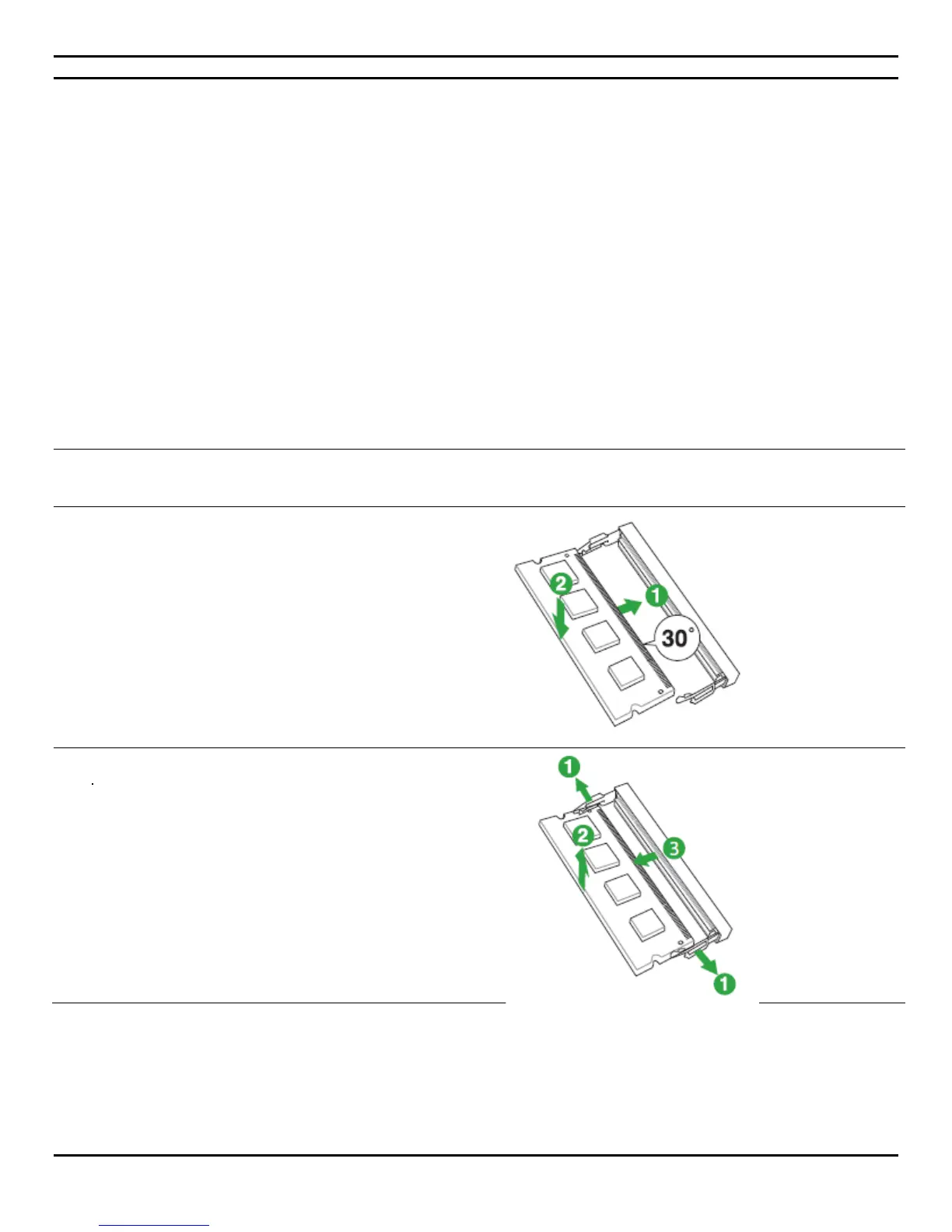
You can install one or two DIMM of DDR4 memory.
1. To install a DIMM, align the memory module key
along with the memory socket key and insert the
memory at a 30 degree angle.
2. Rotate the memory downward until the
lock/ejector tabs engage and click into place.
1. To remove pre-existing memory, gently pull the
lock/ejector tabs (located on both sides of the
memory socket) away from the memory module.
2. The memory will unlock and pop-up 30 degrees
for removal.
3. Pull it out.


 To Next Page