- 11 -
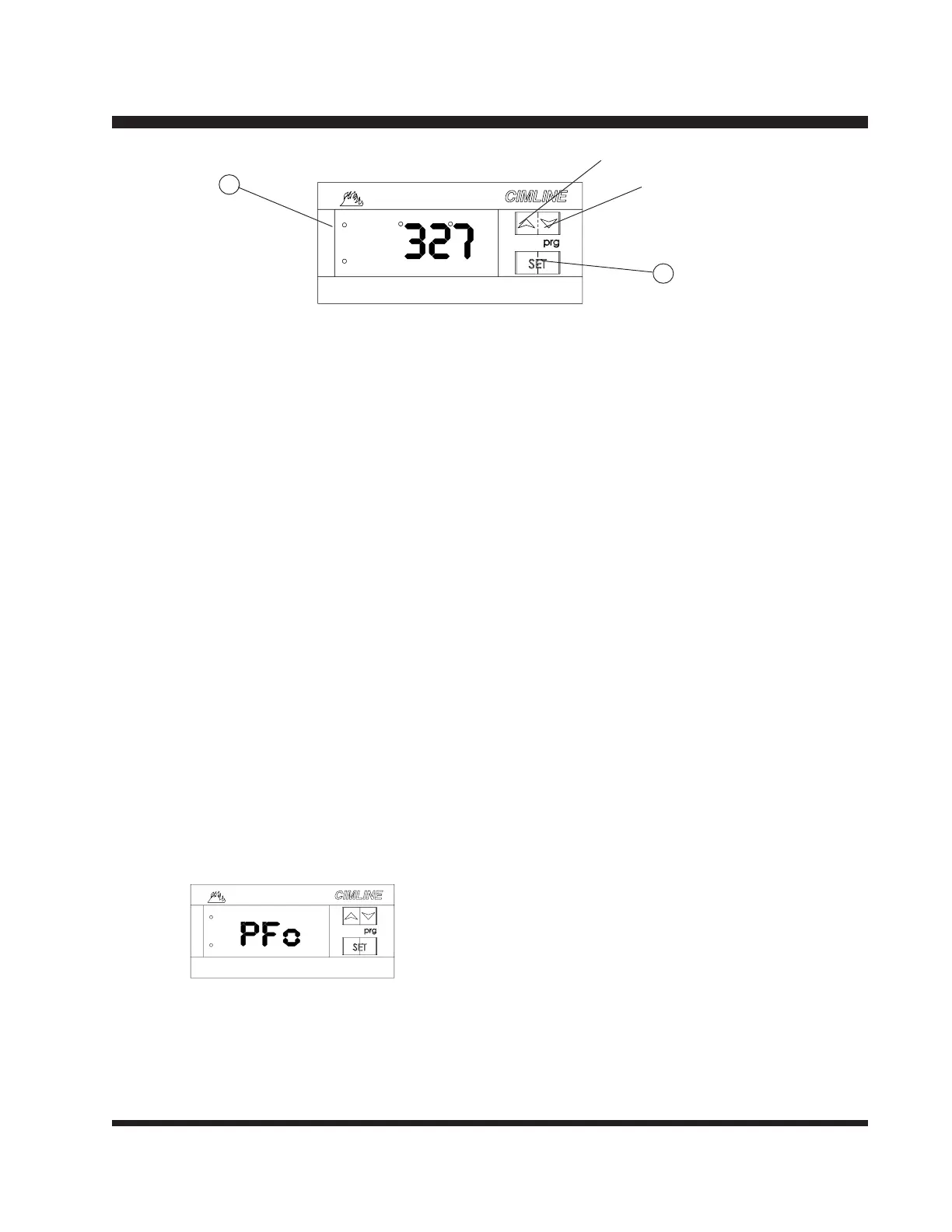
Setting Temperature Controllers
"PFo" indicates broken or absent probe.
"PFc" indicates short circuited probe.
Increase (UP)
Decrease (DOWN)
A
B
1) Press and hold set button (A) for 5 sec. Light (B) will turn on while in the setting
mode.
2) Press "UP" or "DOWN" button until desired temp is shown.
3) Press set button (A) , light (B) will turn off and the readout will display actual
temperature.
4) Indicator light (B) will remain on anytime the burner is running.
NOTE: Press set button (A) at anytime to display the setpoint temperature.
For safety, the high limit settings are locked in at the factory to prevent overheating. The
settings are:
Oil Controller- 550º F (288º C)
Material Controller- 450º F (232º C)
Heated Hose Controller- 400º F (218º C)
These settings can be field adjusted for specific applications.
Consult the factory for instructions.



 To Next Page