1-5
Cisco 7200 VXR Installation and Configuration Guide
OL-5013-09
Chapter 1 Cisco 7200 VXR Product Overview
Cisco 7204VXR Overview
With the NPE-G1 or NPE-G2 installed and the Port Adapter Jacket Card installed in the I/O controller
slot, an additional port adapter slot is available.
Note If you have difficulty installing a processing engine or I/O controller in the lowest slot of a
Cisco
7200 VXR router that is rack-mounted, remove the port adapters, processing engine and I/O
controller from the chassis and reinstall them. Install the processing engine and I/O controller in the
lowest slots first, then populate the slots above them, in a bottom-to-top order.
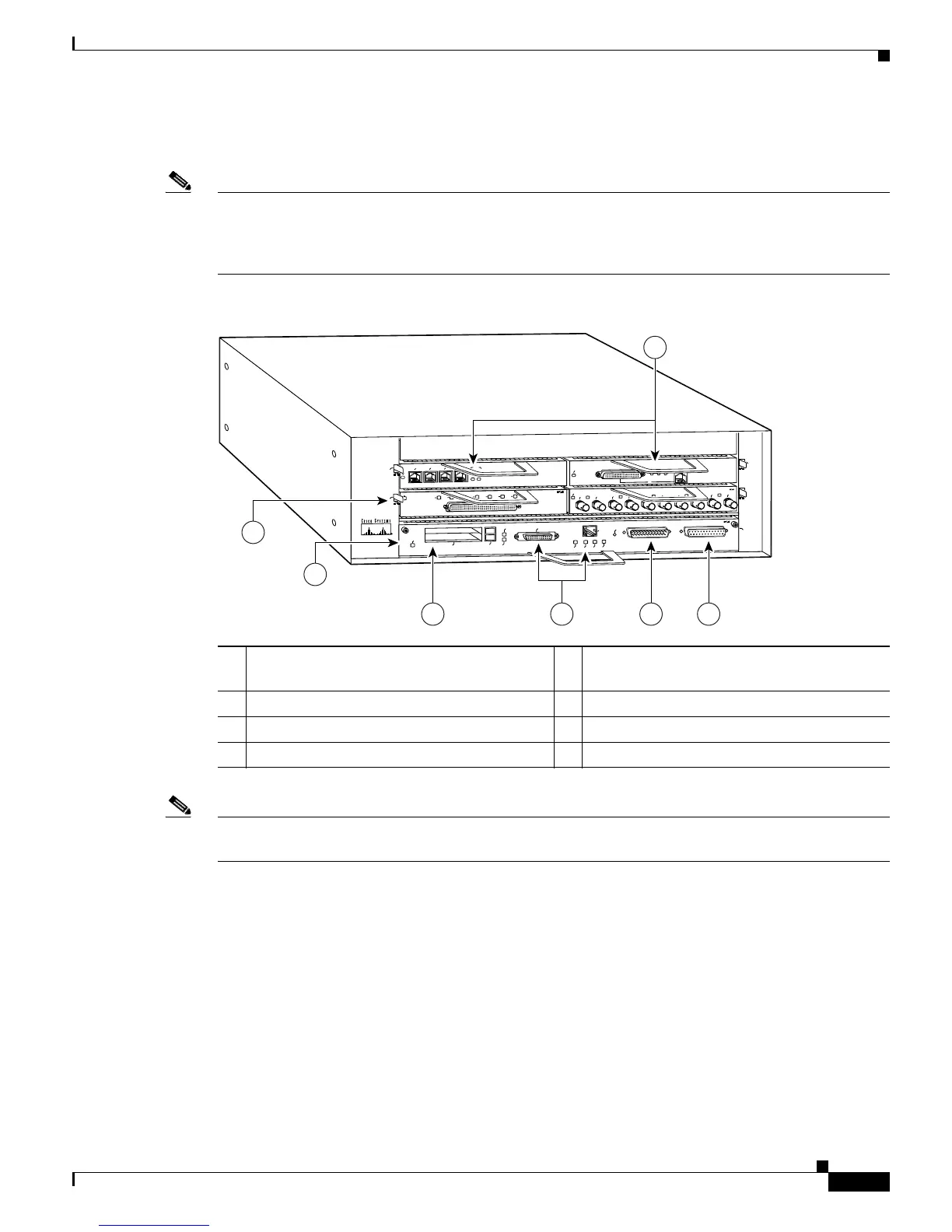
Figure 1-1 Cisco 7204VXR Router—Front View
Note In Figure 1-1, a blank port adapter is installed in slot 3. To ensure adequate airflow across the port
adapters, each port adapter slot must be filled with either a port adapter or a blank port adapter.
The rear of the Cisco 7204VXR router provides access to the network processing engine or network
services engine and up to two power supplies. (See
Figure 1-2.)
1 Port adapters 5 Optional Fast Ethernet interface (MII port and
RJ-45 port)
2 Port adapter lever 6 Auxiliary port
3 I/O controller 7 Console port
4 PC Card slots









 To Next Page