3-35
Cisco 7200 VXR Installation and Configuration Guide
OL-5013-09
Chapter 3 Installing a Cisco 7200 VXR Router
Connecting I/O Controller, NPE-G1, or NPE-G2 Cables
Note Both the console and the auxiliary ports are asynchronous serial ports; any devices connected to these
ports must be capable of asynchronous transmission. (Asynchronous is the most common type of serial
device; for example, most modems are asynchronous devices.)
The I/O controller uses two types of physical media for console port and auxiliary port connections.
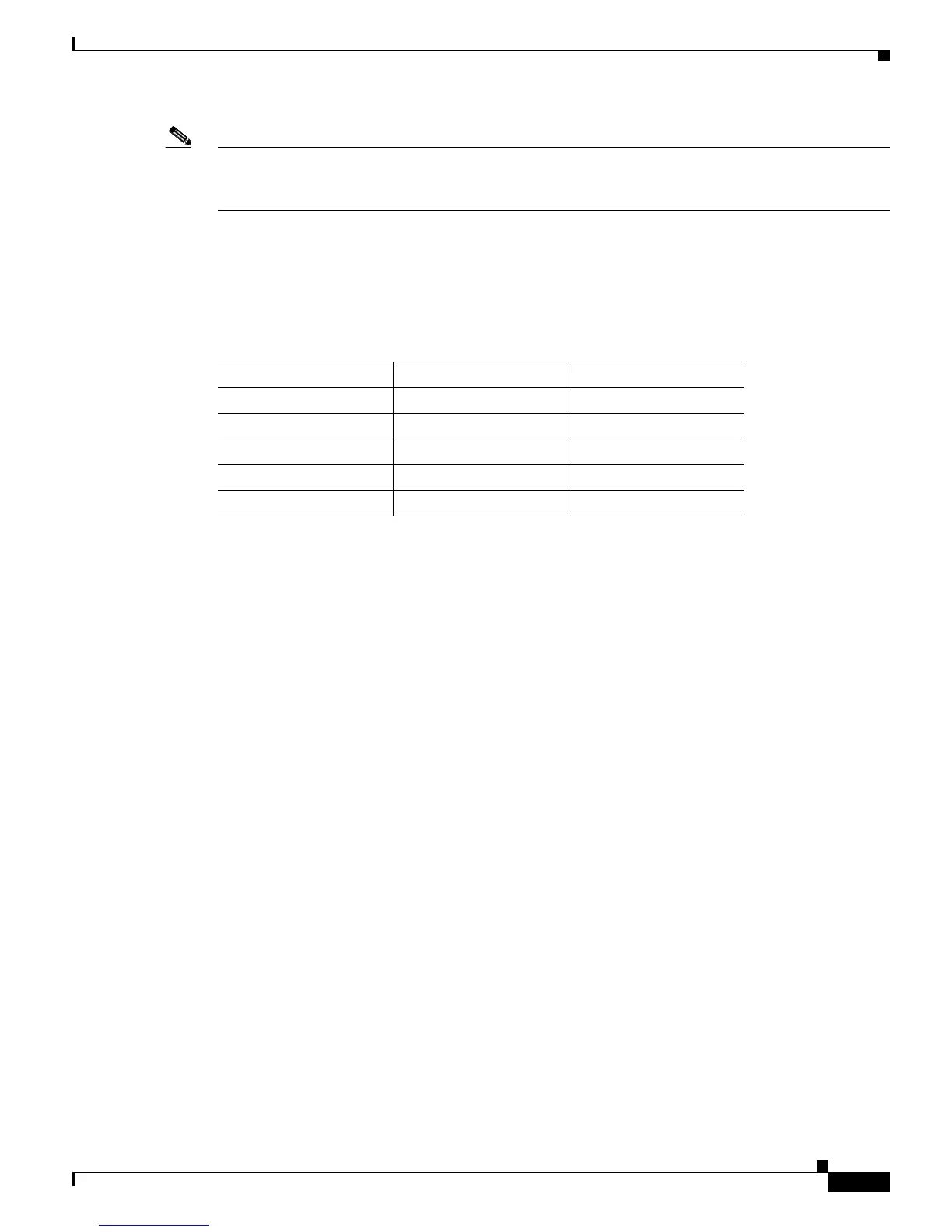
Table 3-13 describes the I/O controller console and auxiliary port media type for each model.
The NPE-G1 and NPE-G2 use RJ-45 media for console port and auxiliary port connections. See
Table 3-18 for console port pinout information and Table 3-19 for auxiliary port pinout information.
Before connecting a terminal to the console port, configure the terminal to match the router console port
as follows: 9600 baud, 8 data bits, no parity, 2 stop bits (9600 8N2). After you establish normal router
operation, you can disconnect the terminal.
DB-25 Port Cabling and Pinouts
The DB-25 ports and connectors conform to the EIA/TIA-232 serial data transfer standard for
communications between DTE and DCE equipment.
Figure 3-28 shows console and auxiliary port
connections for DB-25 physical media.
Ta b l e 3-13 Console and Auxiliary Port Physical Media
Model Console Port Auxiliary Port
C7200-I/O-GE+E RJ-45 port RJ-45 port
C7200-I/O-2FE/E RJ-45 port RJ-45 port
C7200-I/O-FE DB-25 port DB-25 connector
C7200-I/O DB-25 port DB-25 connector
C7200-I/O-FE-MII DB-25 port DB-25 connector



 To Next Page
 Loading...