1-54
Cisco 7200 VXR Installation and Configuration Guide
OL-5013-09
Chapter 1 Cisco 7200 VXR Product Overview
Functional Overview
Chassis Slot and Logical Interface Numbering
In the Cisco 7200 VXR routers, the port-adapter-slot-number is the chassis slot in which a port adapter
is installed, whereas the logical-interface-number is the physical location of the interface port on a port
adapter.
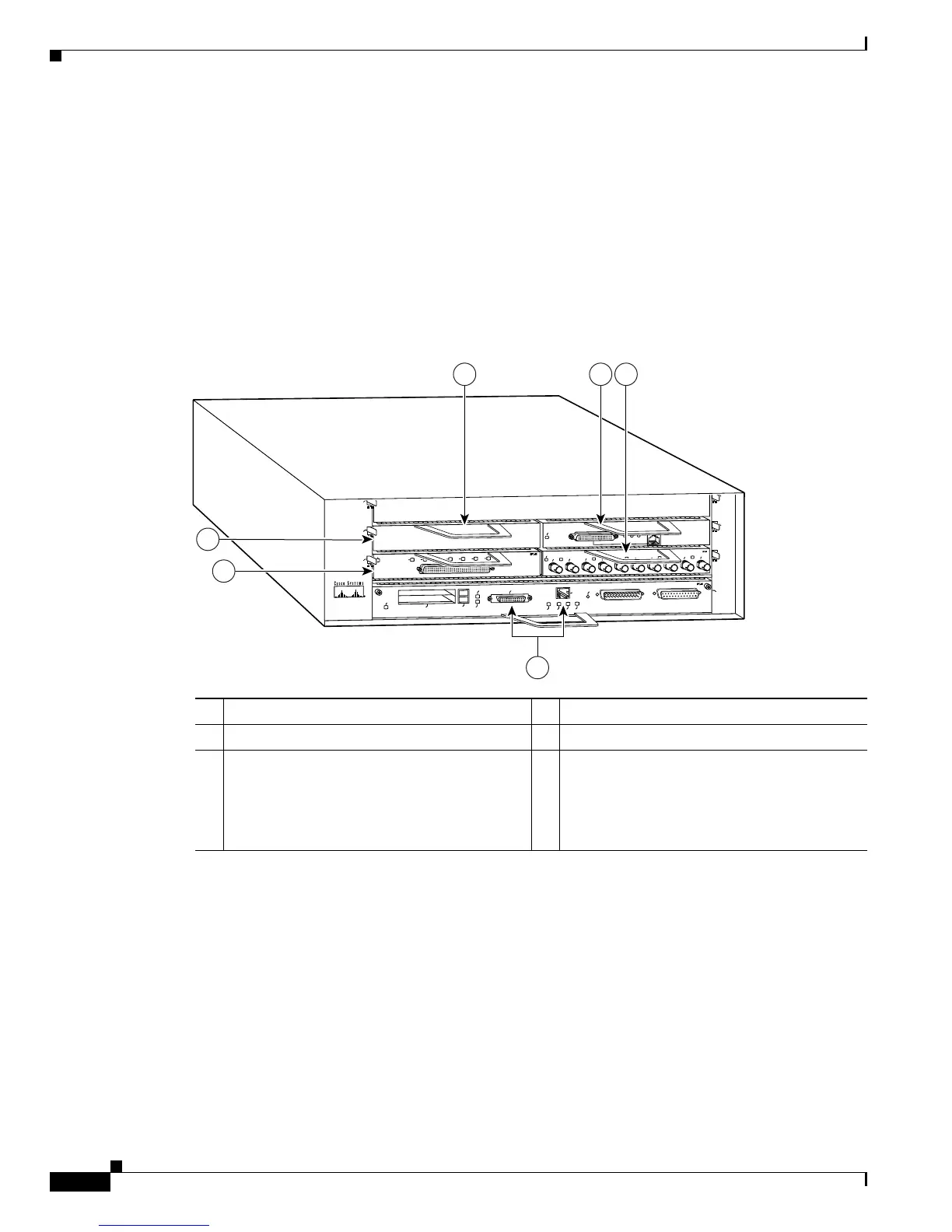
Port adapter slots in the Cisco 7200 VXR routers are numbered from left to right— slot 1 through slot 4
in the Cisco
7204VXR (see Figure 1-31) and slot 1 through slot 6 in the Cisco 7206VXR (see
Figure 1-32). Port adapter slot 0 is always reserved for the Fast Ethernet port on the I/O controller—if
present.
Figure 1-31 Port Adapter Slot Numbering—Cisco 7204VXR
1 Blank port adapter 4 Port adapter slot 3
2 Port adapter slot 4 5 Port adapter slot 1
3 Port adapter slot 2 6 Port adapter slot 0 (Reserved for the Fast
Ethernet port on the I/O controller. With the
NPE-G1 or NPE-G2 and the Port Adapter
Jacket Card installed, the slot becomes port
adapter slot 5.)









 To Next Page