The following table describes the Wireless Microphone Options and, where applicable, explains how to change
them.
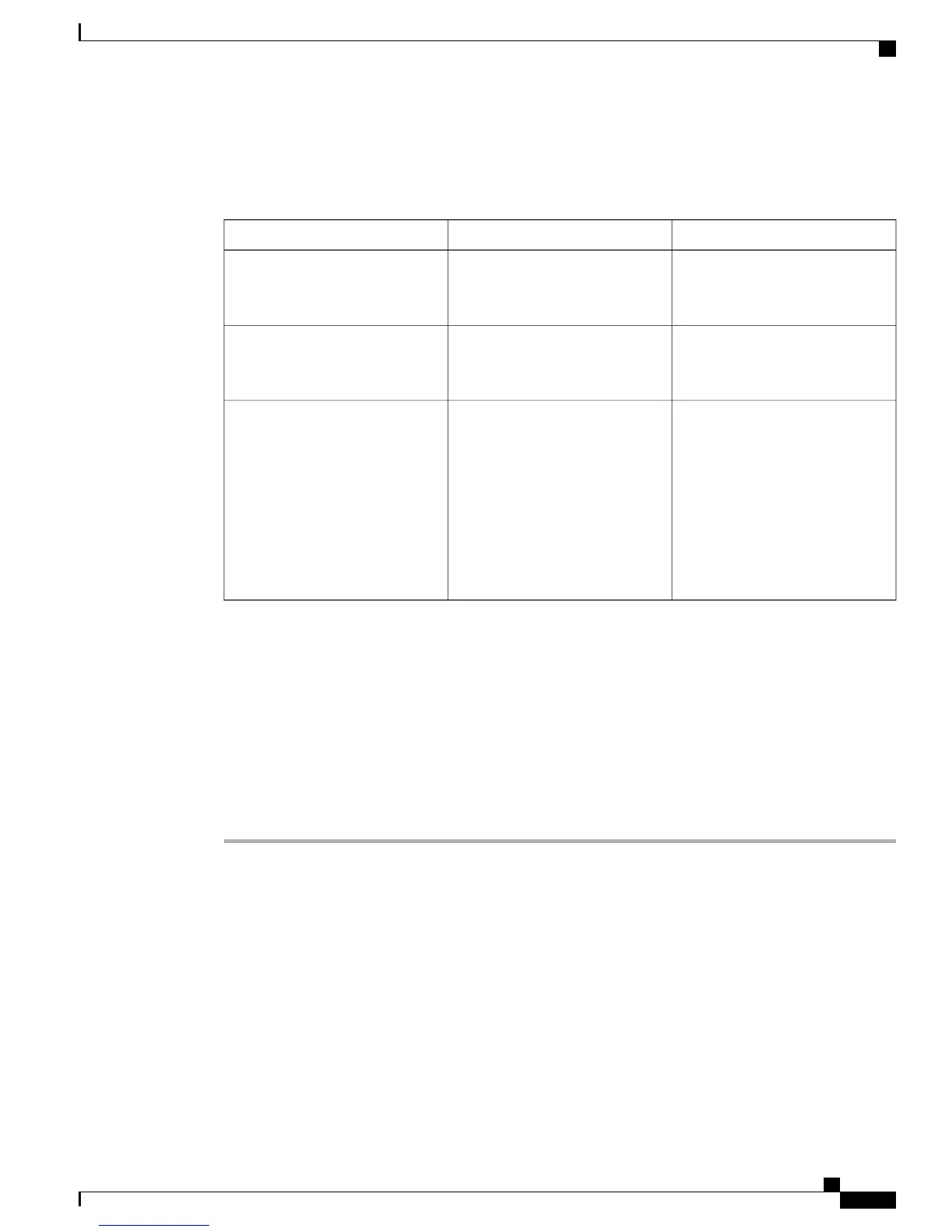
Table 3: Wireless Microphone Options
To ChangeDescriptionOption
See Pair Wireless Microphone, on
page 11 or Unpair Wireless
Microphone, on page 12
The channel that can be used to
pair the first microphone.
Wireless Microphone 1
See Pair Wireless Microphone, on
page 11 or Unpair Wireless
Microphone, on page 12
The channel that can be used to
pair the second microphone.
Wireless Microphone 2
Select Low, Medium or High, and
press Select. Or press Default to
select the default setting and press
Select.
Sets the baseband power and
effective RF range for the wireless
microphones.
The RF range can be set to
•
Low
•
Medium
•
High
Wireless Microphone Range
Pair Wireless Microphone
Before You Begin
The microphone must be in the off state before you can pair it to the conference station. A microphone is off
if the microphone's LED is off. To turn off the wireless microphone, hold down the microphone button until
the microphone LED turns solid red, then release.
Procedure
Step 1
Choose Apps > Admin Settings > Wireless Microphones.
Step 2
Select either Wireless Microphone 1 or Wireless Microphone 2.
If the selected channel is available, a Pair microphone 1? or Pair microphone 2? prompt displays,
and the Pair softkey displays.
If a microphone is already linked to a particular channel, pairing cannot be initiated on the selected channel
and the dialog shows that the microphone is linked.
Step 3
Press Pair.
If the channel is ready to pair, the pairing process begins and a text message displays.
Step 4
Put the microphone that corresponds to the selected channel in pairing mode by pressing the microphone's
Mute button until the LED lights solid red.
Cisco Unified IP Conference Phone 8831 Administration Guide for Cisco Unified Communications Manager 9.0
11
Cisco Unified IP Conference Phone 8831 Installation
Wireless Microphone Menu


 To Next Page
 Loading...