EasyManua.ls Logo

Cisco 8841 - User Manual

Cisco 8841
170 pages
Print Icon
To Next Page IconTo Next Page
Loading...
REVIEW DRAFT - CISCO CONFIDENTIAL
Cisco IP Phone 8811, 8841, 8845, 8851, 8851NR, 8861, and 8865 User
Guide for Cisco Unified Communications Manager 11.0
First Published: February 17, 2015
Americas Headquarters
Cisco Systems, Inc.
170 West Tasman Drive
San Jose, CA 95134-1706
USA
http://www.cisco.com
Tel: 408 526-4000
800 553-NETS (6387)
Fax: 408 527-0883

Table of Contents

Other manuals for Cisco 8841

Questions and Answers

  • B
    Barry ReyesJul 25, 2025
    What to do if my Cisco 8841 displays an "Initialising Network" message constantly?
    • A
      andrew40Jul 25, 2025
      Check the connection from the handset to the router or switch to ensure it's receiving a signal. Swap out Cat 5 cables and check ports, as well as connections on all wires. Also, plug the handset into a different port that you know definitely works.
  • T
    Tammy McdonaldAug 5, 2025
    What to do if my Cisco IP Phone handset shows an on-screen extension but has an amber light?
    • A
      Ashley RamirezAug 5, 2025
      First, ensure all router port settings have been implemented, paying special attention to port 5060 and ensuring SIP ALG is disabled. Next, eliminate LAN variables by plugging the handset directly into the router. If your router doesn't provide power over Ethernet, ensure the only thing between the router and the handset is the Power Over Ethernet switch, and that all wires and units function correctly. Also, verify the handset is still assigned to a user on the Horizon Portal. Finally, try plugging the handset into a different port that you know works.
  • M
    Martha WagnerAug 14, 2025
    What to do if my Cisco 8841 handset boots up with an amber light and no extension?
    • U
      uwilliamsAug 14, 2025
      First, ensure all router port settings have been implemented, especially on port 5060, and make sure that SIP ALG is disabled. Check that you've assigned a local IP address by looking it up on the router's ARP cache. Eliminate LAN variables by plugging the handset directly into the router. If your router doesn't provide power over Ethernet, make sure the only thing between the router and the handset is the Power Over Ethernet switch and that all the wires and units are working correctly. Make sure the handset is still assigned to a user on the Horizon Portal. Finally, try plugging the handset into a different port that you know works.

Summary

Getting Started with Cisco IP Phones

Cisco IP Phone 8811: Phone Connections

Covers phone connections for the Cisco IP Phone 8811 model.

Cisco IP Phone 8811: Buttons and Hardware

Details the buttons and hardware for the Cisco IP Phone 8811 model.

Cisco IP Phone 8841: Phone Connections

Explains phone connections for the Cisco IP Phone 8841 model.

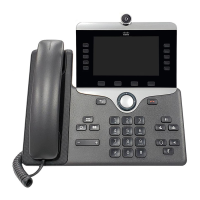
Cisco IP Phone 8841: Buttons and Hardware

Details the buttons and hardware for the Cisco IP Phone 8841 model.

Cisco IP Phone 8845: Phone Connections

Covers phone connections for the Cisco IP Phone 8845 model.

Cisco IP Phone 8845: Buttons and Hardware

Details the buttons and hardware for the Cisco IP Phone 8845 model.

Cisco IP Phone 8851;8851 NR: Phone Connections

Explains phone connections for Cisco IP Phone 8851 and 8851NR.

Cisco IP Phone 8851;8851 NR: Buttons and Hardware

Details the buttons and hardware for Cisco IP Phone 8851 and 8851NR.

Cisco IP Phone 8861: Phone Connections

Covers phone connections for the Cisco IP Phone 8861 model.

Cisco IP Phone 8861: Buttons and Hardware

Details the buttons and hardware for the Cisco IP Phone 8861 model.

Cisco IP Phone 8865: Phone Connections

Explains phone connections for the Cisco IP Phone 8865 model.

Cisco IP Phone 8865: Buttons and Hardware

Details the buttons and hardware for the Cisco IP Phone 8865 model.

Basic Phone Operations

Make Calls

Instructions on how to make calls, including predialing and using the speakerphone.

Answer Calls

How to answer the oldest available call, including handling hold reversion and park reversion calls.

Call Pickup Procedures

Explains how to answer a coworker's ringing call using Pickup, Group Pickup, and Other Pickup.

Hold and Transfer Calls

Procedures for placing calls on hold, resuming calls, and transferring calls to other numbers.

Advanced Calling Features

Conference Call Management

How to add parties to a conference, join calls, and swap between calls before finalizing.

Extension Mobility and Mobile Connect

Configuring the phone for temporary use of different IP phones and handling calls on mobile devices.

Advanced Phone Operations

Mobile and Remote Access

Connecting securely to the corporate network off-site via Expressway and available phone features.

Cisco Unified Video Camera Setup

Troubleshooting Phone Issues

Product Safety and Security Information

Cisco 8841 Specifications

General IconGeneral
Resolution800 x 480 pixels
AudioWideband audio
BluetoothNo
Ethernet10/100/1000 Mbps
PoEIEEE 802.3af compliant
ConnectivityEthernet
Buttons4 programmable line keys
SpeakerphoneFull-duplex speakerphone
Headset JackYes, RJ9
CodecsG.711, G.722, G.729a, iLBC
Power OptionsPoE
Network InterfacesDual Gigabit Ethernet ports
SecuritySecure boot, 802.1X authentication, secure credential storage
Dimensions40 mm
Weight2.5 lb (1.1 kg)

Related product manuals