7Telia Yritysinternet Plus Langaton
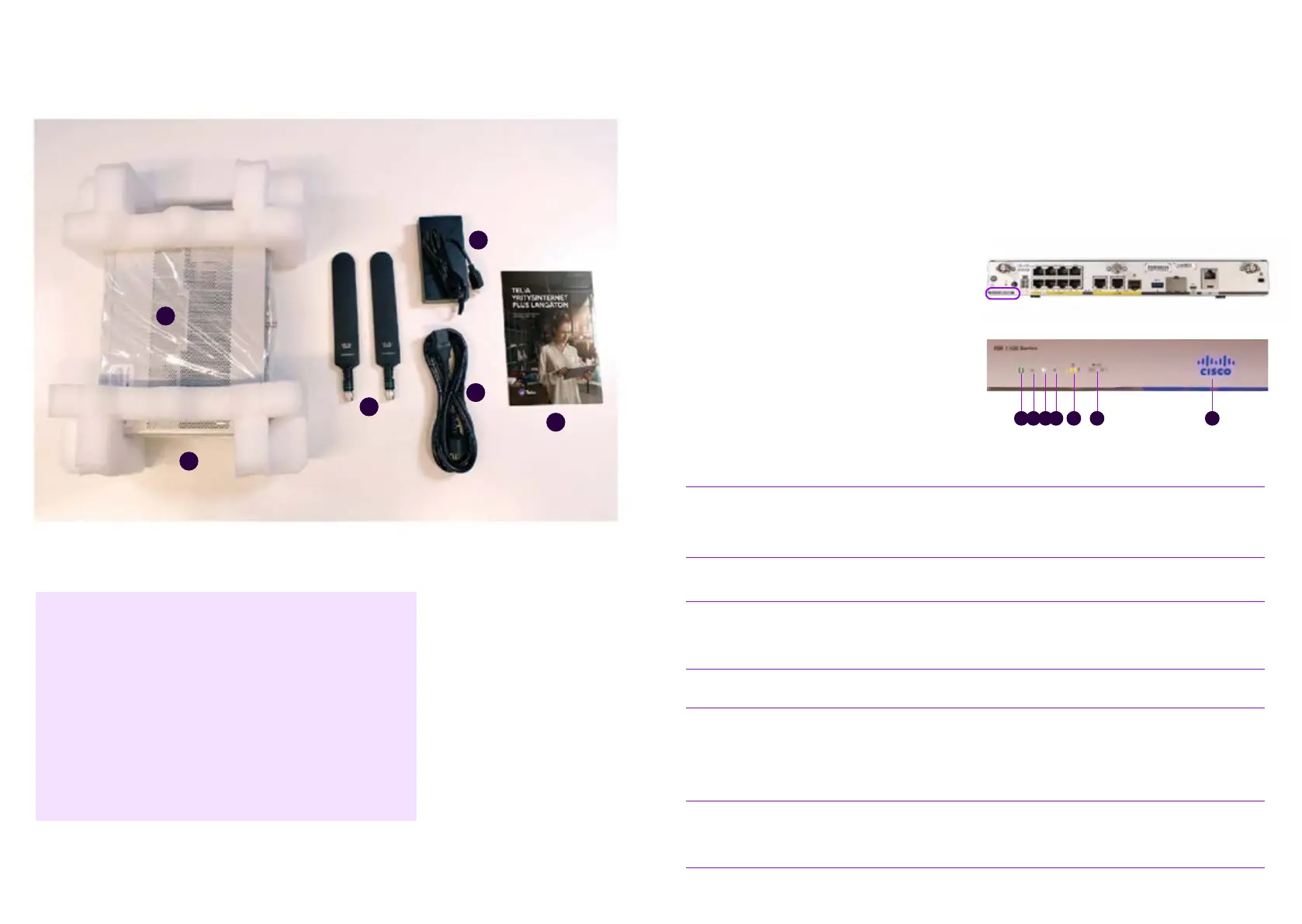
The delivery includes the components listed below.
Please check that you have received them all. If
you notice that any components are missing, please
contact Telia.
1. Router
2. Two LTE antennas
3. Power supply
4. Power cable
5. Customer instructions
6. A SIM card for the mobile connection
(installed in the device and ready for use).
3
4
5
2
6
1
Figure 2. Contents of the Yritysinternet Plus Langaton subscription delivery package
Cisco - C1111-
8PLTEEAWE + PoE
The look, indicator lights and most important
connectors of the C1111-8PLTEEAWE + PoE
router are presented below.
64321 75
Figure 3. Rear view of a C1111-8PLTEW router, device model label
Figure 4. The indicator lights on the front panel
of a C1111-8PLTEW router
Name
Description
1
Status
Green = The router works normally (=normal status)
Orange blinking = BIOS/ROMmon starting
Orange = BIOS/ROMmon started, firmware starting
Off = The system is restarting or the software has failed
2
VPN
Green = At least one VPN tunnel is in use
Off = No VPN tunnels used (=normal status)
3
WLAN
Green = Wireless local area network is operational and at least one wireless device
is connected
Orange = Software update is in progress
Red = Wifi not in use
4
GPS Off = GPS positioning feature is not enabled (=normal status)
5
LTE RSSI/Mode
Green = The device is connected to an LTE (4G) network
Orange = The device is connected to a 3G network
1 LED lit = Poor mobile network reception (RSSI below -100 dBm)
2 LEDs lit = Low mobile network reception (-99 dBm< RSSI < -90 dBm)
3 LEDs lit = Average mobile network reception (-89 dBm < RSSI < -70 dBm) 4 LEDs lit = Good
mobile network reception (RSSI exceeds -69 dBm)
6
LTE DATA/SIM
Green blinking = Data is being transferred over the mobile data connection
Orange = The modem is ready for use and a SIM card has been inserted, but the connec-tion is
not active. Off = The modem is not ready for use, or the modem is ready for use, except that a
SIM card has not been inserted
7
Cisco Logo
Blue = Device power supply is OK (=normal status)




 To Next Page