17Telia Yritysinternet Plus Langaton
Supplementary service:
wireless local area network
If your subscription includes wireless LAN
as a supplementary service, the access point
used in the service is integrated into the
device, and there are no external antennas.
The network name (SSID) and encryption key
required for using the wireless LAN have been
agreed upon in connection with the order.
These details are provided in connection with
the delivery using a technical form, and can
also be found on a label on the device.
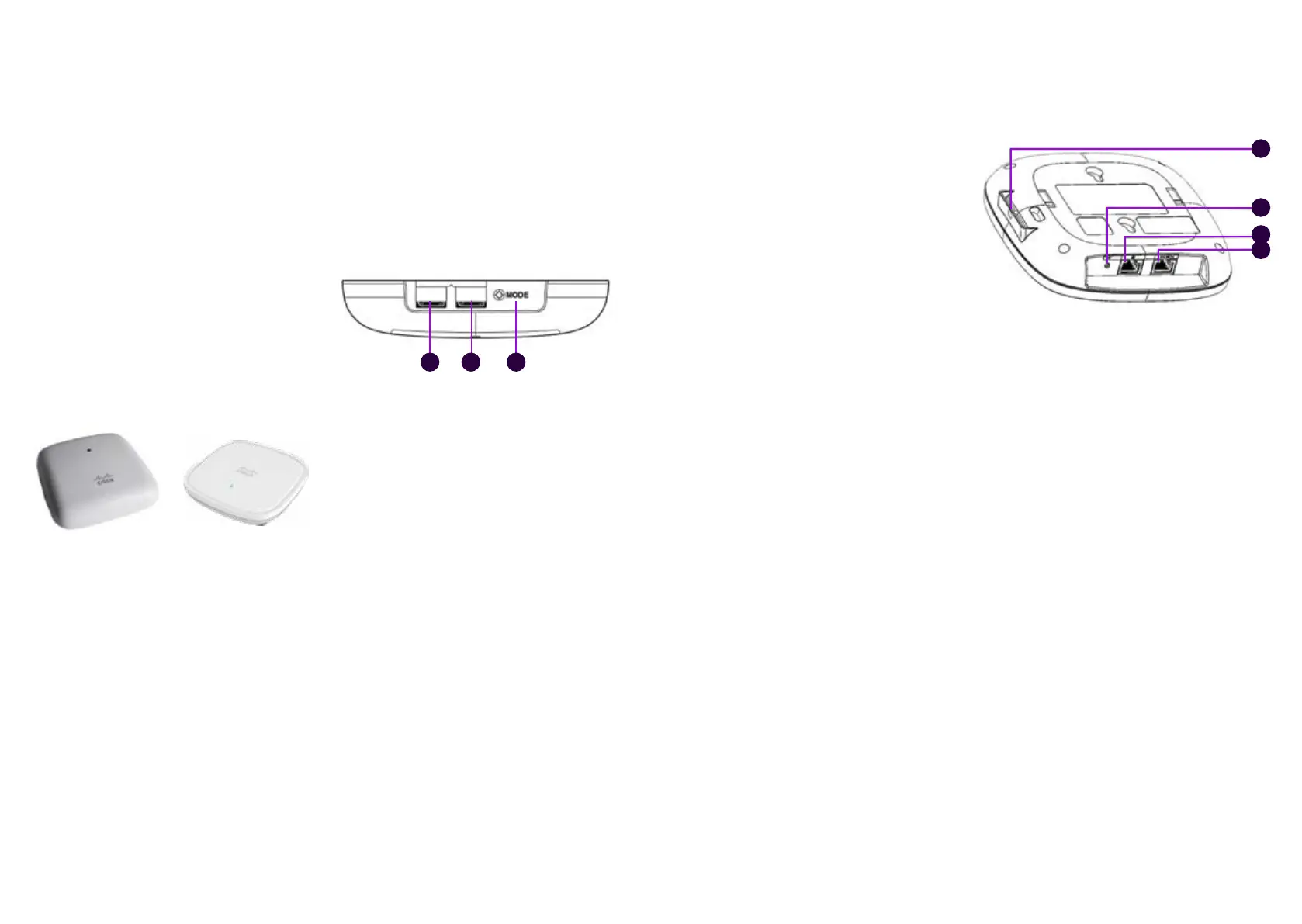
Figure 10. Cisco Aironet 1815i Figure 11. Cisco C9105AXI-E
Figure 12. Cisco Aironet 1815i
31 2
When using the Internet connection over
the wireless local area network, the network
being used is the same firewall-protected
default network that is used when connecting
devices to LAN ports 0/1/x. Traffic in the
wireless LAN is WPA2-encrypted. The
wireless local area network supports the IEEE
standards 802.11a/b/g/n/ac.
It is possible to extend the coverage area of
the wireless LAN service with one addi-tional
external wireless access point. The same
wireless network settings (SSID and encryption
key) are used throughout the entire coverage
area of the wireless net-work. Telia delivers
the external wireless access point to the
customer. The service does not include local
area network (LAN) connections or related
cabling done on the customer’s premises. The
external access point must be connected via
the customer’s LAN cabling to port 0/1/1 of the
Telia-supplied router as shown in Figures 8-9.
The external wireless access point does not
need separate power supply because its
designated port uses PoE technology (Power
over Ethernet) to supply power. The external
wireless access point will be operational in
approximately 1 hour and 30 minutes after
the LAN connection has been made between
the router and the external wireless access
point. The cable is connected to port 2 of the
wireless access point.
It is also possible to implement a wireless
guest network as a supplementary service,
in which case the guest network has its own
SSID and encryption key. Internet traffic on the
guest network is logically isolated from the
traffic in the company’s internal network.
The wireless guest network is configured as
follows:
Default route: 192.168.202.254
Subnet mask: 255.255.255.0
Addresses assigned by DHCP:
192.168.202.1–192.168.202.253
DNS servers: 193.210.19.19, 193.210.19.190
Figure 13. Cisco C9105AXI-E
3
4
1
2
Supplementary service:
Avoin internet (Open Internet)
The IP address details of the open Internet
connection have been delivered in
connection with the delivery, using a so-
called technical form. In addition, the public
IP addresses available are provided on the
form accompanying the customer-premises
equipment. An public IPv4 or IPv6 subnet is
used for the open Internet connection. The
number of IP addresses available depends
on the customer needs. The IPv4/IPv6
addresses to be used are registered under
the customer’s name.
For more detailed information about the IPv4
addresses used for open Internet access, see
the product’s service description.
By default, the IP addresses used by the
Avoin internet (Open Internet) supplementary
service are configured manually for customer
devices. The Räätälöity DHCP (Custom DHCP)
supplementary service makes it possible to
automatically assign the IP addresses used
in the supplementary Avoin internet (Open
Internet) service using the DHCP server built
into the device.
Telia’s name servers can be used to resolve
IP addresses and network addresses. In this
case, the Telia DNS servers 193.210.19.19 and
193.210.19.190 must be configured in the
customer device network settings.
The open Internet connection is fully open to
the Internet and there is no port filtering in
either direction. When using an open Internet
connection, the customer is responsible for
the connection’s information security and
should pay special attention to it.
Open internet access is available on ports
0/1/2–0/1/7 of the LAN switch of the client
device, see figure 6, and through the wireless
local area network connection available as a
supplementary service.
It is also possible to enable a wireless guest
visitor network with the supplementary Avoin
internet (Open Internet) service.
The router performs a network address
translation (NAT/PAT) for the private IP
addresses of the guest network’s customer
endpoint devices. No changes can be made to
the IP addresses used in the guest network.
If you are using the supplementary service
Avoin internet (Open Internet), it is possible
for devices in the guest network to access the
devices on the internal network if adequate
information security has not been ensured.
If you have an external wireless access point,
the visitor network is in use throughout the
extended coverage area.




 To Next Page