9Telia Yritysinternet Plus Langaton
1
10 11 12 13 14 15 16 176 87 9
12 4 53
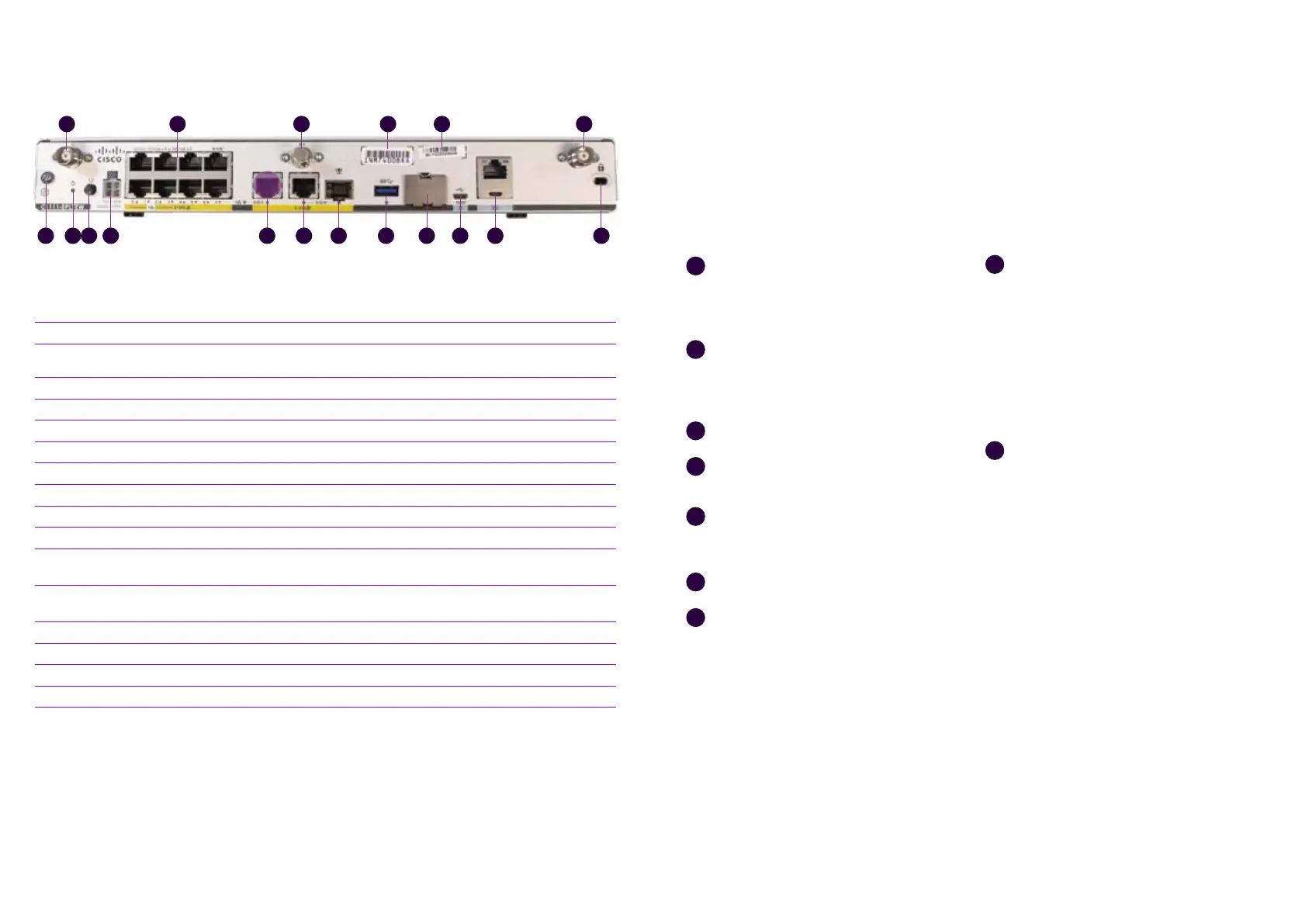
Figure 5. C1111-8PLTEW rear connections.
Name Note
1 LTE antenna connectors – 2 pcs, Main and Diversity Both antennas must be connected
2 Ethernet switch, ports 0/1/0–0/1/7
Ports for connecting the client’s devices (see figure 8 for
switch ports in use!)
3 GPS antenna connector Not used
4 CLEI ID Common Language Equipment Identifier (CLEI)
5 Device serial number
6 Earthing point
7 Reset button Not used
8 Power switch
9 Power cable connector
10 GE 0/0/1 port Not used
11 GE 0/0/0 – RJ45
Ethernet WAN (Internet), cannot be used for con-necting
LAN devices
12 GE 0/0/0 – SFP
Fibre WAN (Internet), cannot be used for connecting LAN
devices
13 USB 3.0 port Not used
14 SIM card slots Do not open – The SIM card must not be removed
15 LTE Diagnostic port (RSVD) Not used
16 RJ45/Micro USB console
17 Kensington lock
C1111-8PLTEEAWE + PoE
router set-up
Connect both LTE antennas to the
connectors numbered with 1 in figure 5.
Note! Both antennas must be connected
to ensure mobile reception.
Connect the power cable to the
power supply and the power supply
to the customer-premises equipment,
connector 9 in figure 5.
Turn the device on, switch 8 in figure 5.
Wait for approximately 10 minutes until
the device has started.
Check the mobile network reception with
the front panel indicators (see figure 4),
indicator light 5.
Your connection is ready for use.
Use ports 0/1/2–0/1/7 to connect LAN
devices to the firewall-protected default
network (see figure 5), connectors 2.
1
2
3
4
5
6
7
8
The supplementary wireless local area
network service (WLAN) uses the
firewall-protected default network. The
settings required using the service: The
SSID and encryption key are delivered
on a technical form with the delivery
and can also be found on a label on the
device. The wireless access point takes
approximately an additional 10 minutes
to start after the router starts.
If a supplementary Avoin Internet (Open
Internet) service has been ordered for
the subscription, it is available in all LAN
ports from 0/1/2 to 0/1/7 (see figure 5),
connectors 2. The IP addresses required
for the supplementary Avoin Internet
(Open Internet) connection service have
been delivered with the technical form
in connection with the delivery. The IPv4
addresses used in the supplementary
Avoin Internet (Open Internet) service
for LAN devices must be configured
manually. If you want to distribute IPv4
addresses used in the supplementary
Avoin Internet (Open Internet) service by
the device’s DHCP server, you must select
the supplementary service Räätälöity
DHCP (Custom DHCP).
9




 To Next Page