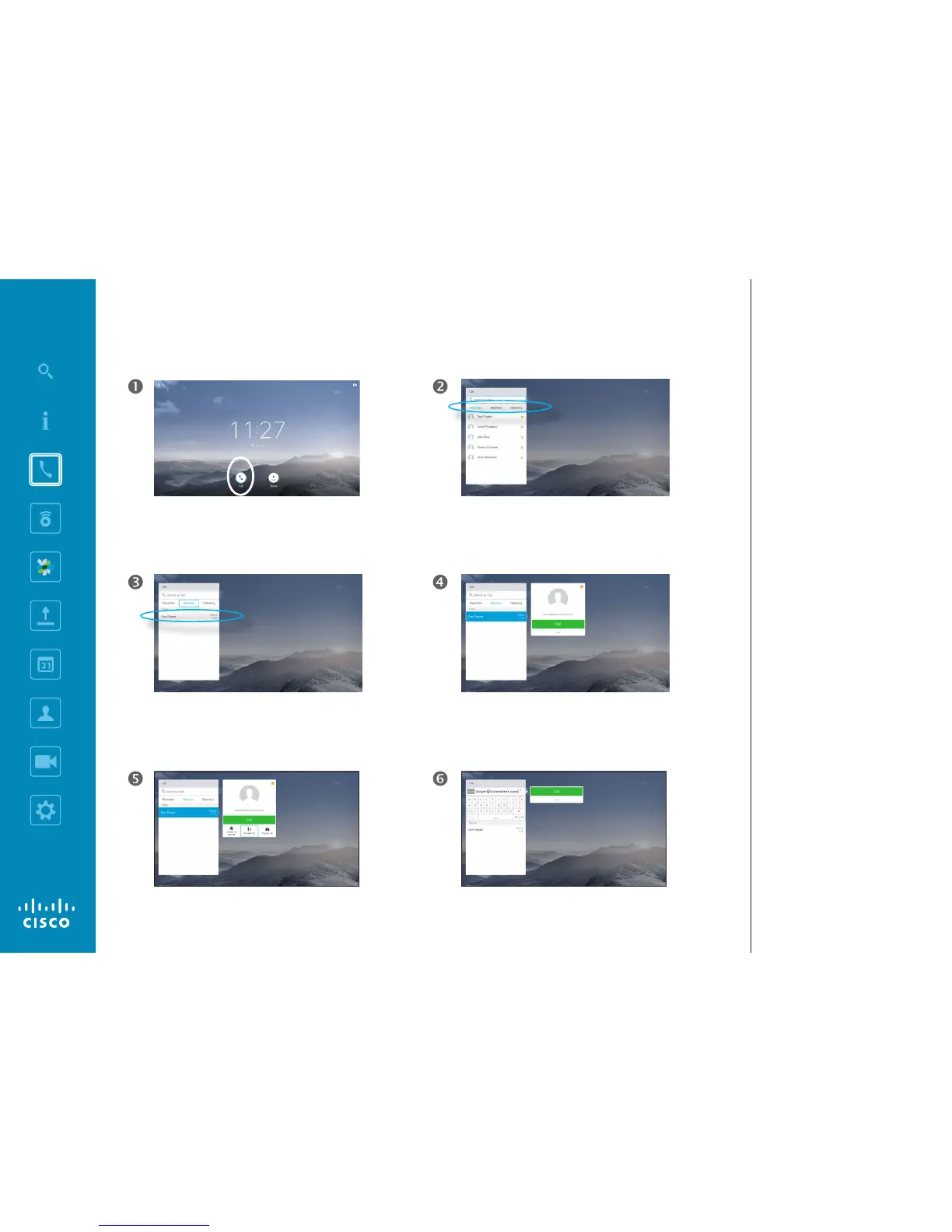
Use the down Cursor key on the remote control to move
the cursor down in order to select the More eld (
...
) and
press OK.
Once an entry has been located, press OK on the remote
control to invoke the Call menu.
Move down to Edit and Call (center eld in the More
menu) an press OK.
Edit the entry as required and press the green Call
button on the remote control to place the call.
Make sure Call is selected (the leftmost icon along the
bottom of the screen) and press OK on the remote
control or press the green Call button on the remote
control.
Use the horizontal Cursor keys on the remote control to
go between Favorites, Recents and Directory and then
down in one of the lists.
Place Call
Edit a Contact List Entry Status, then Place the Call
About Entry Edits
You may have to edit an entry in one
of the Contact lists before you place
the call. There may be a need to add
a prex, a sux or otherwise alter
the entry to ensure success.
At the same time, this set of options
allow you to change the Call Rate
(the bandwidth allocated to the call
referred to as Custom call) as well
as the ability to promote the current
entry to become a Favorite.














 To Next Page