7/20
YF30 instruction manual
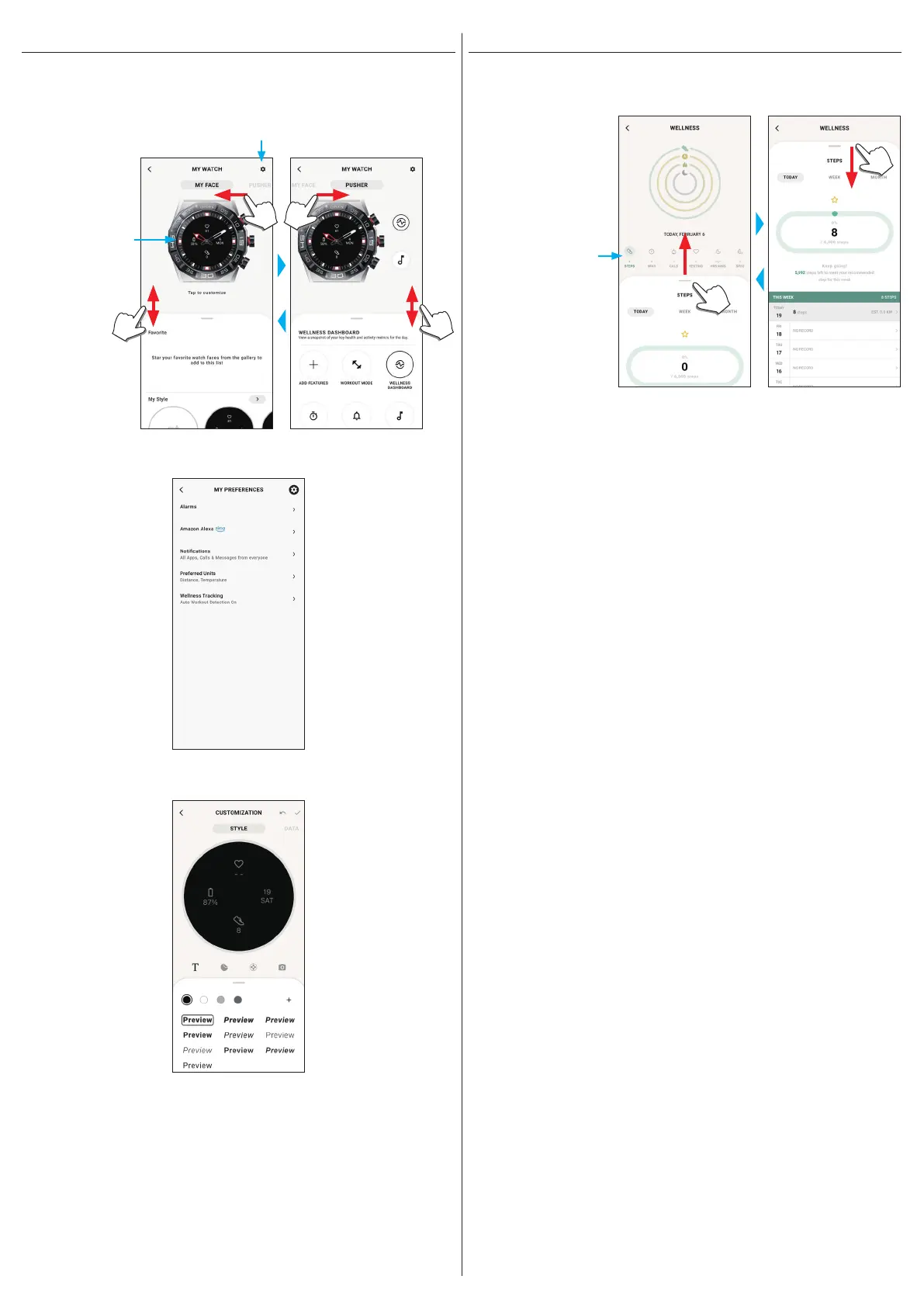
[WELLNESS] screen
It is the screen for indicating the data of the activity monitor on the watch.
The screen has the six following sub menus: [STEPS], [ACTIVE MINUTES (MINS)],
[ACTIVE CALORIES (CALS)], [HEART RATE (RESTING)], [SLEEP (HRS MINS)]
and [SPO2].
Tap to switch to an item
you want to indicate.
• Activity amount is indicated by percentage where the target value set is supposed
100 %. One whole circle means 100 % on a circle graph. For bar graphs, the 100 %
line is indicated in the graph field.
• For details of Target value, see "Changing goal values of activities" (→ page
8
).
[MY WATCH] screen
You can customize watch face indication and assign function to buttons of the watch
here. You can also control settings of notifications and alarm.
Settings icon
It opens the [MY PREFERENCES] screen.
It opens the
[CUSTOMIZATION]
screen.
⿎[MY PREFERENCES] screen
You can control settings of alarm, Alexa, notifications, unit, etc. here.
⿎[CUSTOMIZATION] screen
You can control display indication of the watch here.



 To Next Page