4.3.4 Initializing
WiththepowersupplyOFF,pressSET+△+▽buttonssimultaneouslyandturnthepowerON.
Note1)Wheninitializing,makeanoteinadvanceofanyofthecurrentsettingsyouwishtopreserve.
Note2)DisplayOFFatshipping(optioncode:T)productswillswitchtodisplayONwheninitialized.
4.4 Easysetting(inRUNmode)
●Frequentlyusedsettingscanbeconfiguredduringregularoperation.
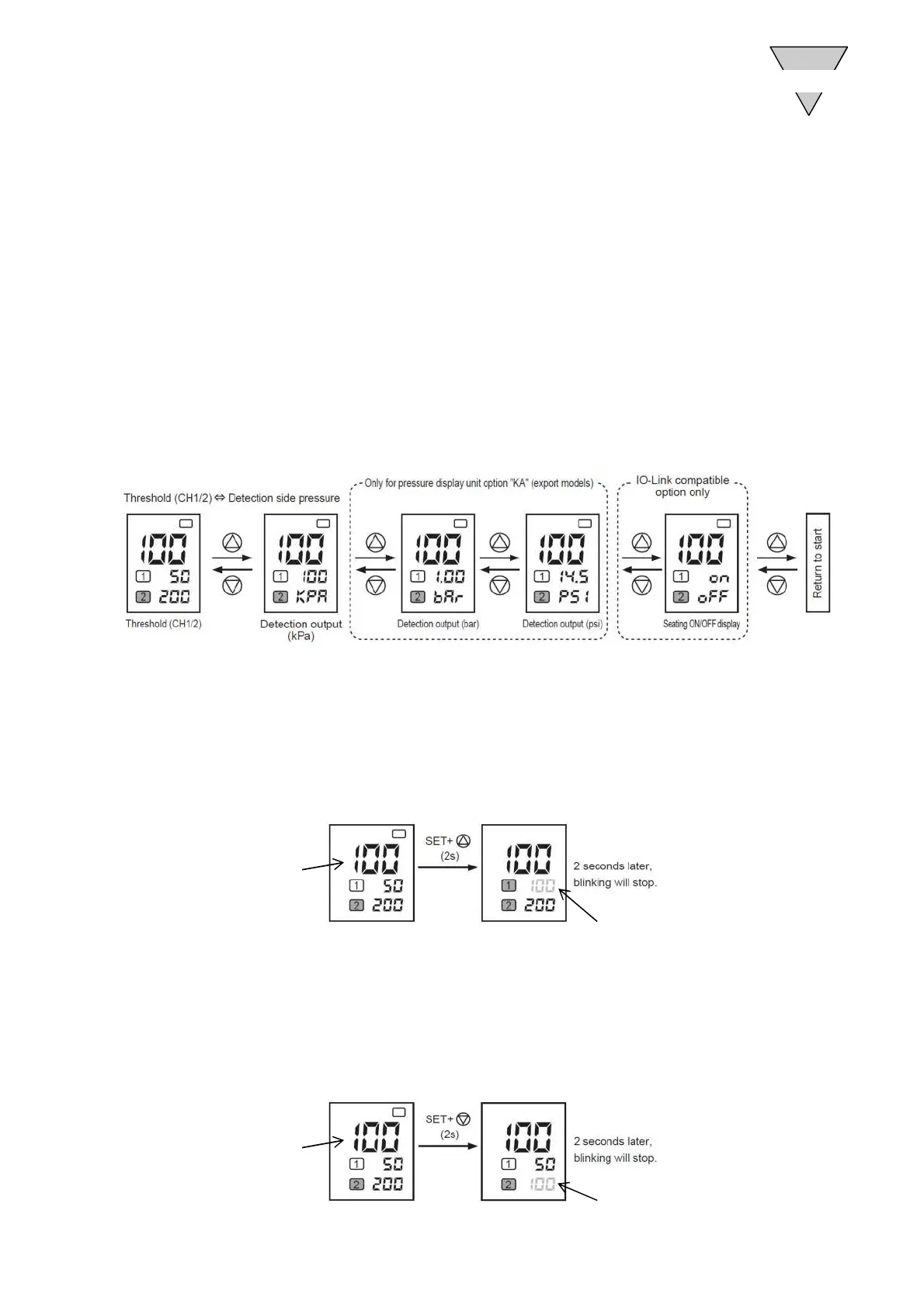
4.4.1 Subscreenselection
●△or▽canbeusedtoswitchtothesubscreen.
Whenoption"KA"isselected,detectionsidepressureunitcanbeswitchedtobar,psidisplay
andwhen"L"isselected,seatingON/OFFdisplaycanbeswitched.
4.4.2 CH1autothresholdsetting
●DisplayvaluecanbesettothethresholdofCH1.
PressandholdSET+△(2secondsormore)tosetthecurrentdisplayedvaluetotheCH1threshold.
Note)Er3willbedisplayedonthesubscreenifthisisoutsidetheconfigurablerange.
4.4.3 CH2autothresholdsetting
●DisplayvaluecanbesettothethresholdofCH2.
PressandholdSET+▽(2secondsormore)tosetthecurrentdisplayedvaluetotheCH1threshold.
Note)Er3willbedisplayedonthesubscreenifthisisoutsidetheconfigurablerange.
Displayvalue
SettoCH1threshold
Displayvalue
SettoCH2threshold
OPERATION
4
−15− [SM-P00143-A]



 To Next Page