EasyManua.ls Logo

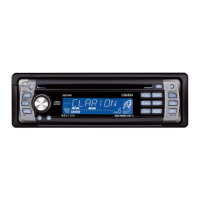
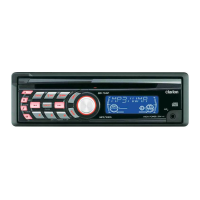
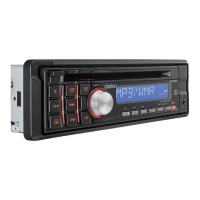
Clarion DB345MP - User Manual

Clarion DB345MP
27 pages
Print Icon
To Next Page IconTo Next Page
Loading...
AM/FM
CD/MP3
PLAYER
RADIO
DE
AM/FM
REPRODUCTOR
DE
CD/MP3

Other manuals for Clarion DB345MP

Questions and Answers

  • R
    ronaldsalazarJul 30, 2025
    How to fix Clarion DB345MP Car Receiver when power does not turn on?
    • M
      Mark CastroJul 30, 2025
      If your Clarion Car Receiver doesn't turn on and no sound is produced, it could be due to a blown fuse. Replace the fuse with one of the same amperage. Alternatively, the wiring may be incorrect. Double-check the “Installation/Wire connection Guide” and ensure it's wired properly.
  • M
    Mary EspinozaAug 5, 2025
    What to do if Clarion DB345MP buttons aren't working?
    • J
      jennifer17Aug 5, 2025
      If buttons aren't responding or the display is inaccurate on your Clarion Car Receiver, the microprocessor may have malfunctioned. Turn off the power, then press the [[[[[RRRRREEEEELLLLLEEEEEAAAAASSSSSEEEEE]]]]] button and remove the DCP. Press the reset button for about 2 seconds with a thin rod. Also, the DCP or main unit connectors could be dirty. Wipe them with a soft cloth moistened with cleaning alcohol.
  • P
    Paula HowardAug 11, 2025
    Why does my Clarion Car Receiver sound skip?
    • A
      ashleyramseyAug 11, 2025
      If your Clarion Car Receiver's sound skips or is noisy, the compact disc may be dirty. Clean it with a soft cloth. If the disc is heavily scratched or warped, replace it with one that has no scratches.
  • V
    vgonzalezAug 17, 2025
    What to do if Clarion DB345MP Car Receiver sound is bad after turning on?
    • K
      Kaitlyn MurrayAug 17, 2025
      If your Clarion Car Receiver has bad sound right after turning it on, water droplets may have formed on the internal lens due to humidity. Let it dry for about 1 hour with the power on.
  • W
    wlarsenAug 22, 2025
    Why won't my Clarion DB345MP load a CD?
    • E
      Elizabeth KnappAug 22, 2025
      If your Clarion Car Receiver won't load a compact disc, it might be because another disc is already inside. Eject the current disc before trying to load a new one.

Summary

1. FEATURES

2. CONTROLS; COMMANDES; CONTROLES

3. BUTTON TERMINOLOGY

4. PRECAUTIONS

5. HANDLING COMPACT DISCS

6. DCP (DETACHABLE CONTROL PANEL)

Removing the DCP

Procedure for detaching the control panel from the main unit.

Storing the DCP in its Case

Instructions for safely storing the detachable control panel.

Attaching the DCP

Steps for reattaching the control panel to the main unit.

7. REMOTE CONTROL

Inserting the Batteries

Guide to installing batteries into the remote control unit.

8. OPERATIONS

Basic Operations Overview

General guidance on unit power, mode selection, and volume control.

Z-Enhancer Sound Settings

How to select different sound tone effect modes.

Audio Mode Adjustments

Instructions for adjusting bass, treble, balance, and fader.

Audio Adjustments (Bass, Treble, Balance, Fader)

Detailed steps for adjusting audio equalization and balance.

Other Operational Functions

Covers MAGNA BASS EX, screen saver, clock, and illumination settings.

Radio Mode Operations

FM Reception and Tuning

Details on FM reception enhancement and manual tuning.

Seek Tuning and Preset Memory

How to automatically seek stations and set preset memory.

Instant Station Recall (ISR)

Function to recall stored radio stations from any mode.

CD Mode Operations

Loading and Playing CDs

Instructions for inserting, playing, stopping, and ejecting CDs.

CD Playback Control

Details on pausing, resuming, and controlling CD playback.

MP3 Mode Operations

MP3 Overview and Disc Creation

Explanation of MP3 format and guidelines for creating MP3 discs.

MP3 Special Functions and Navigation

Accessing menu, searching MP3 folders and files by character.

MP3 Playback Modes (Random, Repeat, Scan)

Instructions for using Random, Repeat, and Scan playback modes.

MP3 Display and CD Selection

Choosing MP3 display types and selecting multi-session CDs.

9. TROUBLESHOOTING

10. ERROR DISPLAYS

11. SPECIFICATIONS

Tuner and Player Specifications

Technical details for FM, AM tuners, CD, and MP3 players.

Audio and General Specifications

Details on audio output, general power, and unit dimensions.

1. BEFORE STARTING; PRÉPARATIFS; ANTES DE COMENZAR

2. CAUTIONS ON INSTALLATION; PRÉCAUTIONS AU SUJET DE LINSTALLATION; PRECAUCIONES PARA LA INSTALACIÓN

3. INSTALLING THE SOURCE UNIT; INSTALLATION DE LAPPAREIL PILOTE; INSTALACIÓN DE LA UNIDAD FUENTE

Universal Mount Installation

Steps for installing the unit using the universal mounting bracket.

Fixed Mount Installation

Instructions for installing the unit in vehicles with factory mounts.

4. REMOVAL OF THE SOURCE UNIT; DEPOSE DE LAPPAREIL PILOTE; DESMONTAJE DE LA UNIDAD FUENTE

5. CAUTIONS ON WIRING; PRÉCAUTIONS AU SUJET DES CONNEXIONS; PRECAUCIONES PARA LA CONEXIÓN DE CABLES

6. GENERAL CAUTIONS; PRÉCAUTIONS GÉNÉRALES; PRECAUCIONES GENERALES

7. SAMPLE SYSTEMS; EXEMPLES DE SYSTÉMES; EJEMPLOS DE SISTEMAS

8. WIRE CONNECTIONS; CONNECTIQUE; CONEXIÓN DE CABLES

Rear Layout Wiring Diagram

Diagram illustrating rear wiring connections for speaker systems.

LIMITED WARRANTY INFORMATION

Clarion DB345MP Specifications

General IconGeneral
TunerAM/FM
CD PlayerYes
MP3/WMA PlaybackYes
Aux InputYes
BluetoothNo
DisplayLCD
Detachable FaceYes
Remote ControlOptional
Preset Stations18 FM, 6 AM

Related product manuals