34
Step 1: Connecting the charging base station
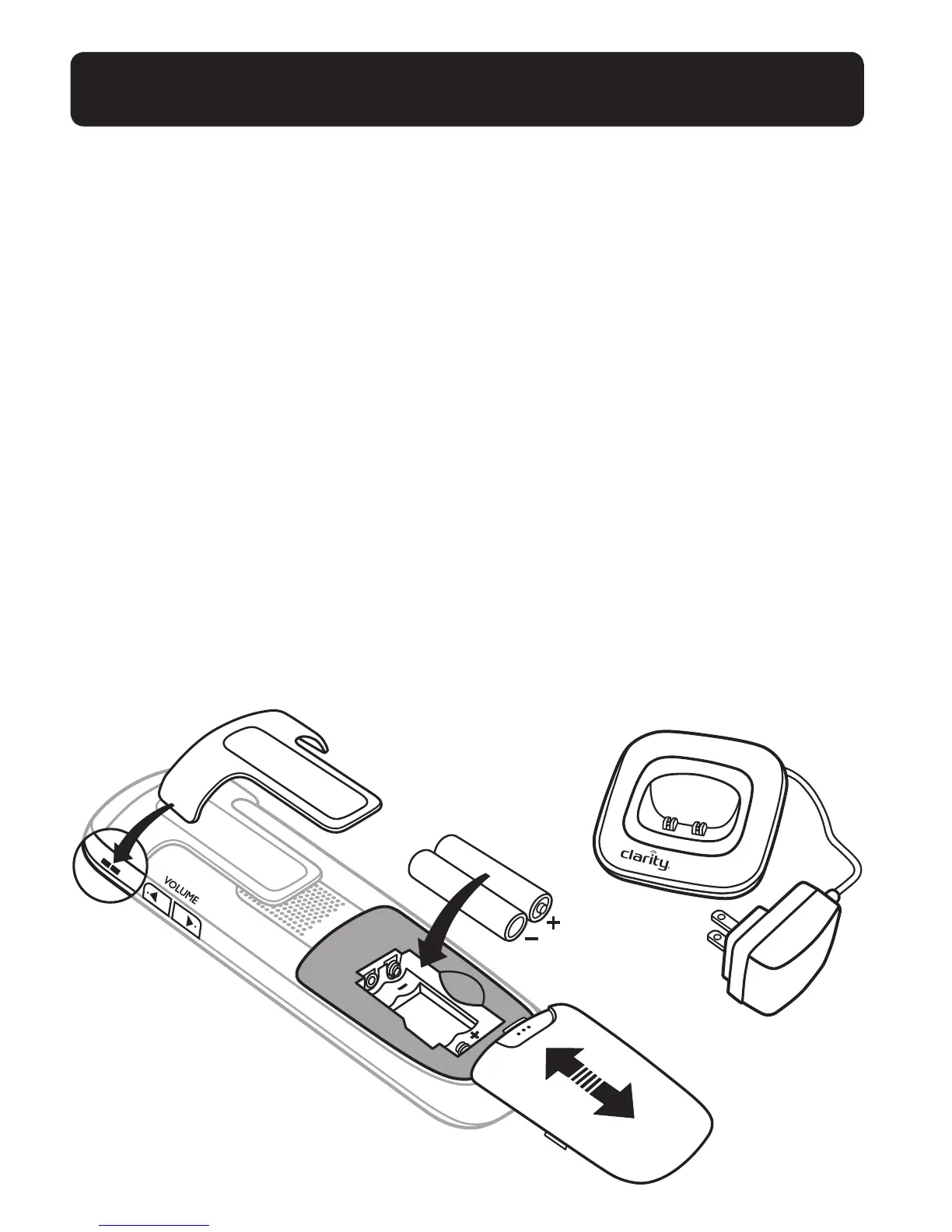
• Locate the charging station (A) in close proximity to the corded base station and plug
the power supply cord into an electrical outlet.
Step 2: Install rechargeable batteries
• Remove the battery compartment cover (B) by pushing down with thumb and sliding
the cover towards the rear of the handset.
• Insert the batteries (C) by aligning the positive and negative end of batteries with the
appropriate matching battery compartment contacts. Positive contact (+) to the at
contact of the battery compartment, and negative contact (–) to the spring contact
of compartment.
• Replace the battery compartment cover by sliding and pushing upward with thumb
until the cover snaps into place.
Step 3: Insert handset on base to charge batteries
• Position the handset on the charging base and charge for 16 hours rst time.
A beep indicates that the handset is properly placed on the base or charger.
NOTE: Use only NiMH rechargeable batteries.
Please refer to the Battery
Safety Instructions on page 5 for proper use and disposal of the batteries.
B
C
A
CORDLESS HANDSET INSTALLATION


 To Next Page