Classeq Under Counter Range - User Manual
19
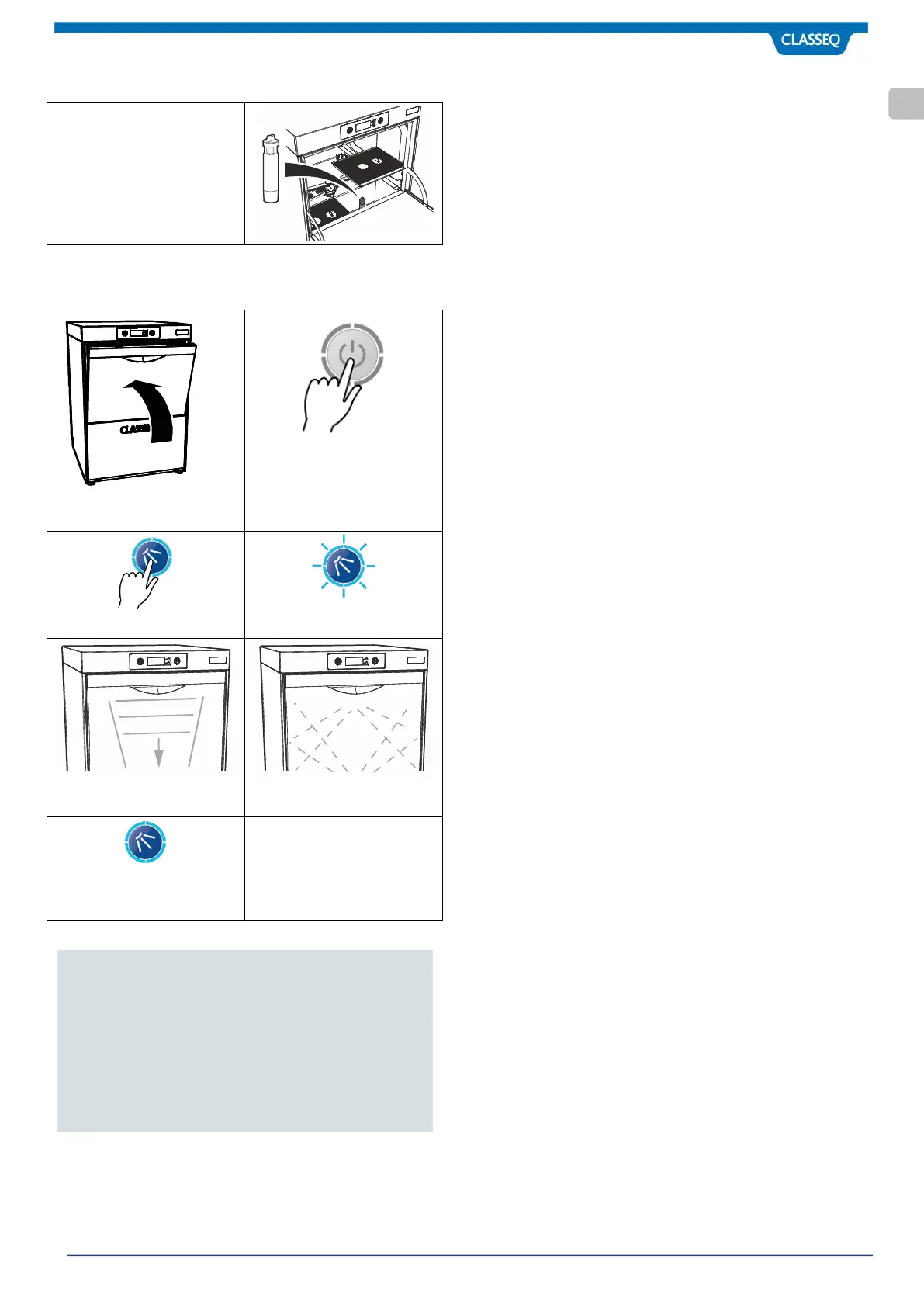
6.9.1 Draining a gravity drain warewasher
1. Open the Door of the
warewasher.
2. Locate and remove the
Drain Plug.
6.9.2 Draining a pumped drain warewasher
Close the Door to the
warewasher.
Press the On/Off button (1) to
turn off the warewasher.
Press the Cycle button (2).
The Cycle indicator (3) will flash
blue.
The warewasher will drain
down the Wash Tank.
The warewasher will do a self-
rinse.
When the Cycle indicator (3)
goes out the drain cycle is
complete.
Notes:
1. Once empty, Classeq recommends that the mains
water and electricity supplies are turned off and
the warewasher is cleaned (►7.2).
2. For hygiene reasons it is recommended that once
the warewasher has been drained and cleaned the
door is left open to assist in natural drying of the
Wash Chamber.
6.10 Warewasher Malfunction
In the event of a warewasher malfunction:
Switch the warewasher off using the On/Off button.
Isolate the electrical supply to the warewasher.
Turn off the water supply.
Request a service callout.


 To Next Page