4-13
ADJUSTING COOLANT FLOW
Step 1 – Press the saw blade start button to start the saw blade drive motor.
Step 2 – Use the flow control valve (shown below) to adjust the amount of fluid flowing to the cutting
area.
Adjust the flow amount if you observe the following changes to the chips generated from
cutting.
If the chips are sharp and curved, increase the coolant
flow amount.
If the chips are granulated, decrease the coolant flow
amount.
INSTALLING MATERIAL STOP BRACKET
This device is easy to cut the same length repeatedly and saves adjusting time.
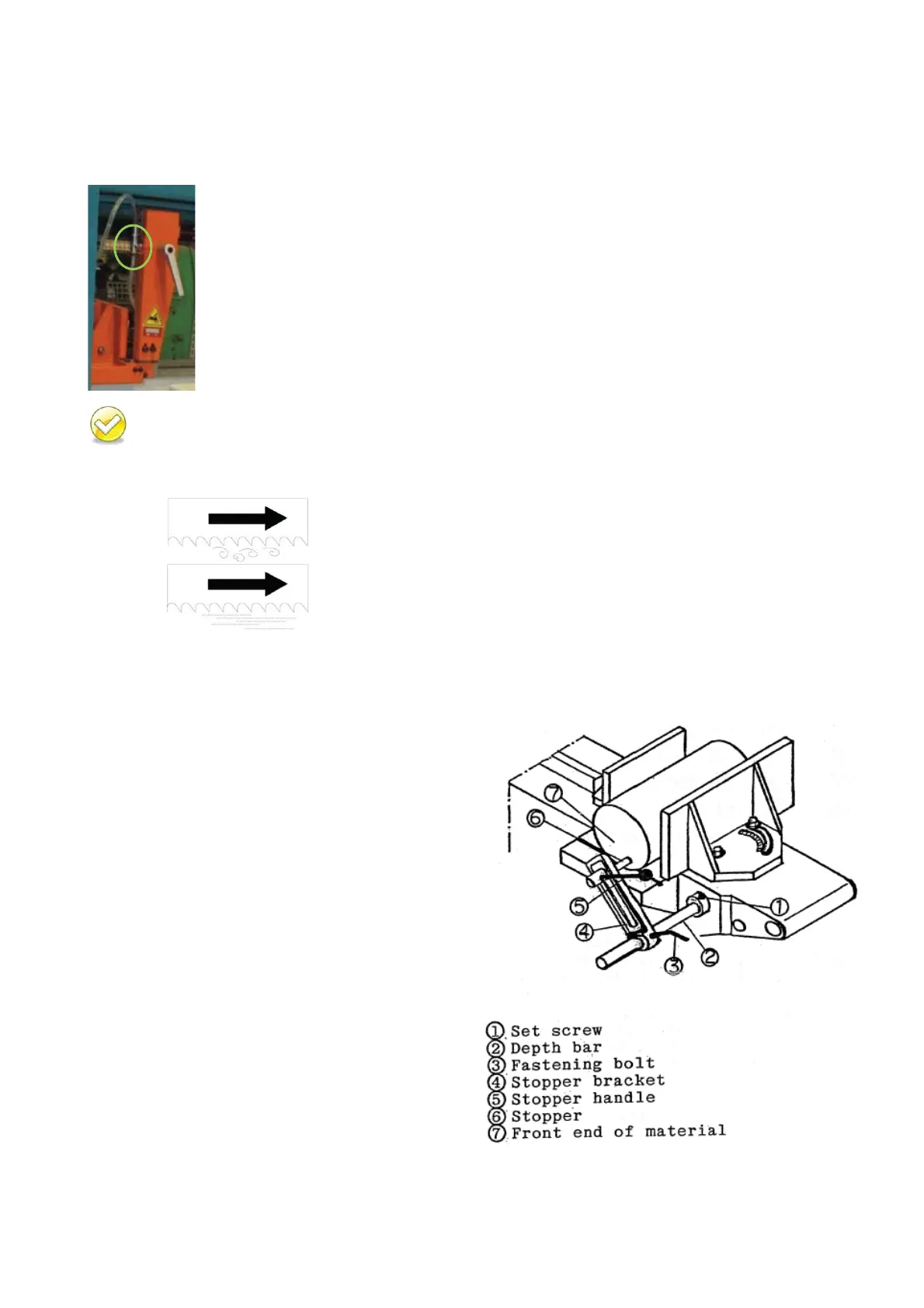
Step 1 - Install the depth bar and tighten the set
screw.
The depth bar is taken off from the
machine base during transit for safety reason.
- Lift the saw bow and clamp material
-
Lower the saw bow to allow about 1 mm
clearance between saw blade teeth edge and the
top of the material. Then measure your desired
cutoff length.
- Loosen the fastening bolt.
- Slide and position the stopper
so that the
end of stopper faces the direction of the front
end of the material.
Then tighten the stopper
to fix the stopper in the bracket.
- Move the stopper bracket toward the
workpiece so the stopper end just to
uches the
front of the material, then tighten the fastening
bolt.
MS1318M / MS1318SA


 To Next Page