4-6
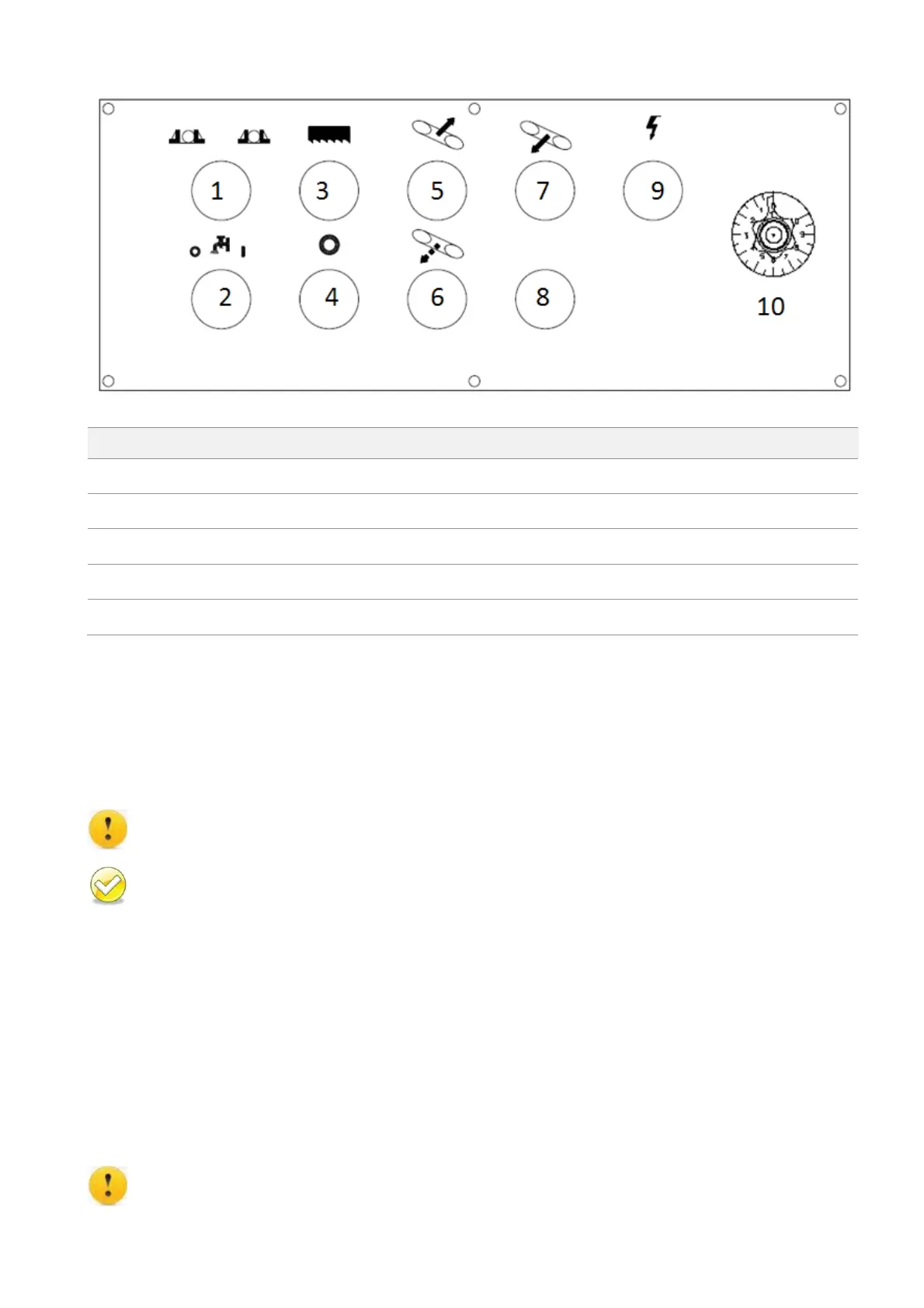
CONTROL PANEL (MS1318SA)
Coolant pump ON/OFF switch
Saw bow quick approach button
Blade descend speed control knob
Control Buttons
1. Vise open/clamp switch
When the switch is turned to the left, the vises open. When the switch is turned to the right, the vises
close until the operator lets go of the switch or until the full stroke vises are clamped together.
Make sure the material is securely clamped by the vise before cutting.
After the blade motor is running, the function of this switch is disabled for the safety concern.
2. Coolant pump on/off switch
When this switch is turned to “1” position, coolant pump starts and the coolant will be injected
whether blade is running or not. When this switch is turned to “0” position, coolant will be injected
when blade is running and coolant will stop when the blade stops. When this switch is turned to
middle, coolant pump will remain stop.
3. Saw blade start button
Press this button to start the blade motor.
Make sure the material is securely clamped by the vise before cutting.
MS1318M / MS1318SA


 To Next Page