Lithium Power Supply User Manual
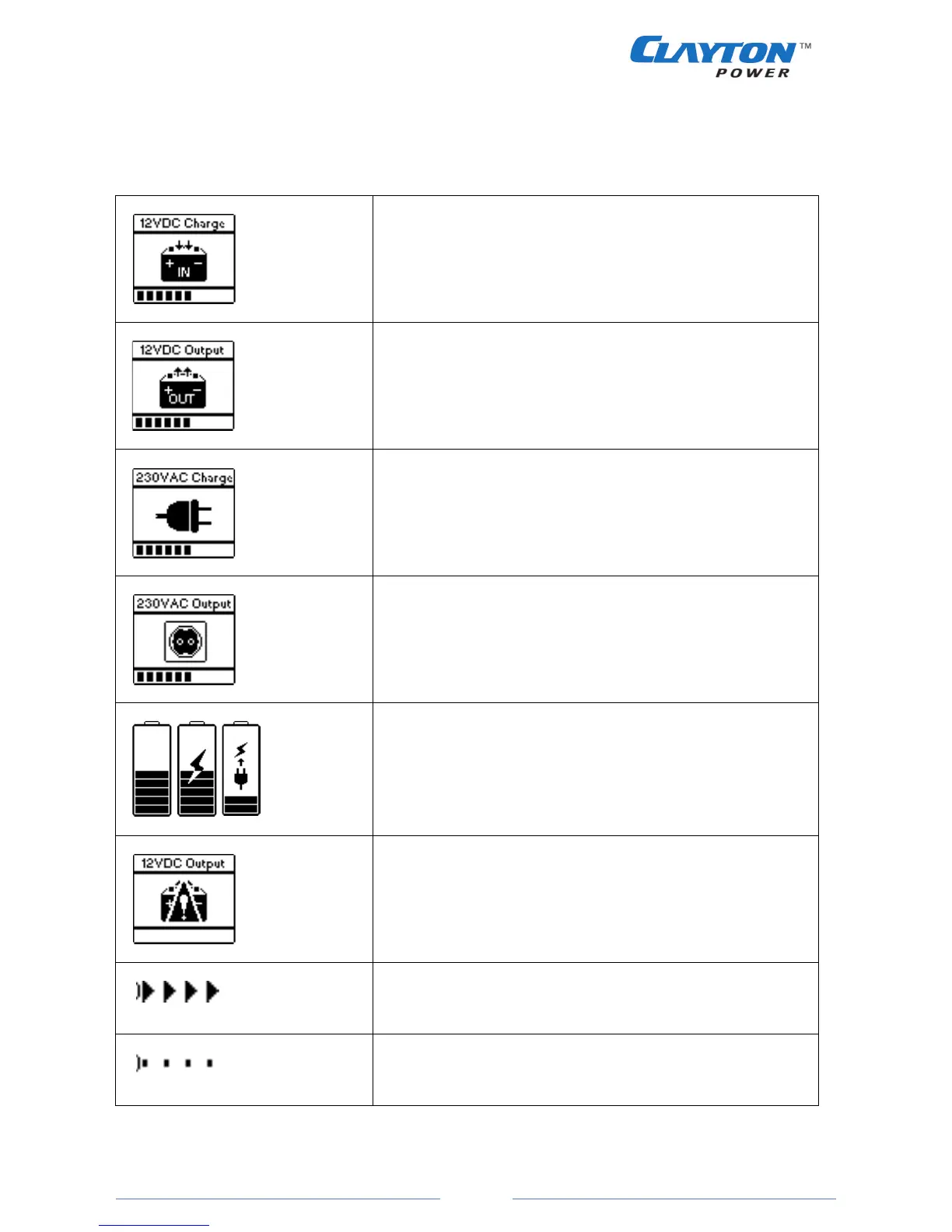
7.2. Icon description
Table 4
12VDC Input
• Shows the status of the 12VDC Input module.
• The power bar shows the level of total 12VDC charge
current.
12VDC Output
• Shows the status of the 12VDC Output module.
• The power bar shows the level of total discharge current.
• A blinking power bar indicates an overload
230VAC Input
• Shows the status of the 230VAC Input module.
• The power bar shows the level of total 230VAC charge
power.
230VAC Output
• Shows the status of the 230VAC Output module.
• The power bar shows the level of total 230VAC output
power.
• A blinking power bar indicates an overload
Battery
• Shows the current battery capacity in 10% steps.
• When the battery is charging, a power symbol is shown.
• If the battery is getting empty a connect to charging
source will show
Warning
• If there is an error or warning the module will be covered
with a warning sign.
Power flow
• Indicates the direction of power flow.
Module on
• Module is on but with no load / consumption (standby).


 To Next Page