8
Product Component
Display panel
Cleaning button part
A. Switch on the robot, CLEAN button indicator will be in gradual blue.
B. Touch CLEAN button, the robot will have 3 beeps and the indicator will flash in blue, then it will start
cleaning if the robot is in good state. And the indicator will keep in blue during cleaning.
C. If the robot is malfunctioned, its indicator will be in different status (details please take reference in
troubleshooting).
D. The indicator will flash in red when the robot with low power.
E. During charging (robot on charging home base or connected by charging adaptor), CLEAN button
indictor will get red gradually. After fully charged, the robot will have 5 beeps and CLEAN button
indicator will turn blue.
F. When the robot is successfully scheduled, the indicator will be pink for two seconds. (Please PLAN
button for seconds to check whether robot has already scheduled. If yes, the indicator will in pink for
two seconds. Otherwise, the indicator will have no color change.)
9
Product Operation
Battery Charging
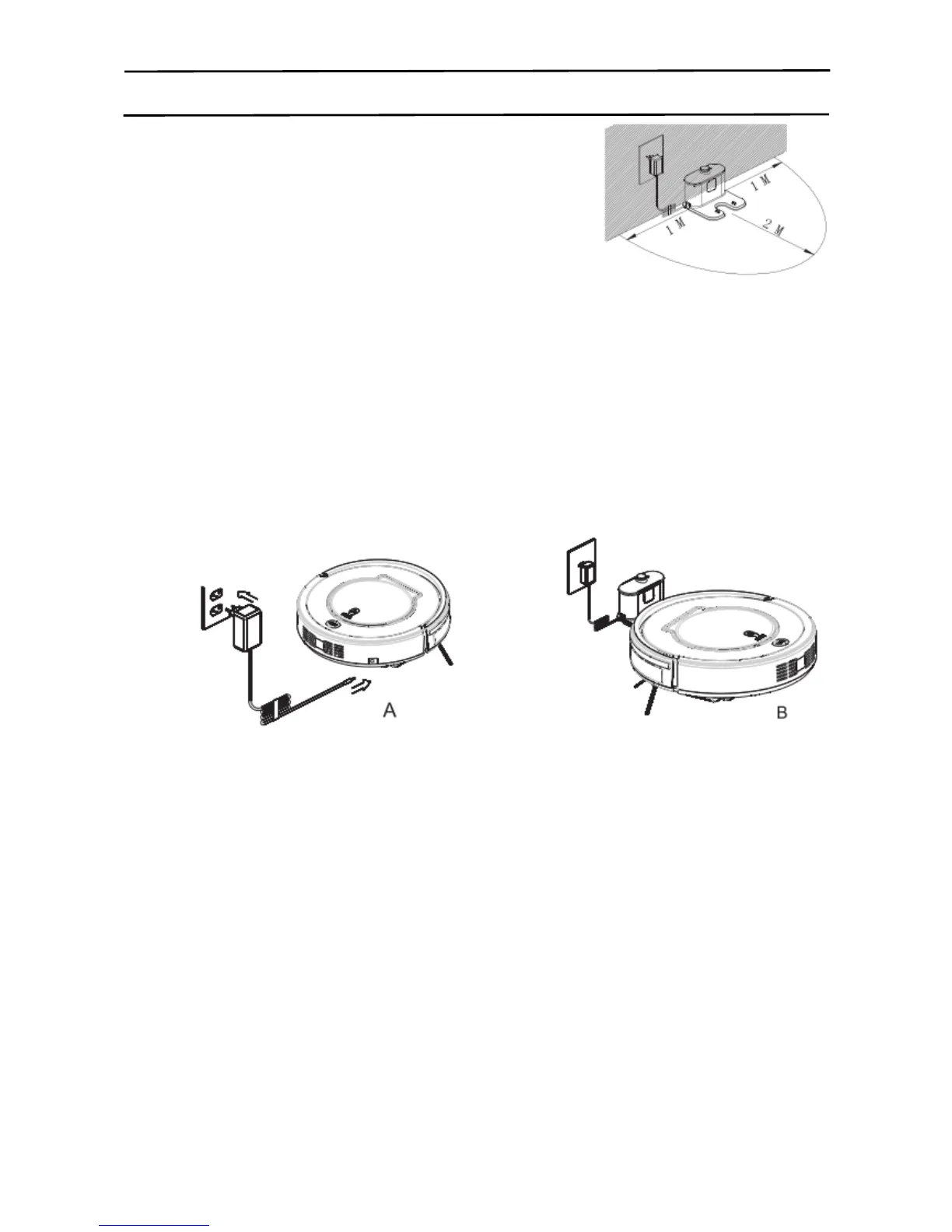
1. Place charging home base against the wall, plug in adapter,
And signal light on charging home base will flash.
Note: Put charging home base against the wall and remove obstacles
about 1 meter distance at two sides and 2 meters ahead.
2.Turn on the power switch at the bottom side of the robot,
And then display indicator will be in gradual blue, the robot is in standby.
(If no command received, the robot will turn to sleeping mode after 30 seconds)
Note:
A. Please always keep the power switch turning on. If not, it is unable to make the robot work.
B. If power switch is turned off, all the scheduled operation will be lost.
C. Before charging the robot, please make sure the power switch is turned on, or else the robot cannot
be charged.
3. Charge the robot in either way as shown below:
A. Plug the adapter into the robot and the other end to the power socket as below on the left;
B. Press HOMW button on remote controller to direct the robot to charging home base for charging.
Note:
A. Make sure the power switch at the bottom side of the robot is on before charging. Otherwise CLEAN
button indicator will have red flash and the robot beeps.
B. During charging, CLEAN button indicator will be in gradual red.
C.After fully charged, the robot will have 5 beeps. (Every charging will take no more than 5 hours).
D.For first use, please run out of the power and then fully charge the robot.
E. If the robot is not used for long time, fully charge the battery, turn the power switch off, remove the
battery and store it in a cool, dry place.
1. Auto charging
The robot will automatically return to charging home base when battery is low.
Note: keep the docking well connected to the power socket. Otherwise, the robot cannot find the
home base for charging.
*This product complies with the EU ERP standard.



 To Next Page