16
Troubleshooting
Note: if all solutions given above don’t work for you, please take actions below:
1) Re-set the robot by switching on the power button on the control panel.
2) If re-set action doesn’t work, please send the robot to seller for repairing.
Robot suddenly stop
cleaning and indicator
keeps in blue
1. Re-place the robot on the floor and re-start the robot
Power on robot, its
indicator keeps in blue
1. Clean cliff senor
2. If solutions given above don’t work out, send it to the
seller for repairing
Robot does not change
direction when it comes
up against obstacle
1.Check the sensor to see if it is covered by foreign
object
During charging, LED
indicator flashes in red
and robot beeps
1. Robot switch might not
powered on
1. Dust bin full
2. Dust passage get
stuck
1. Empty dust bin
2. Clean dust passage
LED indicator flashes in
red
1. Fully charge the battery
Blue LED flashes once,
Red LED flashes once.
1. Put robot on flat surface and clean side brush
Blue LED flashes once,
Red LED flashes twice.
1. Robot bumper not so
flexible
1. Loosen half circle of bumper bottom screw
Blue LED flashes once,
Red LED flashes triple.
1. Check wheels and take out the foreign object
17
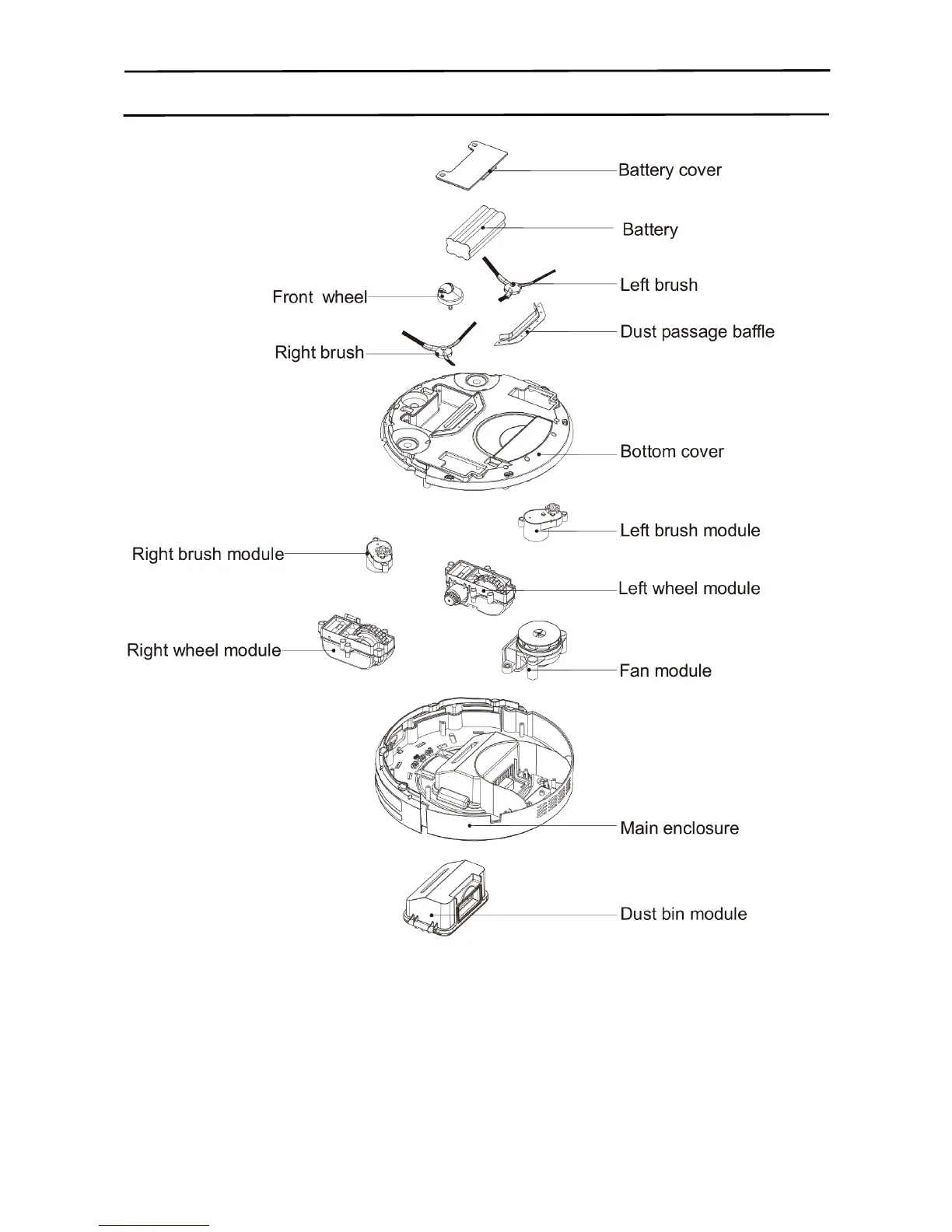
Exploded diagram
Below are exploded parts:



 To Next Page