14
Product Maintaining
1. Cleaning side brushes
A. Check side brushes to see whether they’re damaged or whether there are foreign objects stucj on
the brushes.
B. Clean the side brushes by tool or cloth
C. Replace the side brushes if it’s damaged. (Make sure L side brush at L place and R side brush at R
place on the bottom, then push to fix it. And vice visa – to pull up, side brush will be taken out.)
2. Cleaning dust bin and filter
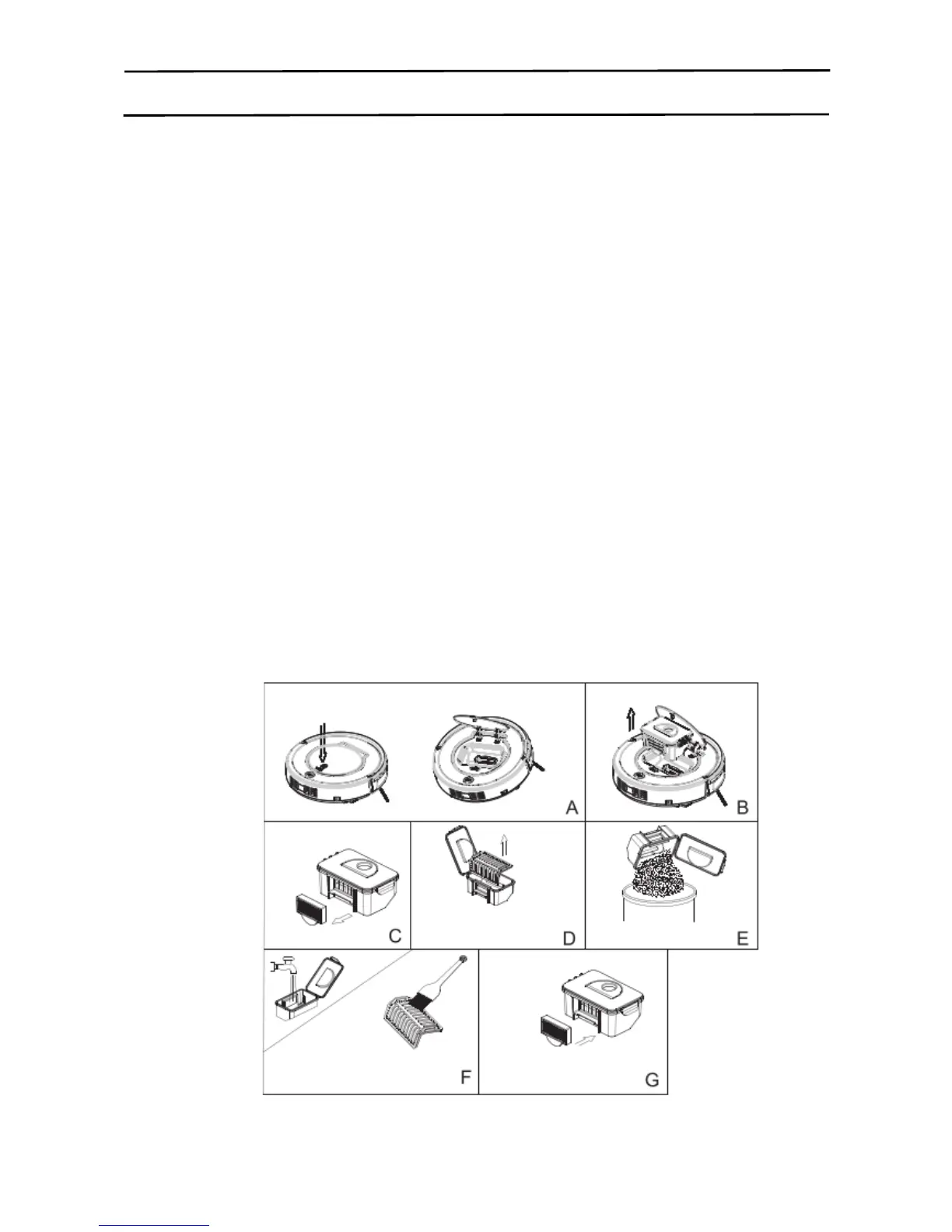
Empty dust bin after each use, the procedures are shown in figures below.
A. Press “PUSH” mark to open the robot upper cover
B. Take out the dust bin by its handle.
C. Separate HEPA filter first from dust bin
D. Open dust bin cover and take out primary filter.
E. Empty the dust bin.
F. Wash dust bin and primary filter under tap water, clean HEPA with the cleaning brush.
G. Install primary filter and HEPA filter into dust bin after it is dry, close dust bin cover, and then install it
into the robot.
Note:
* After taking out dust bin, check whether there are foreign objects stuck in dust passage and clean it.
* Wash HEPA filter after 15~30 days use. Life span for HEPA is 24 months.
* After wash HEPA and primary filter, dry them in ventilated & cool place and install them after they are
fully dry. Do not dry them under baking sunshine.
* HEPA and primary filter are both replaceable.
15
Product Maintaining
3. Cleaning sensors and charging connection pole
A. Slight wipe the sensor window at the robot bottom and auto charging sensors with cleaning tool or a
soft dry cloth, as circled below:
B. Clean suck passage and dust sensor as shown below (with cleaning tool or a soft dry cloth).
C. Clean charging connection pole on charging home base (with cleaning tool or a soft dry cloth).
Note: Do keep the sensors free from water, thinner, etc.
4. Mopping cloth
A. Stick mopping cloth on the bottom of the robot as
shown In right figure to mop the floor.
B. When the mopping cloth is dirty, users can take it
Away and stick a new one on the bottom.
Note: Keep the appliance dry, do not clean the appliance under water.



 To Next Page