18
1.
Remove the filter (and mask if fitted) from the respirator and place the respirator on a stable surface such as a
table.
2.
With the CleanSpace respirator in Standby Mode (i.e. one or more battery indicators lit), press the “Power” and
“Flow Test” buttons on the keypad at the same time.
3.
When both the blue and red LEDs light, release both buttons. Do not touch or move the respirator.
4.
After 5 – 10 seconds the motor will start and will run for 5 – 10 seconds.
5.
When the motor stops, calibration is complete and the battery lights return to indicating battery charge status.
6.
Re-fit the filter.
Important Note: Failure to remove the filter prior to calibration may result in reduced run times. In order to restore
the performance of the respirator, calibration must be performed again with the filter removed.
STEP 3 – TEST FLOW RATE
This test checks that the respirator is able to deliver the Manufacturer’s Minimum Design Flow of 120 litres/minute.
1. Remove the mask if fitted.
Leave the filter in place.
2. Place the respirator flat on a table or other support.
3. Press and release the button marked “Flow Test”.
4. The respirator will automatically run the Flow Test. Note: During the test, the motor will run fast and air will
blow from the left hand bellows.
5. After 2 seconds the respirator reports the test result using the LEDs on the keypad. Use the table below to
interpret the LEDs.
FAIL (Flow <120 l/min)
Do not use the respirator until a new filter has been fitted and / or battery fully
charged and the test has been repeated with a PASS result.
Reset the respirator by
pressing the Power button. Fully charge the battery and / or replace the filter. Repeat the
flow test. If the respirator fails the test but the filter is new and the battery is fully charged,
contact CleanSpace Technology and do not use until it has been evaluated.
Important: The Flow Test is not a battery charge test. Three LEDs means that, as of the moment it is tested,
the unit can deliver high flow. It does not mean the battery is full. You must check the battery charge
separately. See Section 17.
STEP 4 - DON THE FULL FACE MASK
Donning is best done with a buddy to help you check adjustments and fit!
If you have long hair, it is recommended you tie the hair back so that it does not interfere with the
harness and the mask seal on the face. To don the Full-Face Mask, follow the steps below.
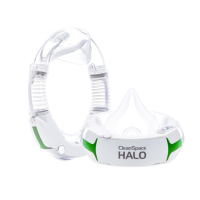
Step 1:
Fully loosen all five straps on the mask
harness. Hold the mask in one hand while you
use the other hand to pull the harness back and
away from the mask.


 To Next Page