26
17. Battery Information
WARNING
CleanSpace HALO is not intrinsically safe. Do not use in flammable or explosive atmospheres.
Doing so may result in injury or death.
WARNING
Always correctly use and maintain the internal lithium ion battery packs. Failure to do so may
result in fire or explosion or could adversely affect respirator performance and result in injury,
sickness or death. Do not charge the on-board battery with unapproved chargers, in enclosed
cabinets without ventilation, near flammable liquids or gasses, or near sources of high heat.
Do not immerse the device in water. Do not use, charge or store the device outside the
recommended temperature limits.
WARNING
The Power Off State is considered to be an abnormal situation. Although respiratory
protection will still be provided the level of protection will be reduced in comparison to the
Power On State.
ASSESSING STATE OF BATTERY CHARGE
The level of battery charge is indicated by the three (3) green battery LEDs on the keypad. The power unit should
not be worn when on charge. The battery LEDs allow the wearer to estimate the charging level of the battery (see
table below).
To ensure the battery is 100% charged plug in the charger and wait until all three (3) green Battery LEDs
light solidly without flashing.
With the unit NOT on charge
Recharge! (20min to 1 hour)
* Operating time is strongly affected by mask seal, work rate, and other factors. The operating times quoted
above are average durations at moderate work rates at sea level. Actual operating times may vary widely
from the quoted average durations.
CHARGING THE BATTERY
The battery must only be charged with a CleanSpace Battery
Charger. To charge the battery.
•
Turn the power unit upside down.
•
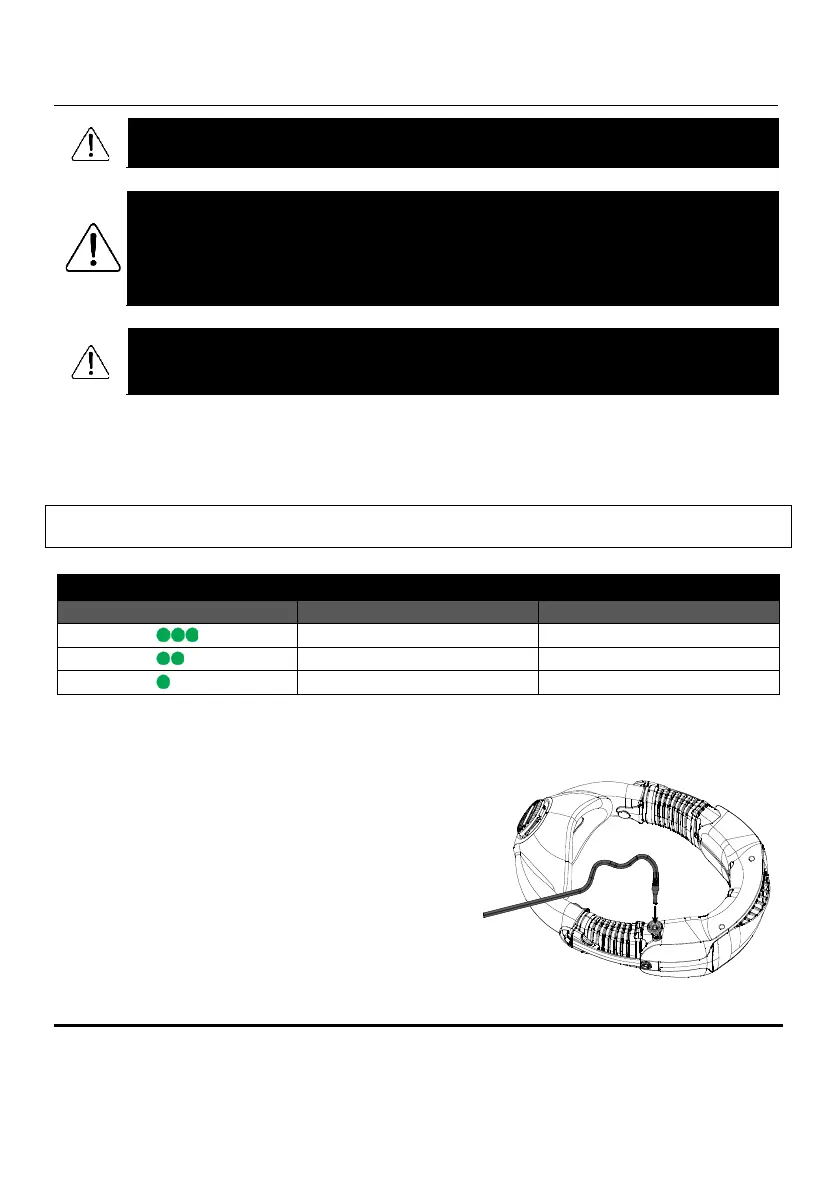
Locate the charging port. See Figure 27.
•
Insert the charger connector into the charging port.
•
Ensure the charger is plugged into a power source.
•
The green battery LEDs on the keypad should light up and
be flashing as the power unit charges.
•
The power unit can be charged at temperatures
between 0°C to 35°C. The battery will not charge
outside of this temperature range.
Figure 27 - Charging Port



 To Next Page