WARNING
You must recalibrate the internal pressure sensor any time that your CleanSpace HALO is
exposed to changes in temperature of more than 20°C. It is best practice to also re-calibrate if
the unit has been in storage, particularly if the storage temperature is not known.
20. Changing Half Mask Exhalation Valve Covers
The mask can be configured to use either the Standard Valve Cover or the BIO Valve Cover. To change between
the two, follow the instructions below.
• To remove the Standard Valve Cover, locate the snap feature on the cover that secures it to the valve seat.
This feature is located on the bottom edge of the valve seat. Using your thumb nail or a small blunt object
such as a pen, press on the snap until the cover springs free of the valve seat. See Figure 33.
• To fit the Standard Valve Cover, locate the small prong on the Valve Cover into the matching hole in the valve
seat. Rotate the Valve Cover towards the mask until the snap on the Valve Cover engages the matching
opening in the valve seat.
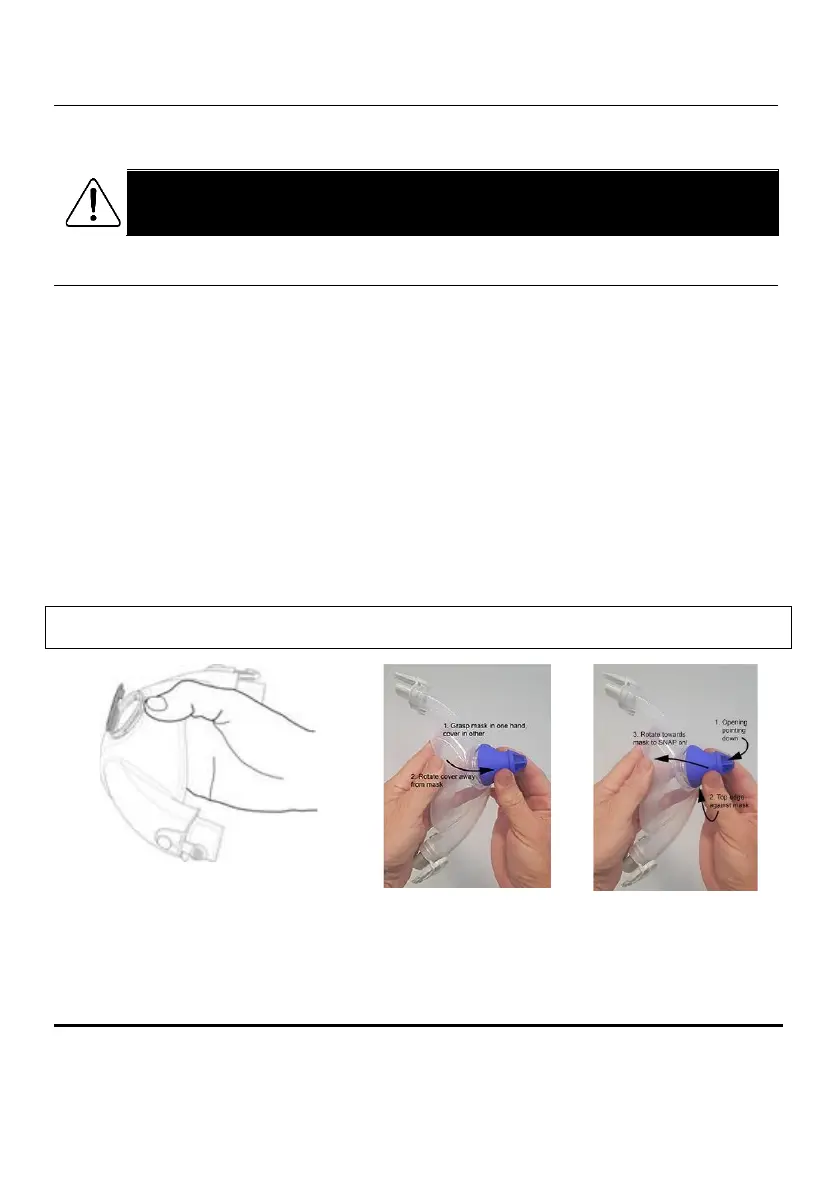
• To remove the BIO Exhalation Valve Cover, grasp the bottom of the mask (where the size marking is located)
in one hand and the BIO Exhalation Valve Cover in the other, and separate them by pulling apart along the
bottom edge of the Valve Cover. See Figure 34.
• To fit the BIO Exhalation Valve Cover, grasp the bottom of the mask (where the size marking is located) in
one hand and the BIO Exhalation Valve cover in the other. Orient the Valve Cover air outlet so that it points
towards the size marking on the mask (i.e. down when in use). Position the top edge of the Valve Cover
against the silicone mask just above the body of the exhalation valve. Push the BIO Exhalation Valve Cover
firmly towards the mask until it snaps into place and is securely fastened to the valve seat. See Figure 35.
Important: After installing either Valve Cover, ensure the valve flap is flat and sealed against the valve body by
inspecting the interior of the valve body.


 To Next Page