4
1. LED indicators: A blue light means the device is on. A blue
blinking light means it is running low on memory.
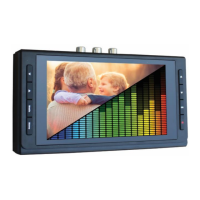
2. LCD Screen: LCD screen for preview/playback.
3. Panel Buttons:
Power: A single press will turn on/off the display screen. Hold
down for several seconds to turn off normally. To force device
shutoff, hold down longer than 10 seconds.
Menu/Back: Press this button to enter or exit menus.
Vol+/-: Press these buttons to control the built-in speaker volume.
Mode: Press this button to switch among Record/Photo/Playback
mode. Hold down longer to delete a recording in playback mode.
Rec/Stop: A single press will start/stop recording in recording
mode. Hold down longer to capture a snapshot.
OK: Select an option. Or in Record mode, press “OK” to
pause/resume while recording.
4. SD card slot: Insert an SD card for recording or playback.
5. Micro USB port: power input for USB power adapter.
6. S-Video: s-video input (optional).
7. AV IN: input jack for RCA input (from VCR, camcorder, etc.)
8. HDMI OUT: HDMI output port (optional).
9. USB: to plug in a USB flash drive



 To Next Page