CFV Startup Guide
Part No. 750-288 7
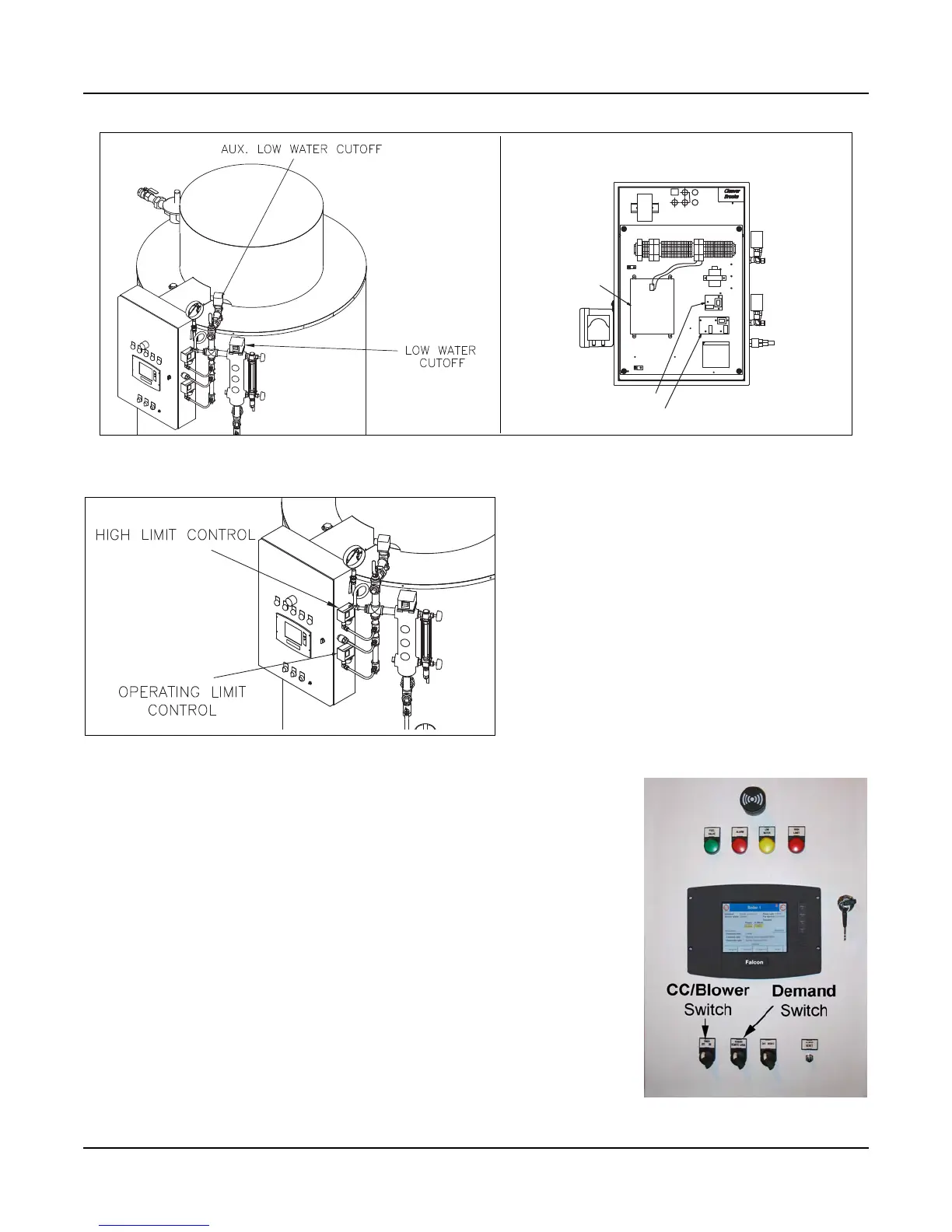
Limit Controls (see Figure 6)
The operating and high pressure limit controls are
externally mounted to the control trim piping. For
control settings and testing instructions, see the
boiler operation manual.
Figure 6 Limit Controls
1.7 Filling Boiler
Ensure that all feedwater equipment is properly installed and any feed
pumps, valves, etc. are in good working order.
Begin with the control panel DEMAND switch and CC/BLOWER switch (see
Figure 7) in the OFF position. Open the boiler vent valve (see Figure 8).
Turn the Control Circuit/Blower Switch ON to enable the feedwater control
circuit. If the CB Falcon icon does not appear on the display when the CC/
Blower switch is turned on, see STARTING THE BOILER below.
With the vent valve open, entrapped air will be allowed to escape while the
boiler fills with water. Do not close the vent valve until water is visible in
the gauge glass. The feed pump will shut off when water reaches the ‘Pump
Off’ probe level.
Check to ensure that no leaks appear at any pipe connections and correct
if water leaks are noticed.
Figure 5 Water level controls
CB FALCON
CONTROLLER
ALWCO CONTROLLER
LWCO CONTROLLER / PUMP CONTROL
Control panel interior
Figure 7 Control Panel Switches



 To Next Page