Clickfree Portable Backup Drive User Guide Advanced topics
Copyright © 2009 Storage Appliance Corporation. 64
WHAT IF I FORGET MY PASSWORD?
If you have forgotten your password, and cannot remember it from the hint you set
when you enabled password protection, your only choice is to reset the Portable Backup
Drive and lose all of your backed-up content.
♦ To reset the Portable Backup Drive
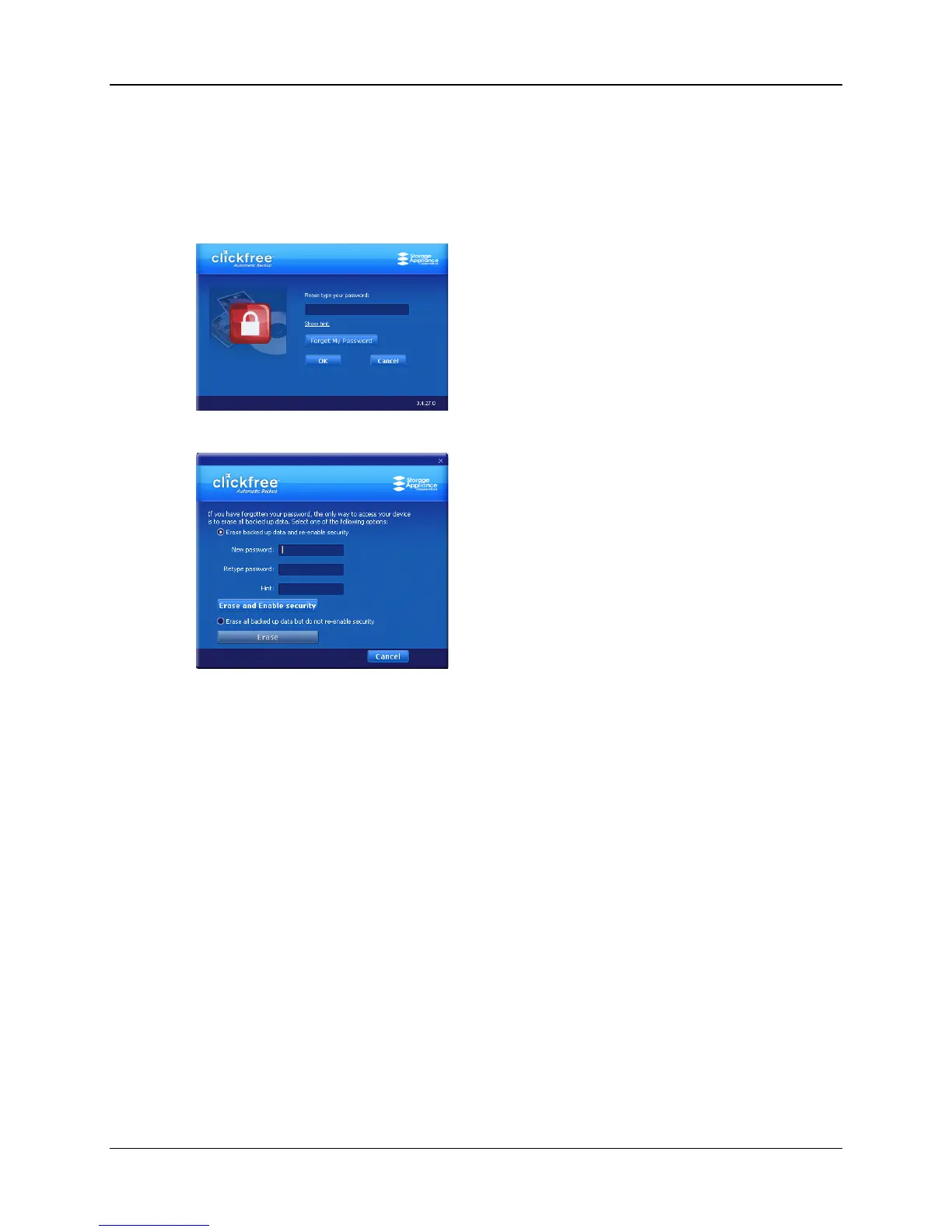
1. When prompted to type your password, click Forget My Password.
You can:
• erase the backed-up content and re-enable security – go to step 2
• erase the backed-up content and disable security– go to step 6
2. Leave Erase backed up data and re-enable security selected.
3. Type a new password (that you will remember) in both the New Password and
Retype Password fields.
4. Optionally set a hint.
5. Click Erase and Enable security, and continue with step 8.
6. Select Erase all backed up data but do not re-enable security.
7. Click Erase and continue with step 8.
8. Click Yes to confirm that you are sure you want to erase all backed-up content.
Clickfree shows you how far it has got with erasing data, then tells you that your
Portable Backup Drive has been reset.



 To Next Page