EasyManua.ls Logo

ClimateMaster Tranquility Digital - Troubleshooting Flow Chart Guide

ClimateMaster Tranquility Digital
62 pages
Print Icon
To Next Page IconTo Next Page
To Previous Page IconTo Previous Page
Loading...
3
Troubleshooting Guide -
Tranquility
®
Digital (DXM2) Packaged Units
Rev.: 01/15/14
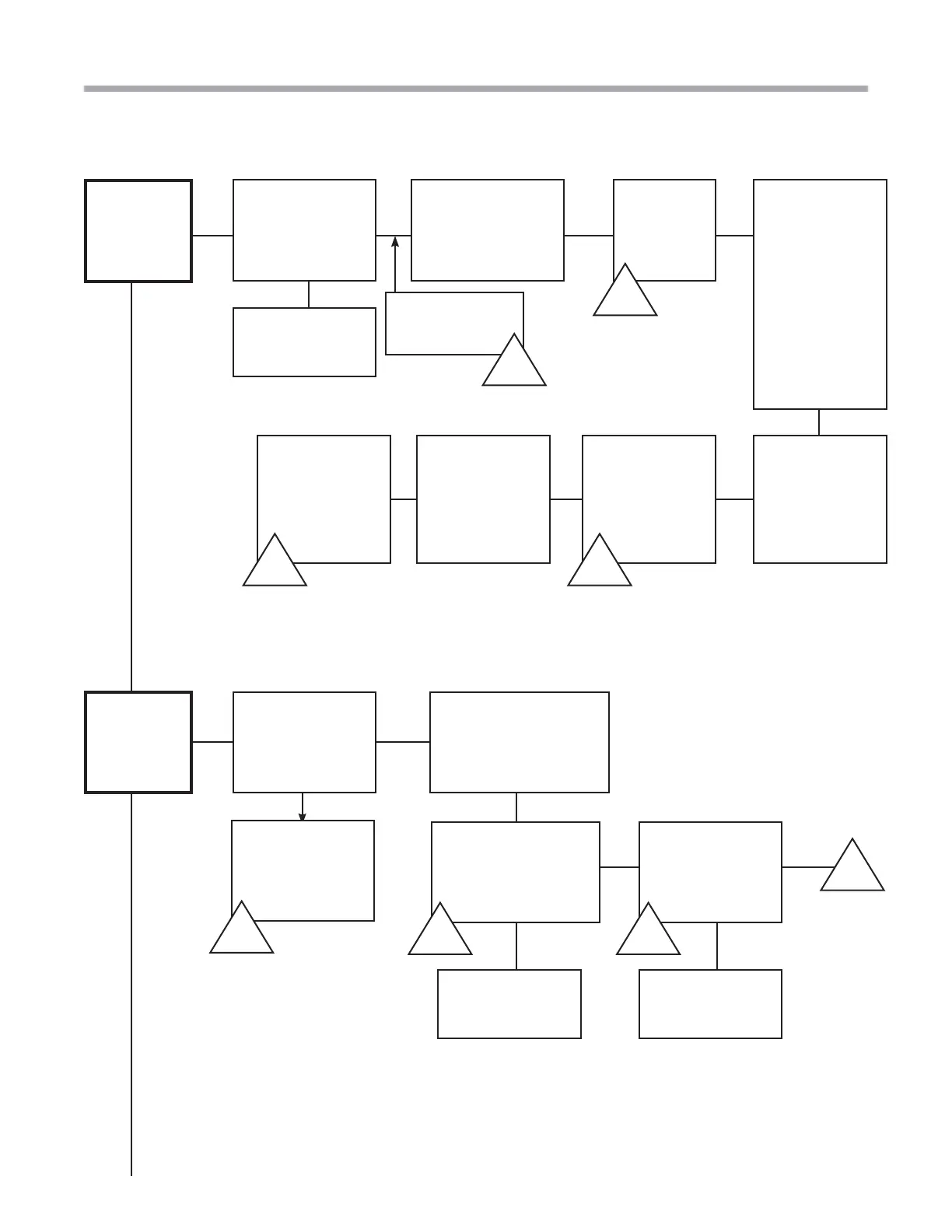
Troubleshooting Flow Chart
Did unit
start?
Check power
(208-240V)
Does thermostat say
‘No Communication’?
The unit did
start but it
locked out
Establish power
Check that the
compressor is not in a
thermal overload
Check Fault Code
from thermostat
or service tool
No
No
Verify that
Dipswitch 1
on S3
is in ‘On’
position
Is there power
to DXM2 24V?
(18-31.5V)
A-W
A-W
A-Z
A-Z
No
Fault
See Fault Codes
and Possible
Causes
A-F
A-F
Check that there
are 24 volts at CC on
DXM2 board and a call
for heating or cooling
A-K
A-K
Check for 24V at
contactor
18-31.5 volts
A-M
A-M
No
Replace the
DXM2 Board
Check and possibly
replace wiring
No
No
Yes Yes
Next Page
Yes
Yes
No
A-A
A-A
Disconnect and
reconnect the
wires from the
DXM2. This
will reset the
thermostat.
Verify that
the DXM2’s
dipswitches are
set properly.
Is the unit properly
con gured? See
Section 3.0 on
page 56.
B-G
B-G
If it is still not
communicating,
check the
thermostat wire
(Be sure it is
not running
along power
wire). Ensure all
wiring is landed
properly on
both DXM2 and
thermostat.
May need to hard
reset thermostat.
B-K
B-K

Related product manuals