Troubleshooting Guide -
Tranquility
®
Digital (DXM2) Packaged Units
Rev.: 01/15/14
42
Geothermal Heat Pump Systems
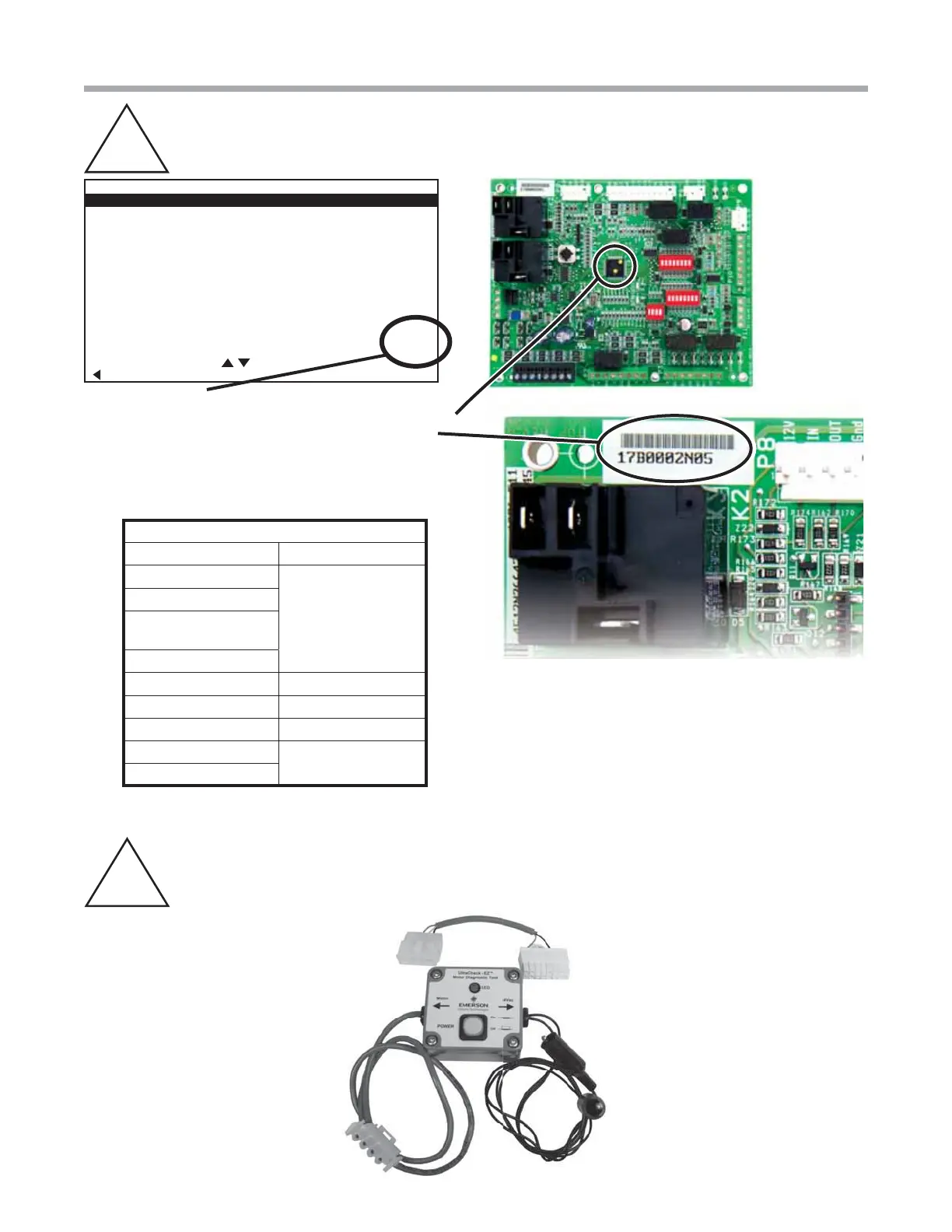
Locating Thermostat Version and DXM2 Version
B-E
INSTALLER SETTINGS
THERMOSTAT CONFIG
SYSTEM CONFIG
ACCESSORY CONFIG
INPUT DEALER INFO
HUMIDITY CONFIG
TEMPERATURE CONTROL
DEMAND REDUCTION CNFG
SERVICE MODE
RESTORY DEFAULTS
DXM2 1.2
ATC32U01 C 2.1
SELECT OPTION
PREVIOUS
Locating the version level of the DXM2 board and thermostat
or service tool on the screen is more accurate than the dots
on the microprocessor chip. You can also locate the part
number on the board and compare it to the table below.
Note: In the future, if there are software changes, the part
number will also change.
UltraCheck - EZ
™
Motor Diagnostic Tool
B-F
Program History of DXM2
Part Number / Dots Version Number
17B0002N06
Version 1.2
17B0002N05
17B0002N02
with 3 Yellow Dots
2 Yellow Dots
1 Yellow Dot Version 1.1
3 Gray Dots Version 1.0
2 Gray Dots Version 0.3
1 Gray Dot
Shows up as nothing
No Dots



 To Next Page