TERMINAL EVOLUTION
2
English
GENERAL CHARACTERISTICS
The EVOLUTION controller allows independent control of all the unit
operating parameters.
The controller is made up of:
• A microprocessor control board housed inside the electrical panel
• A user terminal or graphic interface
The program that resides on the control board can be used on all types
of precision air-conditioning units, specifically:
• direct expansion units, water cooled or air cooled;
• water chiller units;
• direct expansion units with energy saving function;
• dual cooling units.
The main functions of the program are:
• management of the temperature and humidity in civil or technological
environments;
• management of 1 or 2 scroll compressors
• management of between 1 and 3 electric heating stages for heating
and post-heating;
• management of modulating valves for cooling using cold water and
heating using hot water;
• management of the evaporator fan speed, when featured;
• management of an external or built-in immersed electrode humidifi-
er;
• outlet temperature control;
• management of alarms and maintenance warnings;
• logging of up to 100 alarm events;
• management of the safety running time for each components;
• unit on/off from user terminal, remote contact, supervisory system
and according to time bands;
• local network (LAN) connection for managing backup units;
• connection to local supervision networks and BMS (LonWorks,
BACnet, Modbus…..).
Throught the user terminal you can view and modify (by using a pas-
saword) all following datas:
• values read by the probes and the corresponding calibration;
• active alarms, alarm log, configuration of the alarm digital outputs;
• configuration of the local network (LAN);
• parameter settings for serial communication with the supervisory
system;
• configuration parameters and fundamental control parameters;
• operating hours and number of starts of the controlled devices;
• clock settings;
• selection between the different languages available.
Using the local network connection, the program can manage the fol-
lowing additional functions:
• Automatic rotation by time or event, for 1 or 2 units in stand by
mode, between max 10 units connected in LAN
• management of the average temperature and humidity readings from
a maximum of 10 units;
• use of just one terminal to control a maximum of 10 units;
In order to protect the program default settings, the software features
two levels of password, USER for the main user settings, and FACTORY
for the authorised technicians, used to modify and reset all the software
parameters.
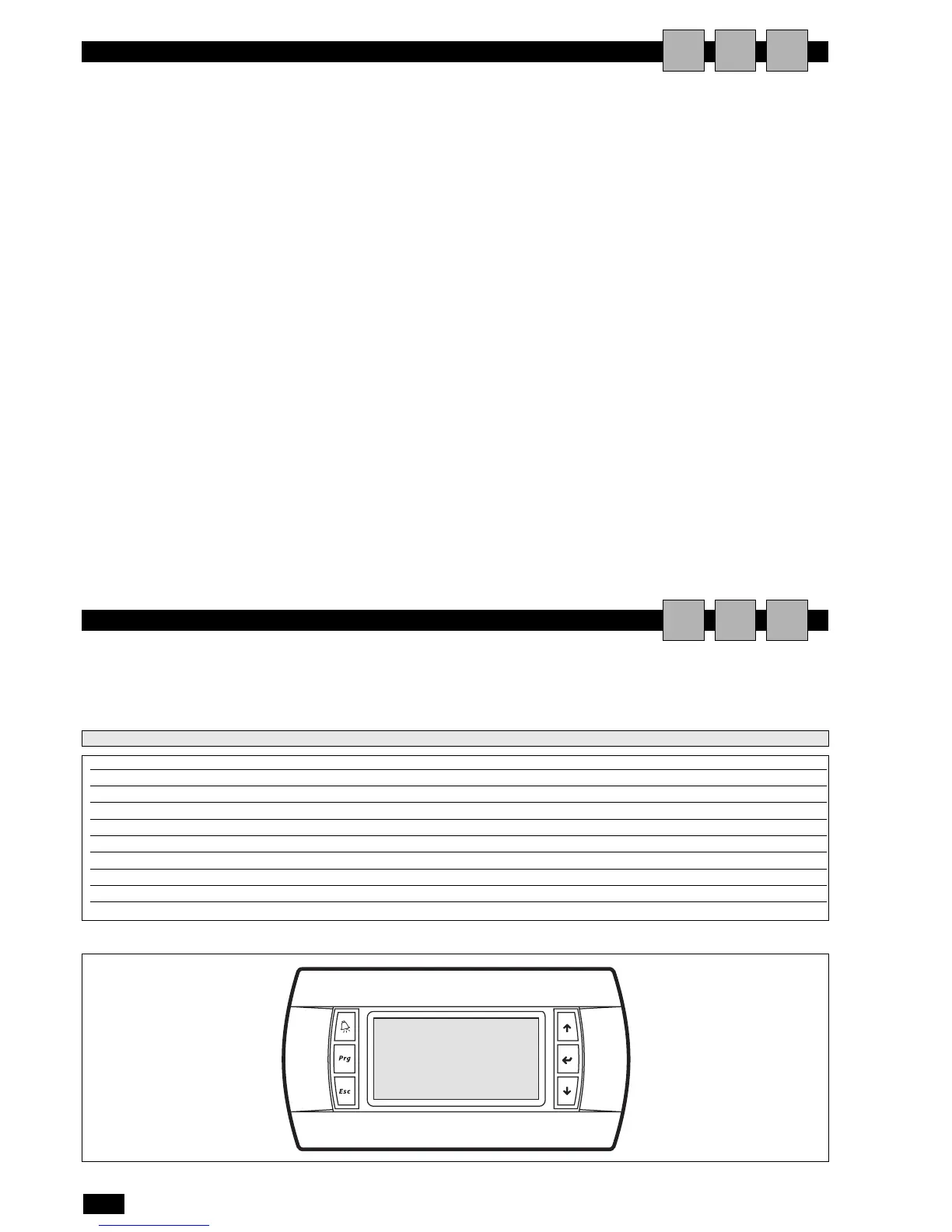
The user interface is made up of:
• 11x15 pixel backlit LCD;
• 6 backlit buttons for scrolling and modifying the parameters.
The microprocessor board is connected to the user interface
using a 4-pin telephone cable with RJ11 jack.
AIU
USER INTERFACE
ALARM button functions:
• reset the alarm (if hold for 5 seconds)
• flashes red in the event of active alarms
• to stop buzzer durino an alarm
button PRG:
access the configuration menu
button ESC:
exit the screens
button UP functions:
• scroll and/or change screen
• modify the values
• to move inside the manù
button ENTER functions:
• confirm the modifications
• access the areas for modification
button DOWN functions:
• scroll and/or change screen
• modify the values
• scroll inside the menus
AIU
Power supply from the power board through telephone cable (cod. S90CONN00*) or from external source 18 to 30 Vdc through TCONN6J000
Power input PGD1: 1.2 W;
Operating conditions -20T60 °C, <90% rH non-condensing
Storage conditions -30T70 °C, <90% rH non-condensing
Index of protection IP65 with panel mounting, IP40 with wall mounting
Resolution 132X64
Back-lighting green LED
Buzzer NOT AVAILABLE
Row number 8
pLAN default
Technical features


 To Next Page