29
Climax Air Inc. www.climax-air.com
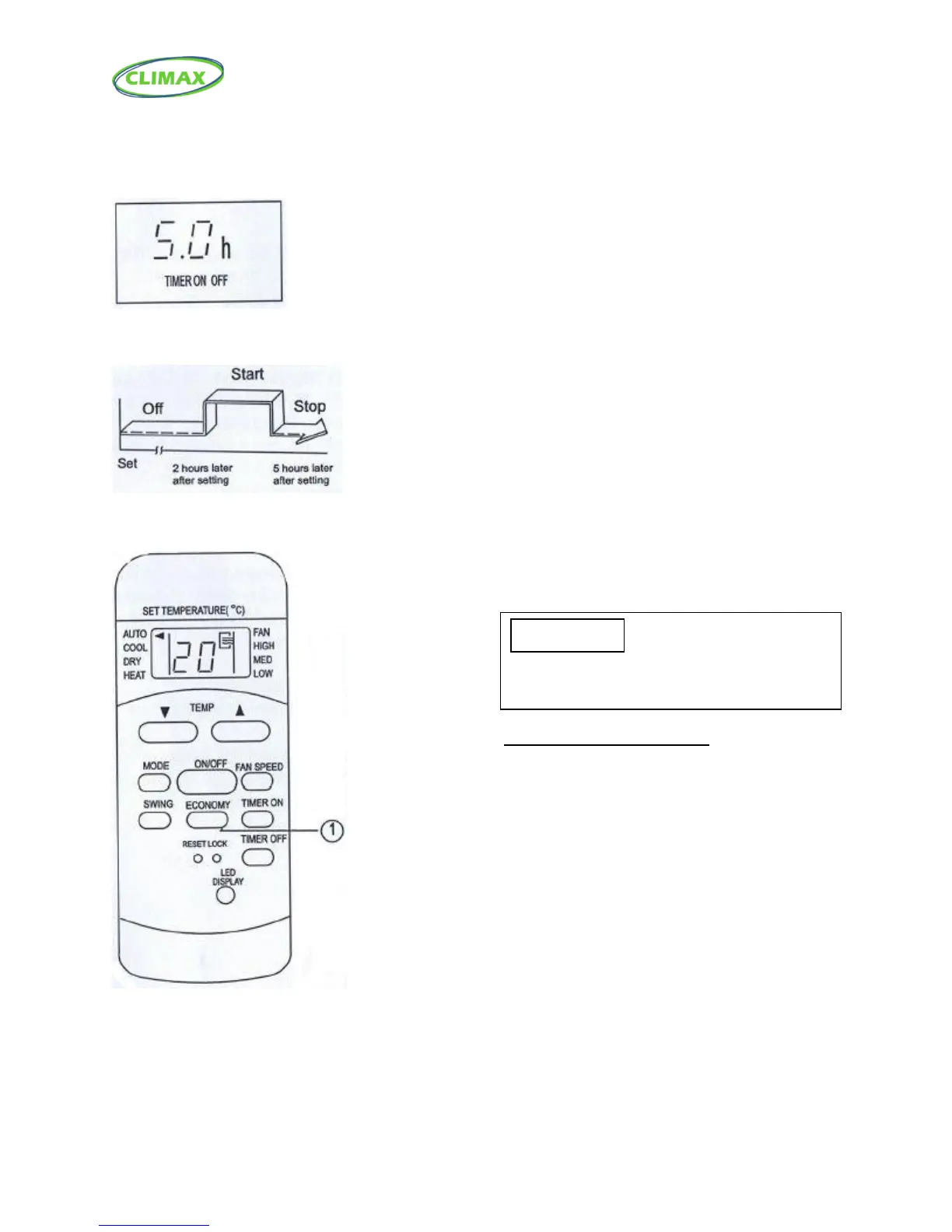
TIMER ON TIMER OFF
(Off Start Stop operation)
This feature is useful when you want to start
the air conditioner after you wake up and
stop it after you leave the house.
Example:
To start the air conditioner 2 hours after
setting, and stop it 5 hours after setting.
1. Press the TIMER ON button.
2. Press the TIMER ON button again to
display 2.0h on the TIMER ON display.
3. Press the TIMER OFF button.
4. Press the TIMER OFF button again to
display 5.0h on the TIMER OFF display.
5. Wait for the remote control to display
the setting temperature.
ECONOMY (SLEEP) operation
Activate/Disable sleep function. It can maintain
the most comfortable temperature and save
energy. This function is available on COOL,
or AUTO mode only. For the details, see
“Sleep operation” in the “USER’S MANUAL”.
NOTE: While the unit is running under SLEEP
mode, it would be cancelled if the MODE, FAN
SPEED or ON/OFF button is pressed.
•The timer setting (TIMER ON or TIMER OFF) that in
Sequence occurs directly after the set time till be
activated first.



 To Next Page