8
Climax Air Inc. www.climax-air.com
AIR CONDITIONER FEATURES
ELECTRONIC CONTROL OPERATING
INSTRUCTIONS
Before
you
begin
,
thoroughly familiarize yourself
with the
contro
l panel,
remote
controller,
and
all
its
functions,
follow
the
symbols
for the
functions
you
desire.
The
unit
can be
controlled
by the
units
contro
l
panel
alone or
with
the
remote
controller.
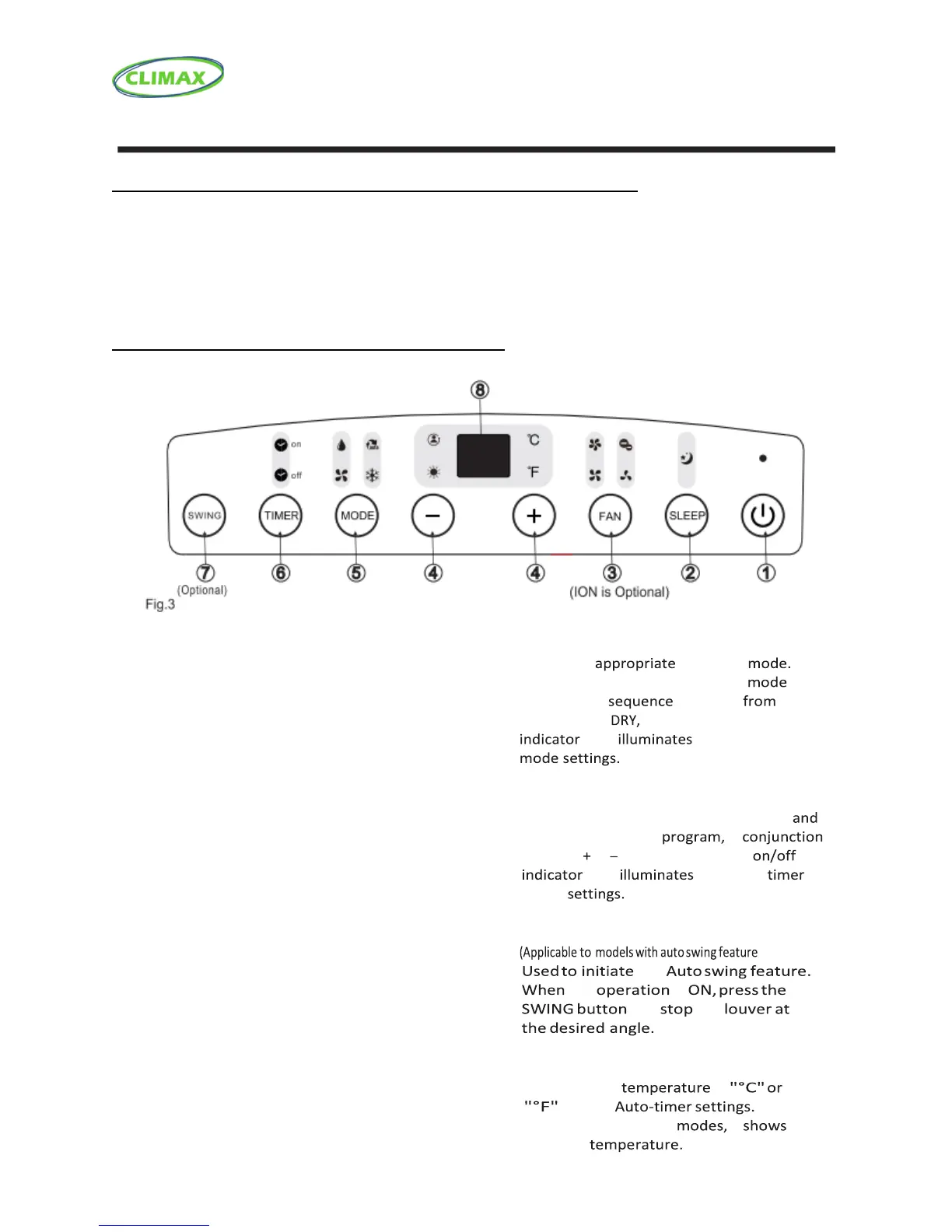
AIR CONDITIONER OPERATION PANEL
❶ POWER button
Power switch on/off.
❷ SLEEP button
Used to initiate the SLEEP operation.
❸ FAN button
Control the fan speed. Press to select the fan
Speed in four steps-LOW, MED, HI and AUTO.
The fan speed indicator light illuminates under
different fan settings except AUTO speed. When
select AUTO fan speed, all the fan indicator lights
turn dark.
❹ UP ( + ) and DOWN ( - ) button
Used to adjust (increasing/decreasing)
temperature settings (1°C/2°F increments)
in a range of 17°C (62°F) to 30°C (88°F) or
the TIMER setting in a range of 0~24hrs…
NOTE: The control is capable of displaying
temperature in degrees Fahrenheit or degrees
Celsius. To convert from one to the other, press
and hold the Up and Down buttons at the same
time, for 3 seconds.
❺ MODE select button
Selects the operating
Each time you press the button, a is
selected in a that goes
AUTO, COOL, and FAN. The mode
light under the different
❻ TIMER button
Used to initiate the AUTO ON start time
AUTO OFF stop time in
with the & buttons. The timer
light under the
on/off
❼ SWING button
only)
the
the is
can the
❽ LED Display
Shows the set in
and the
While on DRY and FAN it
the room



 To Next Page