7
CDT 100
+
Source
+
-
unDIO2x2
Input
Shield
-
CDT100 User Manual
© Clockaudio 2015
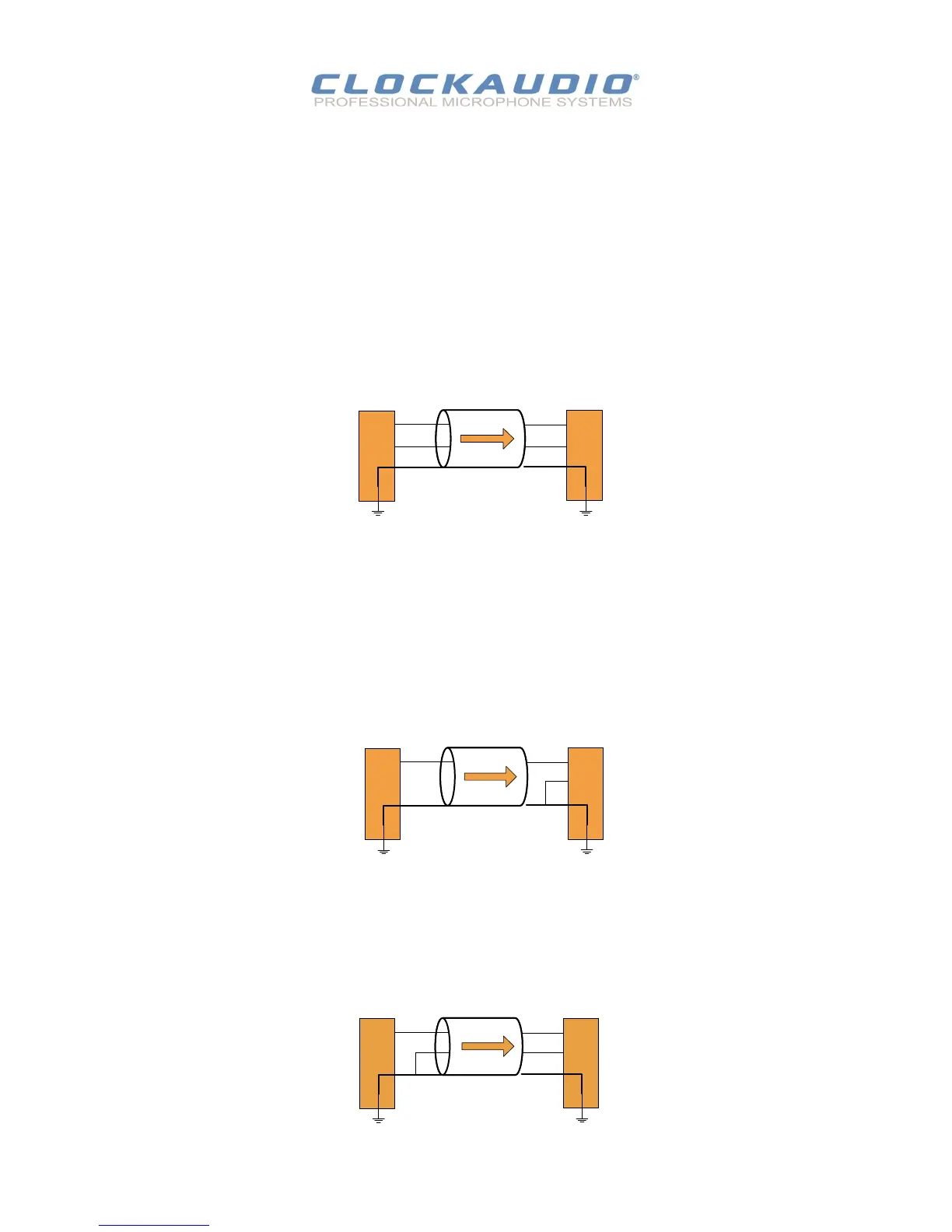
Figure 4 - Balanced Source Connecon
-
To connect balanced sources to the CDT 100:
Connect posive output to posive input, negave output to negave input
Connect the grounds together through the cable shield.
The CDT 100 accepts unbalanced or balanced audio devices.
Refer to the following diagrams and instrucons for connecng dierent types of audio devices.
Professional grade audio cabling is recommended to achieve the best audio performance throughout the system.
To connect a 2-wire unbalanced source to the CDT 100:
Connect the posive output of the unbalanced source to the posive input of the CDT 100.
Connect both the source and CDT 100 input grounds together
Short the negave input of the CDT 100 to ground at the input of the CDT 100.
+
Source
+
-
unDIO2x2
Input
Shield
CDT 100
Figure 5 - 2-Wire Unbalanced Source Connecon
To connect a 3-wire unbalanced source to a CDT100:
Short the negave conductor to the shield at the source connecon.
+
Source
+
-
Shield
unDIO2x2
Input
CDT 100
Figure 6 - 3-Wire Unbalanced Source Connecon


 To Next Page