16
P/N: 10001609 (REV AB) 627NH December 2014
kEYPAD LED AND BUTTON FUNCTIONS
Some of the keypad buttons, whose functions are described below, are dual-purpose. The dual- purpose keys have one function
when used in a view-only mode and another function when used in a programming mode.:
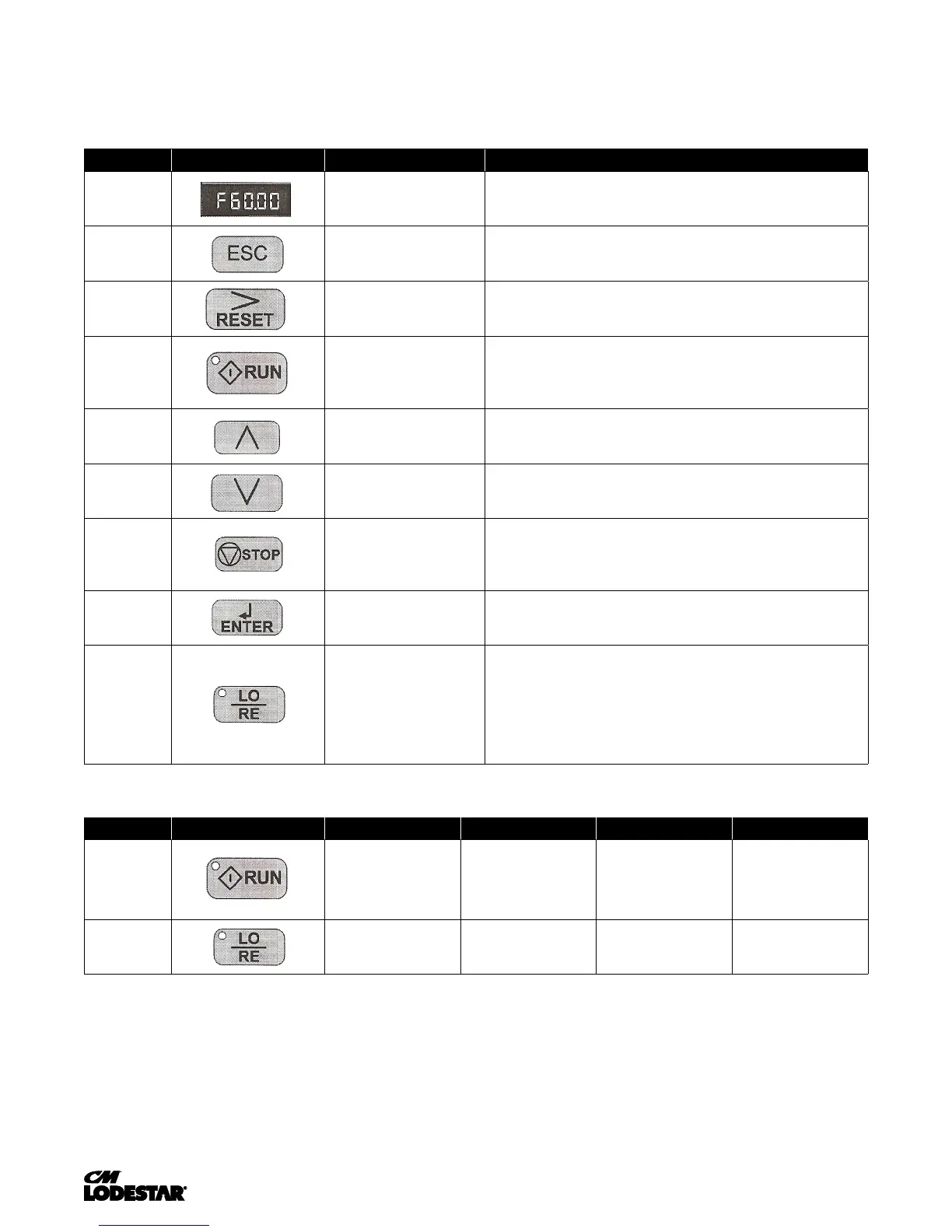
kEYS AND DISPLAYS ON THE LED OPERATOR
NO. DISPLAY NAME FUNCTION
1 Data Display Area Displays the frequency reference, parameter number, etc.
2 ESC Key Return to the previous menu (before ENTER Key is pressed), or cursor position
3 RESET Key Moves the cursor to the right. Resets the drive to clear a fault situation
4
RUN Key
Pressing the key initiates the RUN command when LOCAL mode operation
is selected.
Starts the auto-tuning process.
5
Up Arrow Key
Scrolls up to select next parameter group or parameter settings. It also
increases the value of the blinking digit of a parameter setting.
6 Down Arrow Key
Scrolls down to select next parameter group or parameter settings. It also
decreases the value of the blinking digit of a parameter setting.
7
STOP Ley
Stops the drive by initiating a base block STOP command.
Note: Stop priority circuit.
8
ENTER Key
Selects modes or parameters. Displays each parameter's set value. By pressing
this key again, the set value is stored.
9
LO/RE Key
Pressing the key once displays support phone number 866-624-7378.
Pressing the key again shows control method, motion and reference speed.
Pressing the key again will show RESET. Pressing the ENTER Key afterwards will
reset the maintenance timers.
LO/RE LED AND RUN LED INDICATIONS
NO. LED Lit Flashing Flashing Quickly OFF
10 During run.
During deceleration to stop.
When a run command is
input and frequency is 0.
During deceleration at a
fast stop.
During stop by interock
operation
During stop.
11
When run command
is selected from LED
operator (LOCAL)
— —
Run command is selected
from device other than
LED operator (REMOTE)



 To Next Page