AN279
3 Offline burning operation and description
3.1 Basic operation
The basic burning steps are as follows:
1. Connect the burner to the computer through the USB cable and load the user program data file *.hex in
WriterConfig, and then configure and download to the burner. (More information, see chapter 3.2
“WriterConfig” configuration download description.)
2. Insert the "burning connection flat cable" into the burning interface, connect the burner and the chip
module, and connect to power supply. Or connect the burner control interface to the automaton table in
mass production, and connect the power supply (See Chapter 2.4 "The burner control interface
description and connection mode" for details).
3.
Recording by manually pressing the start button or the start signal from the automatic machine.
3.2 Use WriterConfig for program and configuration download
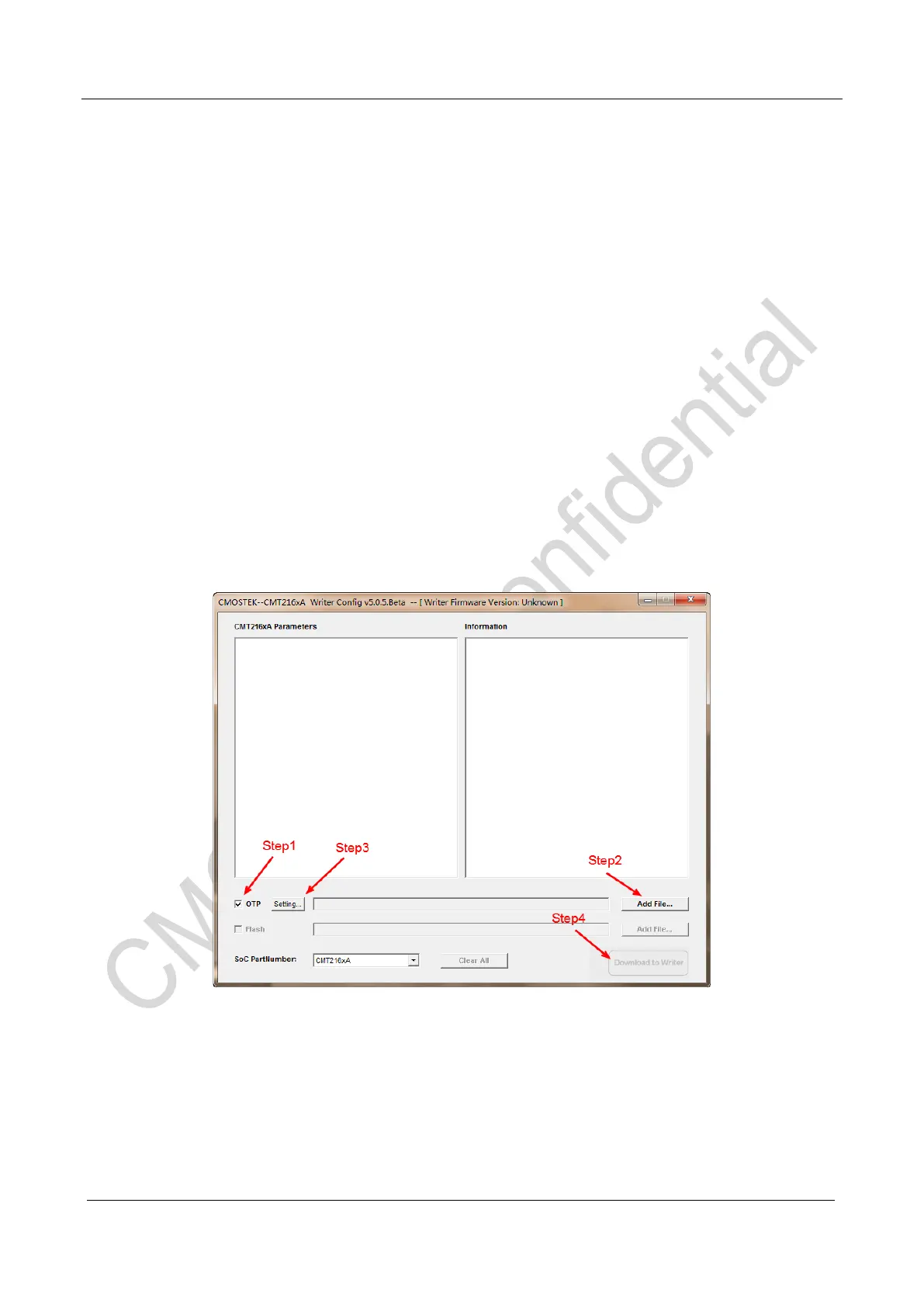
Figure 9. CMT216x Writer Config Master Interface
Steps for downloading the burning target Hex to offline burner:
1. Select the “OTP”, which means the operation burning target is the import Hex file in OTP.
2. Click “Add File…”, import the target burning Hex file;
3. Click “Setting…”, choose the required burning option;
4. Click“Download to Writer”, download the target Hex and burning options to the offline writer, after



 To Next Page