AN279
7 FAQ
Below shows some common questions and solutions.
Table 18. Common questions and solutions
No. Abnormal situation Cause and solution
1
LCD appears one of the 4 following
meassges:
1. Low Battery, Pls Press SAVE key;
2. Low Battery, Pls Replace Battery;
3. No Battery, Pls Press SAVE key;
4. No Battery, Pls Replace Battery
Reason
Low battery or no battery in writer
Solution
After pressing the "Save" key, replace the
button battery under the LCD screen which is inside
the burning device to save the burning count.
2
The LCD screen displays a string of black
squares without correct characters
Reason: The power supply is not properly
connected during power-on.
Solution
Power off the power and wait a few
seconds before powering it on again. If the fault
persists, contact technical personnel for support.
3 LCD appears:CFG CHK ERR1 …
Reason:Configuration data of the Checksum is
incorrect.
Solution
Use WriterConfig to re-download the
4
Computer pop up dialog when
WriterConfig is downloading parameters:
The version between Writer Config and
Offline-Writer does not match, please
update the Writer Config version.
Reason
The software version of WriterConfig (for
example, Vx.y.z) does not match the Firmware
version of the Writer burner (for example, abc.App).
That is, the software version of the xyz combination
does not match the firmware version of the abc
combination.
Solution
Update to the latest version of
WriterConfig or the two match versions to
WriterConfig.
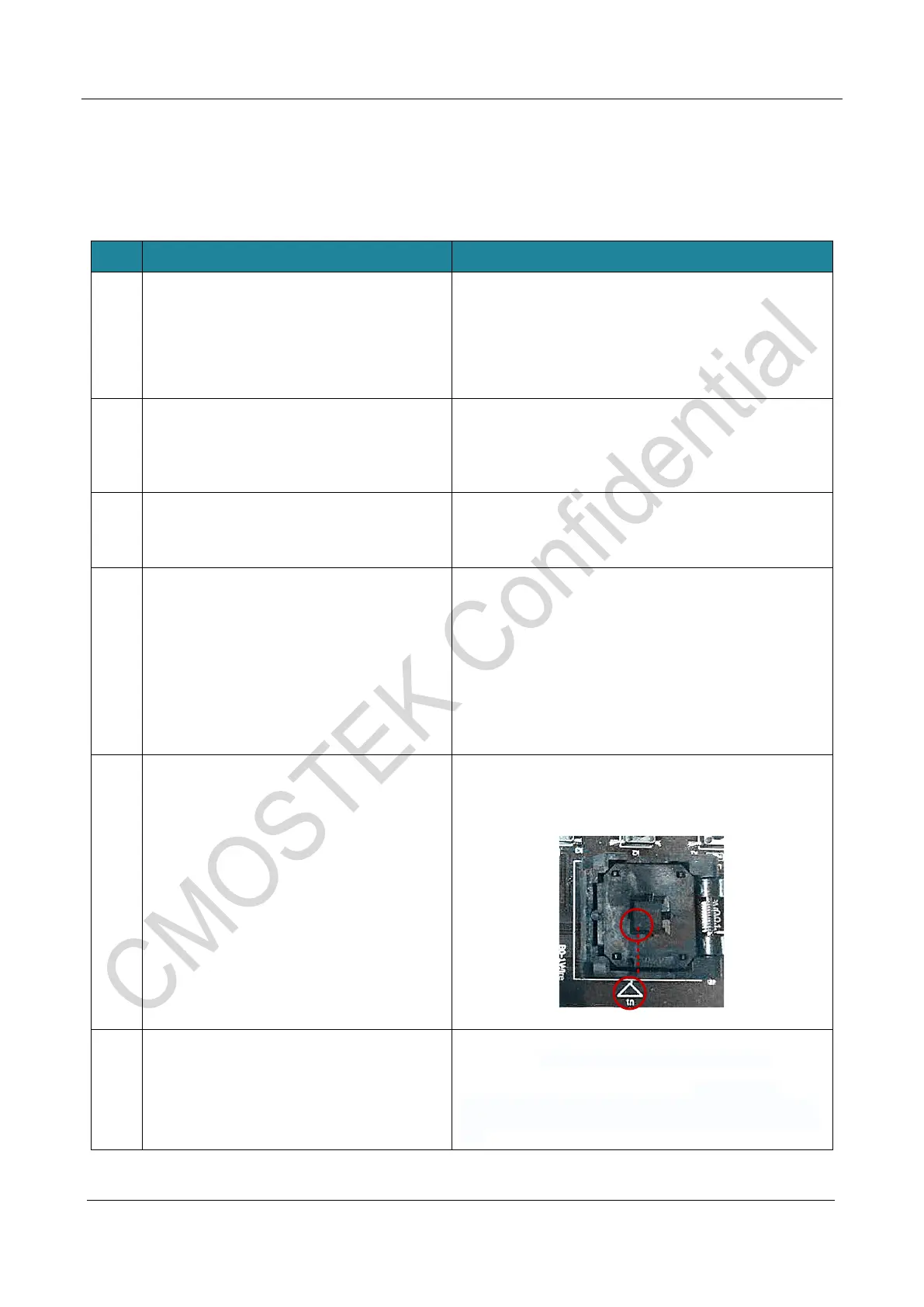
5 LCD display: com fail
Reason: The chip is not properly placed
Solution
Reposition the chip; Make sure the white
dot of the chip corresponds to the triangle orientation
(as shown below).
6 Burning fail
Reason
It may be caused by abnormal voltage
Solution
Measure and check the voltage. The
normal voltage between VPP and GND of the
burning socket should be 6.5V; the voltage
between VDD and GND should be 3.9V. Specific
voltage measurement points are shown in Figure
18.



 To Next Page